 PledgeBox
What Is Email Marketing Software? a Creator's Guide
What is email marketing software? Learn its core features, how automation and segments work, and why crowdfunding creators need it.

What is email marketing software? Learn its core features, how automation and segments work, and why crowdfunding creators need it.
Your launch announcement is nearly ready, but your contacts are scattered across a waitlist, a campaign export, and a spreadsheet of backers who haven't finished their surveys. You need to send different messages to each group, avoid contacting people who opted out, and work out whether the emails helped.
Email marketing software handles those jobs together. For crowdfunding creators, it isn't just a place to design newsletters. It's the operations and compliance layer behind each send, connecting audience records, messages, delivery safeguards, and measurable actions.
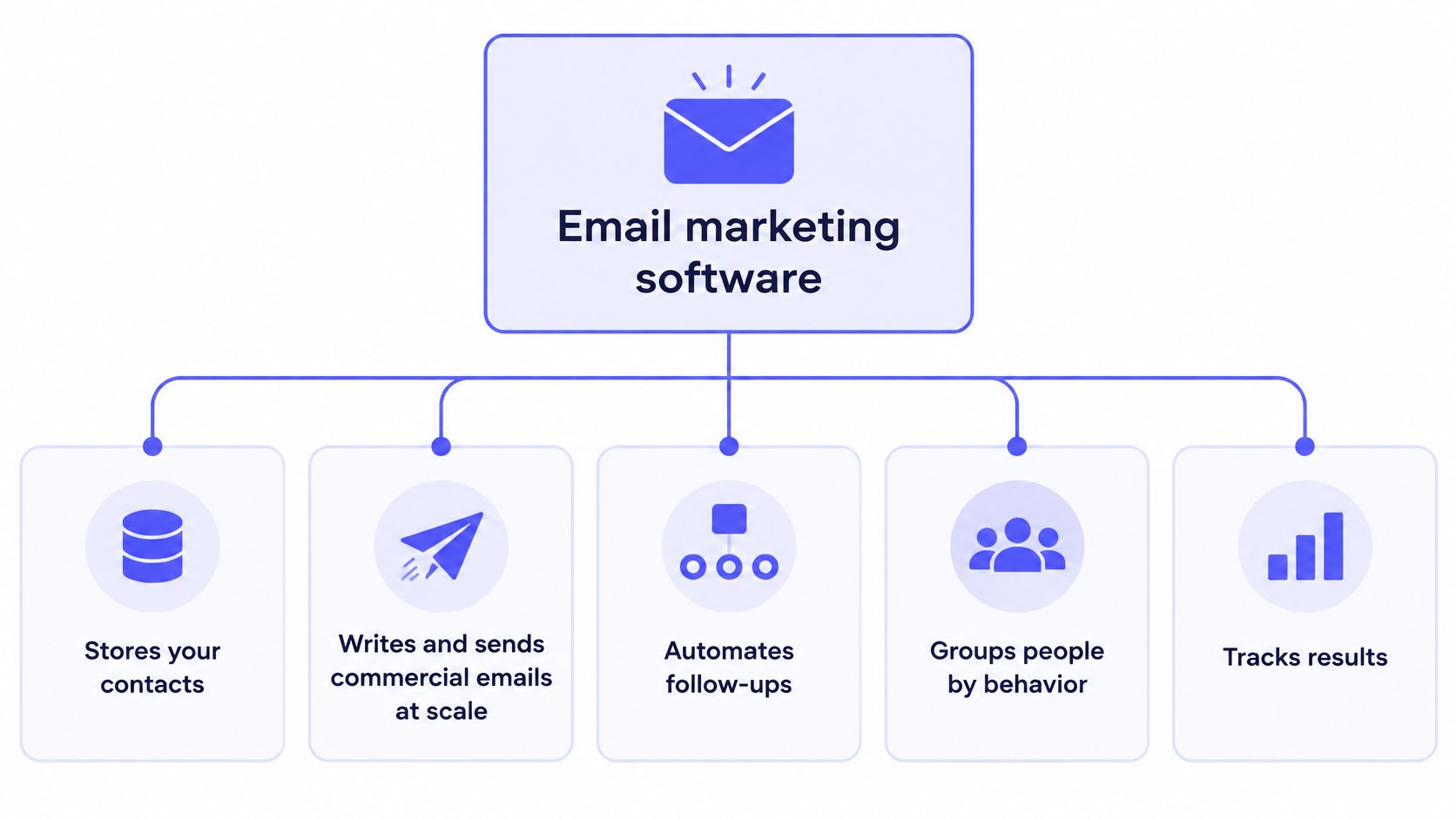
Email marketing software stores your contacts, helps you write and send commercial emails at scale, automates follow-ups, groups people by behavior, and reports what happened. Instead of copying addresses into your regular inbox, you manage a repeatable communication process.
Say you're launching a tabletop game. Someone who joined your preview list needs a launch invitation, while a backer who already pledged needs instructions about choosing a reward variant. The software helps you distinguish those people before you send anything.
Think of it as a post office with a filing cabinet. The cabinet holds subscriber details, preferences, and permission records. The post office handles message preparation, scheduling, sending, and tracking.
The diagram shows how those responsibilities fit together.
| Feature | What It Does | Crowdfunding Example |
|---|---|---|
| Campaigns | Sends one-off emails to a chosen list | Launch-day announcement to pre-launch subscribers |
| Automation | Sends timed or triggered message sequences | Welcome series after someone joins the waitlist |
| Segmentation | Groups contacts by behavior or data | Separates active backers from survey non-completers |
| Analytics | Reports delivery, clicks, and conversions | Shows which reminder drove survey completions |
| Compliance | Records consent and handles unsubscribes | Honors opt-outs before the next add-on promotion |
These features work best as a connected system. A reminder shouldn't depend on someone remembering to export a fresh spreadsheet. Once the backer completes the survey, their record should change so the next reminder no longer applies.
Contact storage isn't the same as a complete marketing workflow. A spreadsheet can hold names and addresses, but it doesn't automatically enforce preferences, select eligible recipients, or connect a message to a completed purchase.
Use a practical screening test: can the tool store consent, schedule a sequence, and report clicks? If it can't, treat it as a mailing list rather than the email marketing system your campaign needs.
A campaign is a planned send. An automation is a rule-driven sequence, and a segment is the audience eligible to receive it. Keeping those definitions separate makes the workflow easier to build.
A kitchen offers a useful analogy: templates are recipes, the contact database is the pantry, and scheduling controls the timing. Good ingredients don't help if the wrong dish goes to the wrong person.
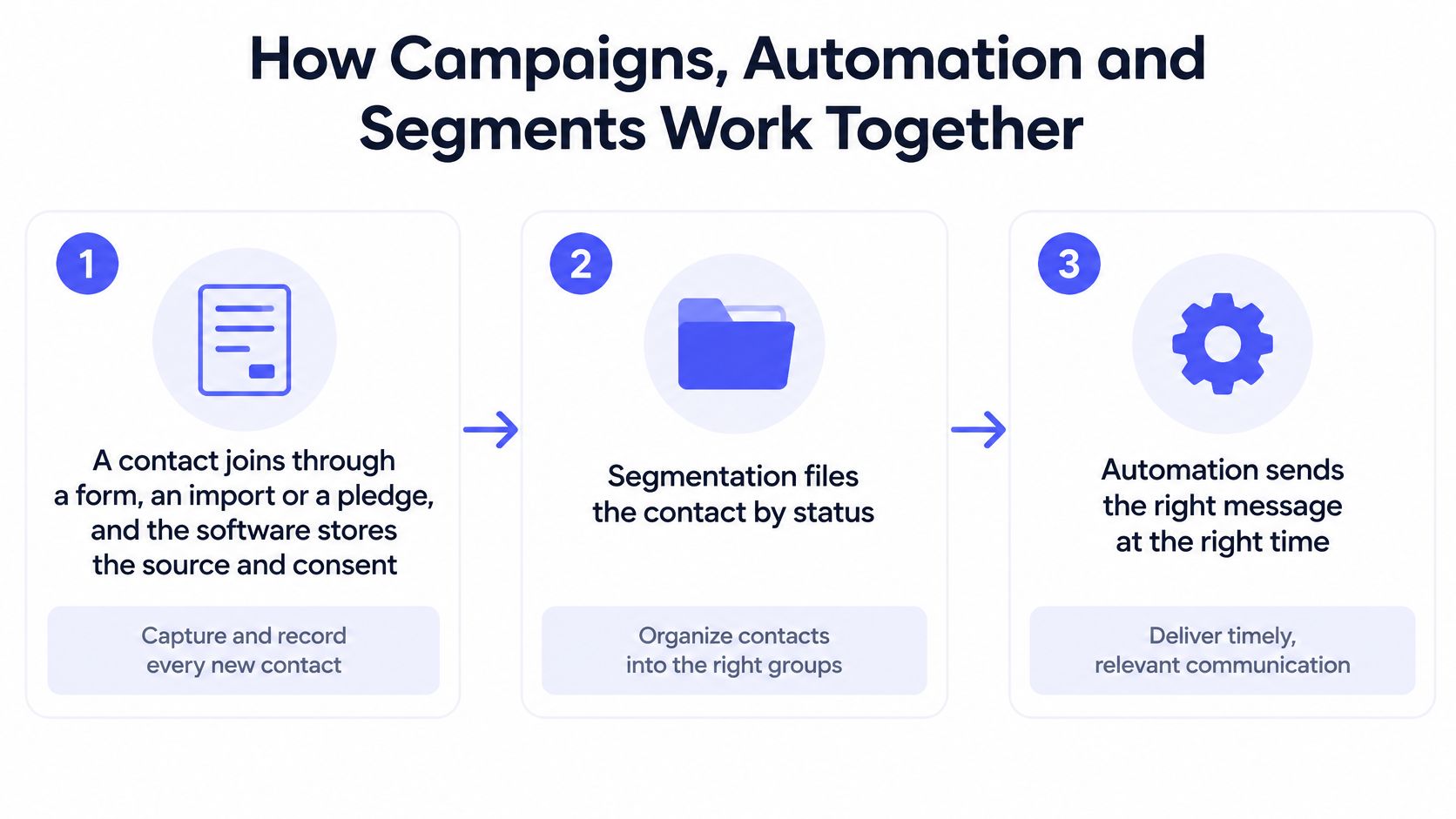
Capture the contact and their permission. Someone joins through a form, an import, or a pledge, and the software records their source and communication preferences. An imported address or a pledge isn't automatically permission for unrelated promotions.
File the person by status, such as prospect, active backer, or survey non-responder. Segmentation keeps a reward-selection reminder away from someone who hasn't backed the project.
Attach the appropriate automation to that status. A hypothetical survey-reminder sequence can include an initial invitation and follow-ups, but it needs an exit condition so completed surveys stop generating reminders.
Schedule a one-off campaign when timing matters. A late pre-order announcement might go to eligible prospects on a chosen date. Exclude people whose existing orders make the offer irrelevant.
Templates turn your content into the message recipients see. Our InBox drag-and-drop campaign builder requires no HTML coding, so creators can assemble the email without hand-coding its layout.
Track actions and update the record. A click can indicate interest, while a confirmed survey completion changes operational status. Don't mark someone as finished merely because they clicked the survey button.
This simplified workflow shows the relationship between contact capture, segmentation, and automation.
The common mistake is sending the same broadcast to everyone. Prospects receive backer instructions, existing buyers receive acquisition offers, and recipients have more reasons to unsubscribe.
Our guide to email workflow automation can help you translate campaign milestones into triggers and stopping conditions. If you're also building an editorial audience before crowdfunding, Narrareach's guide to reach your first 1,000 Substack subscribers offers a separate resource for audience acquisition.
Before choosing software, test whether contacts can move between segments automatically when their pledge or survey status changes. Manual tagging can become a bottleneck precisely when launch activity increases.
Recipients need to recognize who sent a commercial email, understand its purpose, and have a clear way to stop future promotions. Your software should make those requirements part of the sending process rather than leave them to memory.
The history of email overview places CAN-SPAM's effective date at January 1, 2004. The relevant operational issue isn't email's age, though. It's whether your campaign meets the rules that apply when you send it.
The FTC's CAN-SPAM compliance guide requires accurate sender information, non-deceptive subject lines, a valid physical postal address, and a clear opt-out for commercial messages; opt-outs must be honored within 10 business days, and the mechanism must remain available for at least 30 days after sending.
Those obligations translate into concrete software requirements:
The historical penalty figure of up to $11,000 per violation belongs to earlier CAN-SPAM summaries, not a dependable statement of today's maximum. Check current enforcement guidance rather than budgeting around an old penalty amount.
Consent requirements also differ across jurisdictions. Use our GDPR requirements checklist when reviewing audience collection and data handling, rather than assuming U.S. commercial-email rules cover every recipient.
Mailbox providers also evaluate whether you're authorized to send from your domain. Under Google's email sender guidelines, all senders to Gmail accounts need SPF or DKIM, while bulk senders need SPF, DKIM, and DMARC, including domain alignment.
SPF authorizes sending infrastructure. DKIM applies a cryptographic signature, and DMARC specifies how receivers should handle authentication failures while checking alignment with the visible From domain.
For implementation, use an appropriately separated sending domain, keep SPF within DNS lookup limits, protect and rotate DKIM keys, and begin DMARC with monitoring before moving to stricter enforcement. Monitor bounces, complaints, authentication failures, and unsubscribe events after sending.
Practical rule: Legal compliance and deliverability aren't interchangeable, but the same operational discipline supports both: recognizable identity, respected preferences, and controlled sending.
The UK Direct Marketing Association's email benchmarking report reports 98% overall delivery, 35.9% opens, and 2.3% unique clicks for 2024, the directional benchmarks used below.
| Metric | Benchmark (DMA 2024) | Reliability |
|---|---|---|
| Delivery rate | 98% | High for receiving-server acceptance, not proof of inbox placement |
| Unique open rate | 35.9% | Low as an attention measure because privacy features distort tracking |
| Unique click rate | 2.3% | High relative to opens, but validate downstream activity |
| Conversion rate | No benchmark stated | High when tied to confirmed pledges or purchases |
| Revenue per delivered recipient | No benchmark stated | High for commercial value when attribution is sound |
These aren't targets every crowdfunding campaign should match. Audience source, message purpose, and recipient status affect what a useful result looks like.
Read the report from business outcome back to message activity. A confirmed pledge or survey completion matters more than a recorded click. A click provides more evidence of intent than an open, while delivery only confirms that the receiving server accepted the message.
Open tracking is especially easy to misread because privacy features can load tracking content without a person deliberately reading the email. A pre-launch message with high opens but few clicks might have an appealing subject line and a weak offer, but the open count alone can't prove either conclusion.
Check the destination too. A clear email can still underperform if the campaign page doesn't explain the reward, the checkout is confusing, or the tracking connection misses completed purchases.
Conversely, a survey reminder with modest clicks but strong completion among those clickers can be successful. You wanted usable backer information, not casual browsing.
Our InBox reporting tracks clicks, conversions, and engagement across every campaign a creator sends. Use our email marketing KPI guide to turn those reports into a campaign-specific scorecard.
Choose the success metric before writing the email: pledges for launch announcements, survey completions for reminders, and revenue per delivered recipient for add-on promotions.
A crowdfunding audience doesn't stay in one state. Pre-launch subscribers become backers, backers need to provide fulfillment details, and eligible past backers may want additional products.
Your email system needs to follow those changes without treating every address as a permanent prospect. This lifecycle is the starting point for deciding which messages belong where.
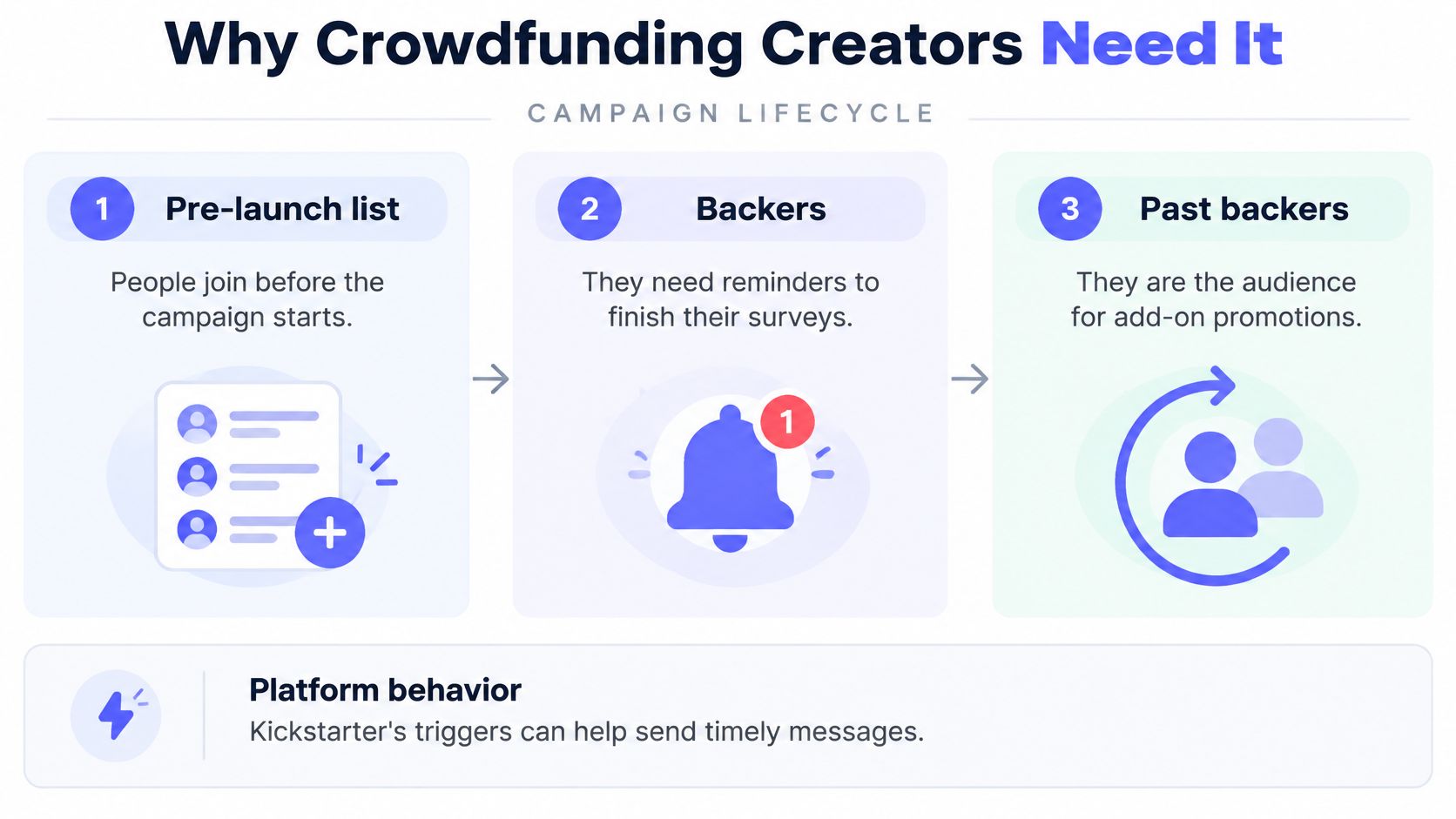
Before launch, explain the product and invite subscribers to the campaign. During the campaign, separate potential buyers from people who've already pledged. Afterward, focus operational messages on completing the information needed for delivery.
The checkout experience can change what a backer needs to answer. Kickstarter's backer pledge-manager guide explains that selecting an add-on or reward upgrade automatically updates the survey with questions relevant to the revised order.
That means an email shouldn't promise a fixed questionnaire when the backer's choices can change it. Describe the task plainly: review your reward, choose any optional items, answer the relevant questions, and confirm shipping information.
Kickstarter's Pledge Manager is like Amazon, an integrated marketplace where the platform controls the transaction environment. PledgeBox's pledge manager is like Shopify, a merchant-oriented storefront and operations layer for the creator's survey, upsells, shipping, tax, and fulfillment workflow.
These are operating-model analogies, not claims that the products have identical features. Kickstarter's creator documentation states that its manager has no upfront cost and supports rewards, upgrades, add-ons, and configurable shipping.
| Feature | Kickstarter Pledge Manager | PledgeBox Pledge Manager |
|---|---|---|
| Role | Integrated marketplace, like Amazon | Merchant storefront and operations layer, like Shopify |
| Upfront cost | No upfront cost | Free to send the backer survey |
| Backer survey | Included in the campaign checkout | Free to send; 3% charged only on upsell revenue |
| Upsells and add-ons | Creators list add-ons inside Kickstarter | Creators run upsells through their own survey |
| Shipping and tax | Configurable shipping and applicable tax calculation, collection, and remittance | Creator-managed shipping and tax workflow, with automatic tax calculation and collection |
We're free to send the backer survey and charge only 3% of upsell revenue if an upsell happens. Our pledge manager manages backer surveys, upsells, shipping fees, and tax/VAT collection, including add-on products and reward upgrades.
Tax collection shouldn't be confused with universal tax responsibility. Kickstarter's pledge-manager FAQs describe its collection and remittance of certain applicable sales taxes and VAT, with creators still responsible for supplying accurate reward information.
For a closer look at the workflow, this video provides a product walkthrough.
Our toolkit supports launching, managing, and scaling Kickstarter or Indiegogo campaigns. Email works alongside the pledge manager: it brings eligible backers to the right destination, while the pledge manager handles their order and survey actions.
Match your email and pledge tools to where backers will check out and pay. A reminder is only useful if its destination recognizes the backer and supports the action you're asking them to complete.
More emails means more reach. Sending volume doesn't prove that recipients saw your message. A larger broadcast to stale or poorly matched contacts can create complaints instead of useful attention, so increase sending deliberately and review audience quality first.
Opens equal attention. Privacy-related image loading can separate a recorded open from an intentional read. Judge whether recipients clicked, completed the task, purchased, or unsubscribed before deciding that a message deserves another send.
Software guarantees deliverability. A campaign builder can't repair a purchased list or make an unrecognized sender welcome. A deliverability overview from EmailValidation describes Gmail's bulk-sender requirements around 5,000 messages per day, including authentication and one-click unsubscribe.
Treat authentication, list hygiene, and complaint monitoring as ongoing responsibilities. Don't wait until launch day to discover that the sending domain hasn't been prepared.
AI removes the need for strategy. In its 2025 State of Email findings, Litmus reported that 29% of surveyed marketers expected advanced AI-driven content generation and analytics to be the biggest change that year. That expectation doesn't establish that generated copy will explain your reward accurately or identify the right audience.
A message can render attractively and still be difficult to use. Stripo's accessibility analysis reports that 99.88% of emails tested in a 2026 analysis contained serious or critical accessibility defects, and notes that Apple Mail Privacy Protection can inflate reported HTML opens by 10–30%.
Those findings concern the tested emails and reported tracking effects, not every campaign. They nevertheless identify practical checks that teams shouldn't skip:
Buyer beware: Automation can repeat a mistake just as reliably as a useful instruction.
Software is a tool. Results still depend on permission, list quality, accessible communication, and measurement that reflects the action you need.
Choose software by testing a backer journey, not by comparing feature names alone. A tool may list automation while lacking the stopping condition your survey reminders require.
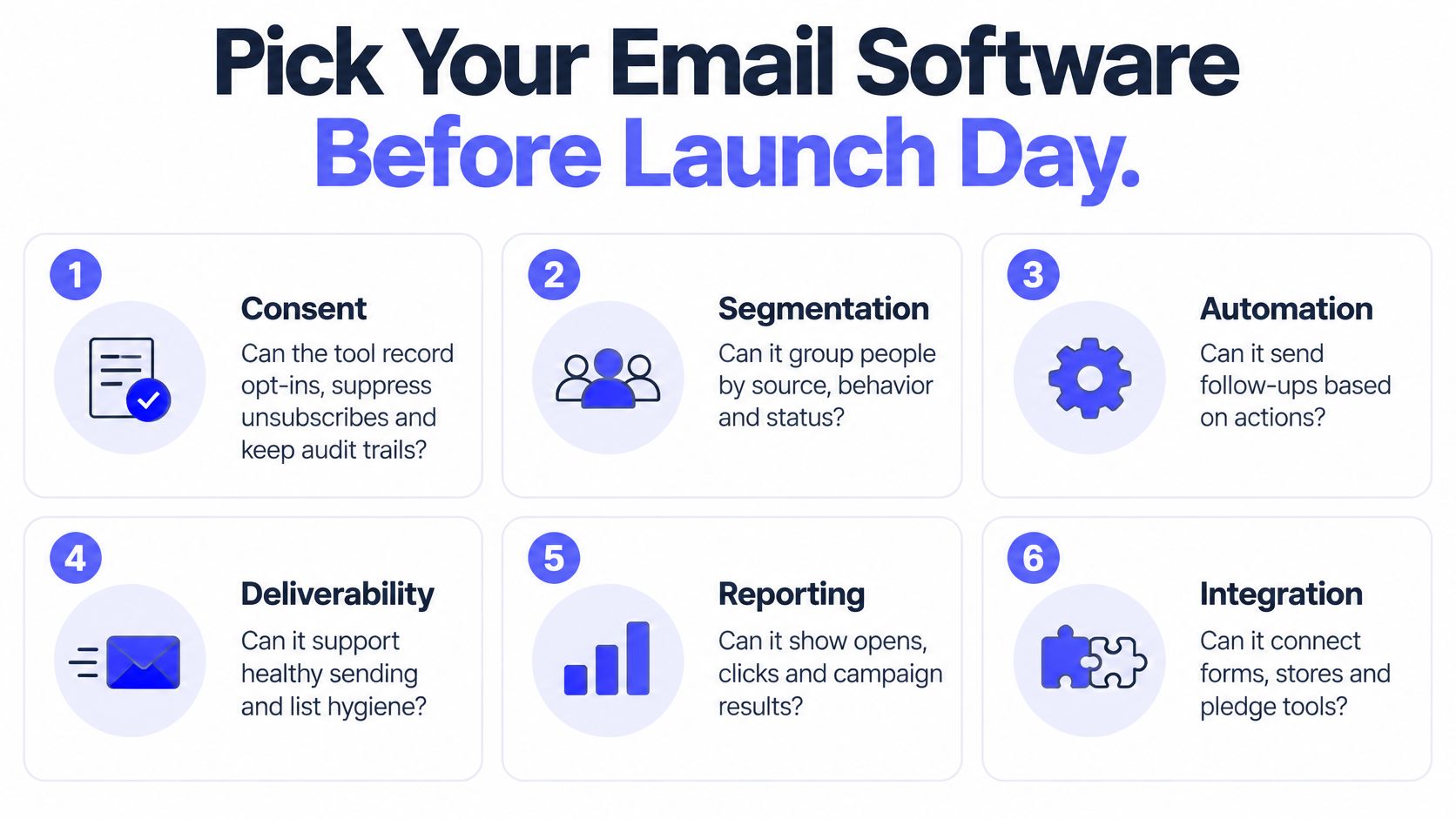
Prepare sample contacts representing a prospect, a backer awaiting a survey, and a backer whose survey is complete. Use them to test these go-or-no-go criteria.
Consent. Can you record the source and scope of an opt-in, suppress an unsubscribe, and retain an audit trail? Re-import a test contact after opting out and confirm that promotional sending stays blocked.
Check segmentation using actual campaign fields, including signup source and pledge status. Pass only if the intended audience is reproducible, without someone manually rebuilding a spreadsheet each time.
Automation. Start a reminder sequence, then record the completion event. The contact should exit before the next follow-up, including when completion happens shortly before a scheduled send.
Open the analytics report and follow a test click through to a confirmed action. You need clicks and conversions, not just an attractive engagement dashboard.
Authentication. Confirm that the tool supports SPF, DKIM, and DMARC setup for your sending domain. Establish who owns the setup and who will investigate failures.
Review accessibility in the actual editor. Look for alt-text fields, language settings, plain-text output, and pre-send checks, then inspect the resulting message rather than trusting the feature label.
Use this visual checklist to keep the purchasing discussion grounded in operational needs.
Work out whether the quote covers contact storage, actual sends, automation, and the connections needed to return order events. Compare that cost with your expected pledge volume and communication schedule, including post-campaign reminders rather than launch announcements alone.
Our InBox email marketing tool processes over 10 million emails per month. It connects to your own Amazon SES account, with no InBox per-email fees or sending limits; include the separate sending-account costs and account-level constraints in your budget.
Keep pledge-manager costs separate from email infrastructure. Model expected upsell revenue against the survey pricing described above, rather than assuming a free survey means every related service is free.
This week, map the backer journey on paper, test it with a small permission-based list, and confirm the survey and reminder sequence before the first live send. Include the unglamorous cases: an unsubscribe, a failed address, a completed survey, and a backer who changes their reward.
The best answer to “what is email marketing software?” is a working demonstration: the right person receives a useful message, can act on it, and stops receiving reminders once the job is done.
PledgeBox offers InBox for email campaigns alongside tools for backer surveys, upsells, shipping fees, and tax collection. Visit PledgeBox to explore how those tools fit your campaign, then test a survey invitation and its completion-triggered reminder stop before launch.
PledgeBox
The All-in-One Toolkit to Launch, Manage & Scale Your Kickstarter / Indiegogo Campaign