 PledgeBox
Email Marketing KPIs: Definitions, Formulas and Benchmarks
Complete reference for email marketing KPIs: definitions, formulas, 2025 benchmarks, and how to report them for crowdfunding campaigns.

Complete reference for email marketing KPIs: definitions, formulas, 2025 benchmarks, and how to report them for crowdfunding campaigns.
A higher open rate can be a warning, not a win. The Global Data & Marketing Alliance's 2024 International Email Benchmark covered 5 million campaigns and 203 billion emails sent in 2023 by 42,000 organizations across 125 countries. Average open rate reached 34.12%, up from 31.35% in 2022. Average click-through rate only moved from 3.44% to 3.56%, click-to-open rate fell from 9.04% to 8.82%, and the average unsubscribe rate was 0.14%. More people registered an open. Fewer of those opens became a click.
That split is the right way to read email marketing KPIs on a crowdfunding list. Delivery, clicks, completed pledges, survey payments, and revenue per delivered email answer different questions. Open rate only tells you which question to ask next.
| KPI | Category | Question It Answers |
|---|---|---|
| Delivery rate | Deliverability | Did the email reach recipient inboxes? |
| Hard bounce rate | Deliverability | How many addresses are permanently invalid? |
| Spam complaint rate | Deliverability | How often were emails marked as spam? |
| Open rate | Engagement | How many recipients opened the email? (diagnostic only) |
| Click rate | Engagement | How many recipients acted on a link? |
| Click-to-open rate | Engagement | Did the content earn clicks from people who opened it? |
| Conversion rate | Revenue | How many recipients completed a target action? |
| Revenue per delivered email | Revenue | How much revenue did each delivered email earn? |
| ROI | Revenue | Did email revenue exceed what the campaign cost? |
| Unsubscribe rate | List health | How many recipients withdrew consent? |
| List growth rate | List health | Is the audience growing after losses? |
Eleven numbers, four jobs. No single cell explains a campaign. The 2024 benchmark's pattern is the operating rule. Opens rose while click-to-open slipped, so a flattering subject line can sit next to weak content and still look like success if you only publish one rate.
Deliverability asks whether the message was accepted and stayed out of the spam folder. Hard bounces are the pressure point. They threaten sender reputation, and a damaged reputation later bends every click and revenue figure.
Engagement asks whether a human moved toward the campaign, the survey, or the pledge manager. Click rate carries that job. Open rate stays on the dashboard as a diagnostic, not as the headline.
Revenue asks whether the click became a pledge, a survey payment, an add-on, or a late pre-order, and whether that money cleared the cost of sending. A busy click report with no attributed revenue is a commercial miss.
List health asks whether the audience is still willing to hear from you after new signups and losses. Unsubscribe rate is the retention warning. List growth that ignores it hides a shrinking core of willing backers.
Pick the leading KPI from the job of the send, not from habit.
Launch announcements lead with click rate, because the job is movement to the campaign page.
Survey reminders lead with completion rate, because a click that never finishes the survey does not unblock fulfillment.
Post-campaign upsells lead with revenue per delivered email, because add-ons and late pre-orders are the point of the send.
Formulas make those rates comparable. Reference values stop you treating a global average as a target. Deliverability checks keep the rates honest. A phase cadence tells you which number to review this week.
Fair comparisons use delivered messages as the base for clicks, conversions, and revenue, and unique recipients rather than total events. A person who clicks three times is one clicker. Dividing by messages sent punishes a clean list and rewards nothing.
| Metric | Formula |
|---|---|
| Delivery rate | Delivered ÷ sent = 4,800 ÷ 5,000 = 96.0% |
| Hard bounce rate | Hard bounces ÷ sent = 60 ÷ 5,000 = 1.2% |
| Open rate | Unique opens ÷ delivered = 1,680 ÷ 4,800 = 35.0% |
| Click rate | Unique clickers ÷ delivered = 144 ÷ 4,800 = 3.0% |
| Click-to-open rate | Unique clickers ÷ unique opens = 144 ÷ 1,680 = 8.6% |
| Conversion rate | Completed target actions ÷ delivered = 36 ÷ 4,800 = 0.75% |
| Revenue per delivered email | Attributed revenue ÷ delivered = $1,440 ÷ 4,800 = $0.30 |
| ROI | (Attributed revenue minus cost) ÷ cost = ($1,440 − $300) ÷ $300 = 380% |
| Unsubscribe rate | Unsubscribes ÷ delivered = 12 ÷ 4,800 = 0.25% |
| Spam complaint rate | Spam complaints ÷ delivered = 2 ÷ 4,800 = 0.04% |
| List growth rate | (New subscribers minus lost subscribers) ÷ starting list size |
Say one launch reminder goes to 5,000 addresses. The mailbox accepts 4,800. You record 1,680 unique opens, 144 unique clickers, 36 completed pledge or survey actions, 60 hard bounces, 12 unsubscribes, 2 spam complaints, $1,440 attributed revenue, and $300 in campaign cost. Those inputs produce the rates in the table.
Campaign Monitor's open and click guidance treats click rate as unique clickers divided by successfully delivered emails, and click-to-open as unique clicks divided by unique opens. Apple Mail Privacy Protection can preload a tracking pixel when a message reaches the inbox, so open rate and click-to-open become less reliable. Click rate on delivered mail does not depend on that pixel.
On a crowdfunding list the completed action has to be named. A pre-launch signup, a launch-page visit, a pledge-manager completion, a shipping-fee payment, an add-on purchase, and a late pre-order are different conversions. Mixing them into one "conversion" makes a survey reminder look like a sales email.
Mailchimp's broad benchmark puts average click-through rate around 2.66%, with industry results running from roughly 1% to 5%. That is a directional comparison. A high-intent backer segment can beat a mixed newsletter average, so the baseline that matters is your own qualified-click and revenue history.
Fix the attribution window before the first send. Keep UTM parameters on every campaign link. Deduplicate recipient-event pairs so one backer is not revenue three times. Leave pledge confirmations and payment receipts out of promotional totals.
List growth uses a different base. New subscribers minus lost subscribers, divided by the starting list size, belongs with list health rather than with a single campaign's click math.
The most common arithmetic error is dividing clicks by emails sent. On this sample that would be 144 ÷ 5,000, or 2.9%, instead of 3.0%. The gap looks small here because delivery is already 96%. On a list with more bounces it makes a competent campaign look weaker than it is, and it hides the delivery problem inside the engagement number.
| Metric | Reference Value | How to Apply It |
|---|---|---|
| Open rate | 32.40% average confirmed open rate (2025, GDMA, 54,000 companies, 63 countries) | Diagnostic only; compare against your own delivered-message trend |
| Click rate | 3.56% average (2024 GDMA benchmark, 2023 sends) | Directional; set a campaign-specific qualified-click baseline |
| Click-to-open rate | 8.82% average (2024 GDMA benchmark, 2023 sends), down from 9.04% in 2022 | Useful for separating content weakness from subject-line weakness |
| Unsubscribe rate | 0.14% average (GDMA, 2023 sends) | Global reference only; investigate any sudden increase on your list |
| Conversion rate | No reliable cross-industry figure | Set a baseline from your last three sends of the same type |
| Revenue per delivered email | No reliable cross-industry figure | Compare by lifecycle segment, not against a newsletter average |
| ROI | 45:1 (Litmus, 2020, brands using Litmus Email Analytics) | Historical baseline; requires stated cost and attribution assumptions |
Reference values are starting points, not grades. The 2025 GDMA International Email Benchmark, published by Spotler from 521 billion emails sent by 54,000 companies across 63 countries, reported a 32.40% average confirmed open rate. Use it to check whether your open diagnostic differs sharply from a broad benchmark, not to judge campaign success.
In the 2024 GDMA benchmark, click rate rose from 3.44% in 2022 to 3.56% on 2023 sends, while click-to-open fell from 9.04% to 8.82%. The pattern shows why opens are diagnostic: a higher open rate does not establish that the email content persuaded more readers to click. If opens rise while click-to-open falls, examine the offer and message before changing the subject line again.
The GDMA click-rate average is a broad reference, not a target for every crowdfunding email. A pre-launch signup list and a post-campaign survey audience have different intentions. Compare launch reminders with previous launch reminders, and survey follow-ups with previous survey follow-ups.
Conversion rate and revenue per delivered email have no reliable cross-industry target. A board-game add-on and a hardware shipping-fee payment are different actions, so a shared average would obscure performance. For each send type, compare results with the median of your last three comparable sends; investigate a result that moves outside that pattern.
A Litmus analysis published in 2020 found that brands using Litmus Email Analytics generated $45 for every $1 invested, a 45:1 return. That result reflects one sample, period, and attribution setup. Treat it as a prompt to state your own costs and attribution assumptions, not as a return to promise creators.
Match the reference. Choose the benchmark closest to your list type, year, and send volume. A global click average is more relevant to a mixed creator list than a benchmark for a single industry.
Prefer your trend. Once you have three comparable sends, use their median as your working baseline.
Flag a real move. Investigate a metric outside that baseline, especially when clicks rise but revenue per delivered email does not.
Click rate is only as honest as the mail that was accepted. Google's sender guidance requires mail to Gmail accounts to authenticate with SPF or DKIM. Bulk senders, defined there as 5,000 or more messages a day to Gmail accounts, must use SPF, DKIM, and DMARC, align the From domain with SPF or DKIM, avoid unsolicited mail, and offer an easy unsubscribe. A creator who crosses that daily line on launch morning is a bulk sender whether the tool feels small or not.
Check the published DMARC policy before that morning with a DMARC record checker. A record that does not align with the From domain will not show up in a subject-line test. It shows up as missing mail and a click rate you cannot trust.
Authentication pass rate: the share of messages that pass SPF or DKIM with alignment. Investigate a drop before you touch creative.
Hard bounce rate: hard bounces divided by sent. Suppress those addresses immediately. Mailing them again trains mailbox providers to distrust the domain.
Spam complaint rate: complaints divided by delivered, split by campaign type and by where the address was acquired.
Unsubscribe rate: unsubscribes divided by delivered, with the same split. One-click unsubscribe on promotional mail, where the mailbox supports it, keeps complaints from replacing a clean opt-out.
Inbox-placement proxies: provider-level gaps in clicks, not a single blended open rate.
List growth rate: (new subscribers minus lost subscribers) ÷ starting list size. Lost subscribers include unsubscribes and hard bounces you removed, or the growth rate flatters a dirty file.
A pre-launch page can add thousands of addresses while complaint rate climbs on the segment that came from a loosely worded ad. The list-growth KPI then looks healthy and the domain gets worse. Segment complaints and unsubscribes by acquisition source so a bad signup form cannot hide inside a good one. Sunset contacts who stay inactive across a documented window. Mailing them "one more time" every week is how a quiet segment becomes a complaint spike.
For the launch itself, keep operational mail apart from promotion. Pledge confirmations, survey reminders, and payment notices are not the same stream as an add-on announcement. Restrict who can export backer data, and keep consent and suppression records you can audit. Those controls are what make later click and revenue comparisons mean something. If the list itself was built on weak consent, start with email lead generation practices that state the cadence before the address is stored.
A high open rate is not a successful campaign. It is a clue that something was counted, and that something may not have been a person.
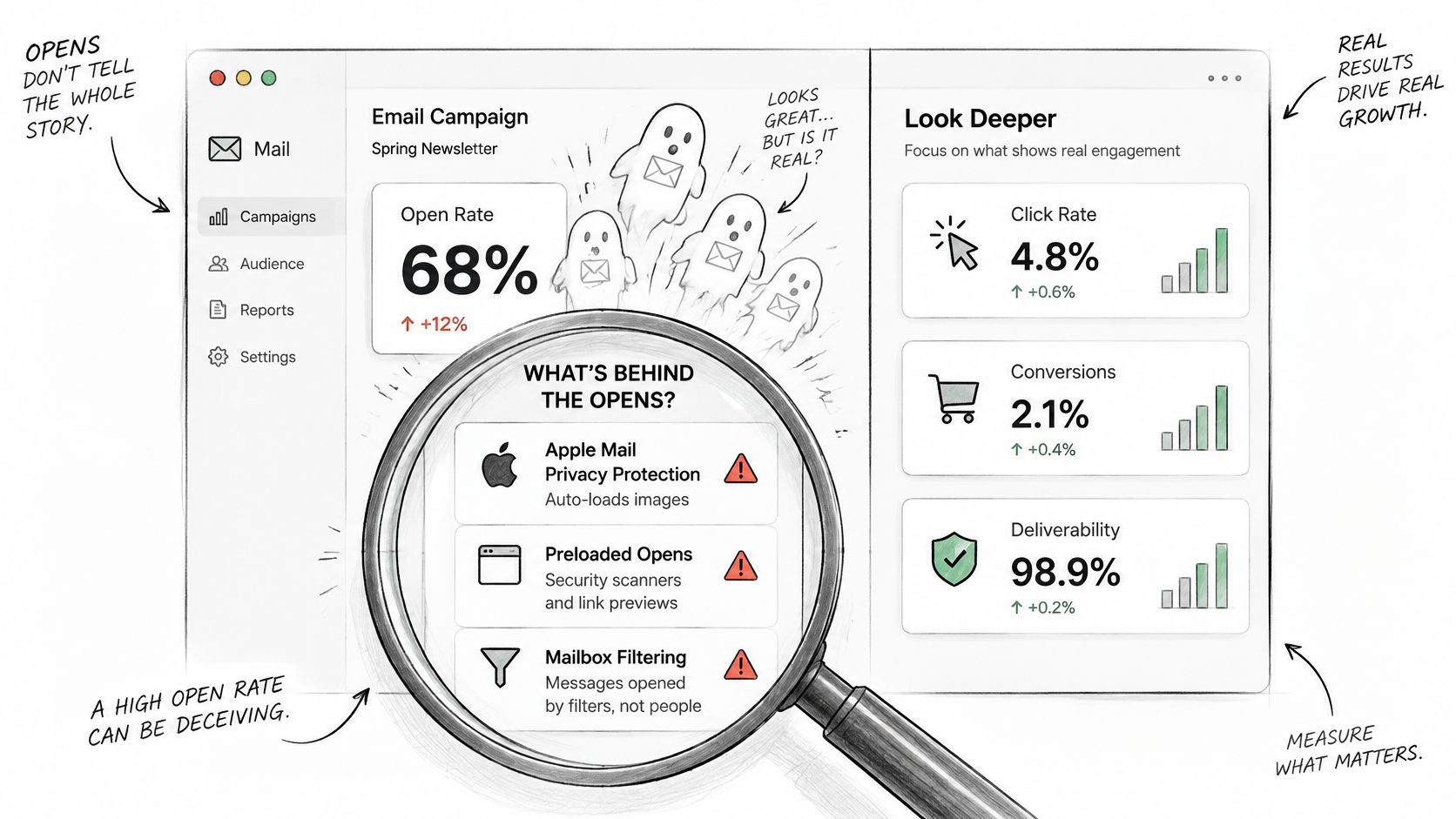
Privacy tools can record an open when a mailbox fetches the message, not when a backer reads it. Filtering can keep a message out of view entirely. Validity's 2025 benchmark found global inbox placement of only 86.0%, with 9.2% of legitimate email classified as missing and 4.8% placed in spam. A reported open rate can conceal both a delivery failure and a machine-generated open.
Low opens with weak delivery. Fix authentication, bounces, and complaints before you rewrite the subject line. The message is not in a position to be ignored.
Healthy delivery and opens, almost no clicks. The content or the offer failed. The subject line did its job and the page, reward, or ask did not.
Opens rise and clicks stay flat. Treat the extra opens as automated until a click or a completed action says otherwise.
The same low open rate has three explanations. The recipient ignored the email. The message never reached the inbox. The open was machine-generated, and the "low" figure is in fact the honest human remainder after filters. You cannot tell those apart from one blended percentage.
Split results by mailbox provider, acquisition source, campaign phase, and recipient status. A pre-launch lead, an active backer, a survey non-completer, and a prior purchaser do not share an intent, so they should not share one open target.
A lower open rate is acceptable when qualified clicks, completed pledges, or finished surveys improve. Report delivered-message click rate and revenue per delivered recipient as the headline pair. Keep opens in the diagnostic row, next to complaints and inbox placement, where they can explain a miss without pretending to be the result.
The short walkthrough below shows how a dashboard can separate those diagnostic opens from the clicks and revenue that move a campaign.
Conversion rate is completed target actions divided by delivered emails, or by unique clickers when you want the landing page's performance rather than the send's. Name the action. "Converted" is not an action.
Qualified subscriber-to-backer rate is pre-launch leads who pledge, divided by that segment's delivered mail across the launch window. It scores audience capture, not the last reminder.
Incremental launch-day conversion is pledges in a mailed group minus pledges in a held-out group, divided by delivered mail. It asks what the send added.
Add-on revenue per eligible backer is survey add-on and upgrade revenue divided by backers who were offered the upsell. People who were never shown the offer do not belong in the base.
Survey completion rate is finished surveys divided by backers who were sent the survey. It is an operations KPI that also predicts whether upsell revenue can exist.
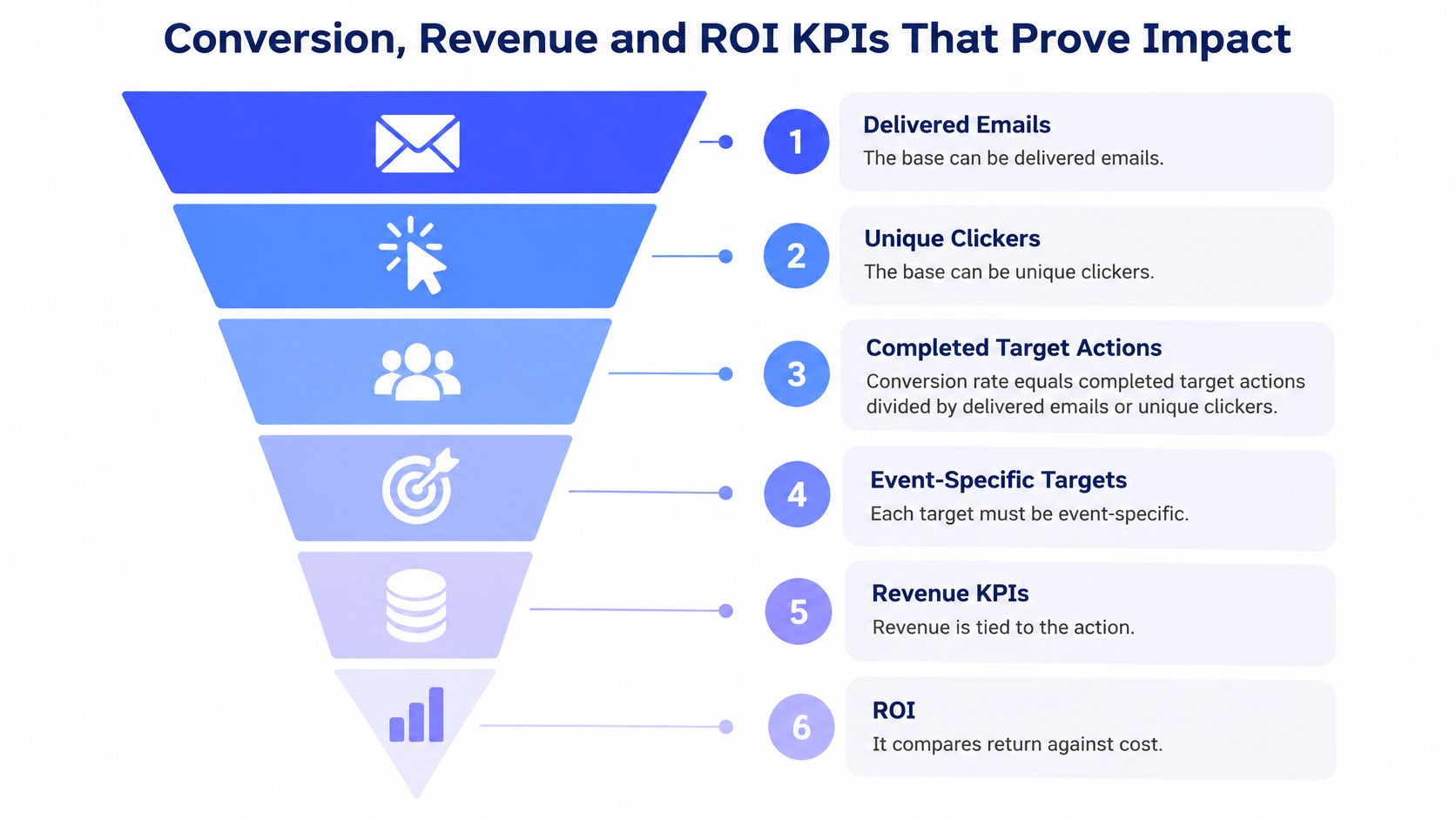
ROI is (attributed revenue minus cost) divided by cost. Before you apply it, list revenue sources. Those may include pledges, add-ons, shipping fees, and late pre-orders. List costs too. Software, creative production, data management, testing, and staff time all belong in the cost, or the return is a fiction. Read the result against the historical Litmus baseline only as context. A smaller, qualified backer segment can beat a high-open newsletter that never sells.
A 2025 survey of 150 U.S. marketers found that 64% tracked revenue, yet only 25% had a clear attribution model. 39% called proving revenue impact a major challenge, and 27% still cited attribution problems. Last-click reporting over-credits the reminder sent the hour before a pledge closes and understates the pre-launch sequence that created the backer. The most "engaged" segment is not always the segment producing incremental revenue. A high attributed total can be timing.
Where volume allows, hold out a random slice of the list or stagger the send, then compare conversion against the group that has not been mailed yet. Where volume does not allow that, disclose the attribution window, exclude transactional mail, and publish assisted conversions beside last-click revenue. The setup for those events is the same work as conversion tracking. Without it, revenue per delivered email is a story about whichever email happened to be last.
| Campaign Phase | Lead KPIs | Secondary KPIs | Review Frequency |
|---|---|---|---|
| Pre-launch | Subscriber growth, qualified signup rate | Delivery rate, open rate as diagnostic | Weekly |
| Live campaign | Click rate, pledge conversion rate | Revenue per delivered email, unsubscribe rate | Daily |
| Backer survey window | Survey completion rate, delivery rate | Survey payment revenue, spam complaint rate | Every two to three days |
| Add-on and late pre-order period | Add-on revenue per eligible backer, conversion rate | ROI, unsubscribe rate | Weekly |
| Fulfillment | Address confirmation rate, support request volume | Hard bounce rate, spam complaint rate | Every two weeks |
Set the reporting cadence around the action each email is meant to prompt. Before launch, track subscriber growth and qualified signup rate weekly; delivery rate checks whether messages are reaching the list. Open rate can help diagnose a send, but it is not the goal.
During the live campaign, review click rate and pledge conversion daily to see whether sends are prompting action. In the survey window, check completion and delivery every two to three days. A rise in spam complaints can indicate that reminders are reaching people who do not want them. After the survey, assess add-on revenue per eligible backer and conversion weekly, rather than reacting to short-term fluctuations. During fulfillment, monitor address confirmations and support requests every two weeks; hard bounces flag shipping emails that could not be delivered.
Kickstarter's Pledge Manager gathers addresses, reward preferences, shipping costs, and taxes in one place. There is no upfront cost, and fees are taken from payments made inside the manager. Backers can choose add-ons, change quantities, answer questions, confirm an address, and pay the remainder. Its checkout is centralized and controlled by the platform, with less room to configure the post-campaign experience.
PledgeBox offers a configurable pledge manager for post-campaign sales, where creators can structure the survey and upsell catalog. Choose the setup before sending the native survey. Kickstarter's eligibility rules say a project can use the native manager only if rewards are itemized, Kickstarter's Backer Survey has not already been sent, and the campaign is not already using another pledge-manager service. The two managers cannot run on the same campaign.
PledgeBox's pricing states that sending a backer survey is free when it collects no additional payment. PledgeBox charges a 3% fee on add-on sales collected during surveys. For example, $100 in add-on sales would incur a $3 platform fee before payment-provider charges.
Include that fee in ROI calculations for the add-on period. Do not include it for a survey that collects no add-on sales. This keeps the cost calculation tied to the revenue the fee applies to.
The choice you cannot undo is the pledge manager. Select it before the backer survey goes out. Kickstarter's native manager cannot run beside another pledge-manager service on the same campaign, so deciding after the survey is not a reporting tweak. It is a blocked setup.
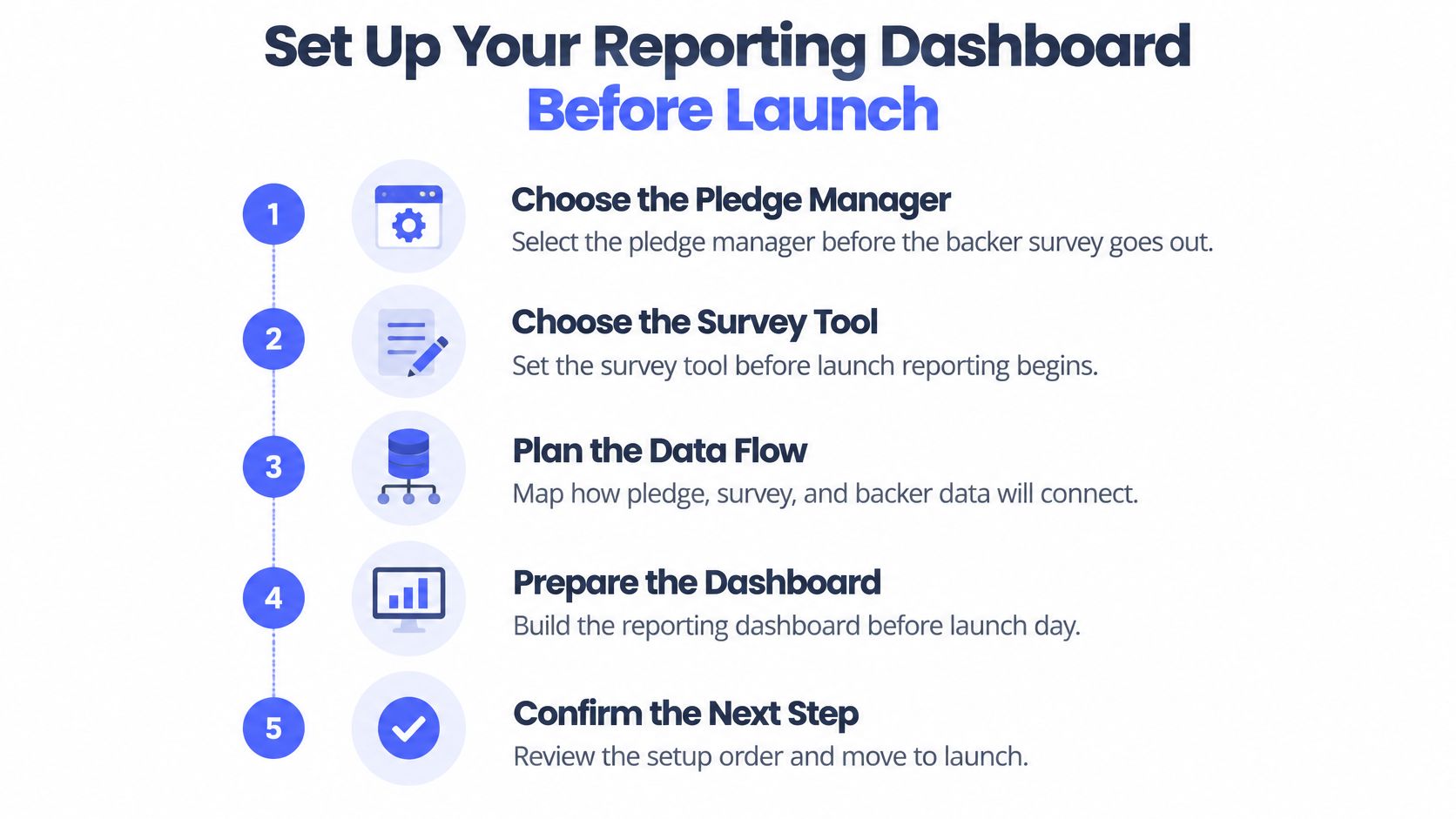
Work in setup order, not in the order a dashboard template suggests.
Choose the pledge manager and the survey tool first. Map how pledge, survey, and backer data will connect before anyone builds charts. PledgeBox is free to send the backer survey and charges 3% only when the survey collects additional revenue. Put that rule in the cost assumptions now.
Define each KPI and its formula using delivered mail and unique people, before the first send. A metric added after launch will not match the earlier rows.
Set baselines from prior sends of the same type, or from the nearest reference for your list. Write the band down so a launch-day panic does not invent a new target.
Configure UTM tagging and event-specific goals. A launch-page visit, a pledge, a survey completion, and an add-on purchase need separate events.
Set one attribution window and state it on the dashboard. Changing it mid-campaign rewrites history.
Segment the list into pre-launch lead, active backer, survey non-completer, and prior purchaser. A blended rate will flatter the wrong group.
Configure SPF, DKIM, and DMARC before any promotional send, including the seed test.
Schedule reviews from the phase table. Daily during the live campaign, every two or three days in the survey window, weekly on either side, every two weeks in fulfillment.
The first live action is a seed send to internal addresses. Confirm authentication passes, the message is accepted, links keep their UTMs, and the dashboard records delivery, a click, and a test conversion. Write those baseline numbers into the campaign performance report. Only then send to the full audience. A dashboard built the night after launch measures the cleanup, not the campaign.
PledgeBox gives Kickstarter and Indiegogo creators one place to run pre-launch email, backer surveys, and post-campaign upsells, with delivery, click, and revenue reporting tied to each phase. You can see which email marketing KPIs moved a pledge or an add-on instead of stopping at opens. Visit PledgeBox to set the survey and the dashboard before the first backer email goes out.
PledgeBox
The All-in-One Toolkit to Launch, Manage & Scale Your Kickstarter / Indiegogo Campaign