 PledgeBox
Revenue Reporting for Crowdfunding: A Practical Guide
Learn revenue reporting for crowdfunding creators. Covers gross vs net, fees, refunds, VAT, and how to automate reports in PledgeBox after your campaign ends.
Learn revenue reporting for crowdfunding creators. Covers gross vs net, fees, refunds, VAT, and how to automate reports in PledgeBox after your campaign ends.
The campaign has closed, the dashboard is celebrating, and your spreadsheet is already becoming unmanageable. You can see the headline pledge total, but you can't yet answer the questions that matter: how much settled, what was refunded, which fees were deducted, how much shipping or tax was collected, and what belongs in revenue versus a liability.
That confusion isn't a bookkeeping failure. Crowdfunding revenue reporting is a post-campaign operations problem. Money moves through Kickstarter or Indiegogo, Stripe or PayPal, a pledge manager, fulfillment partners, and sometimes separate tax or shipping systems. Your job is to connect those records into one defensible transaction trail before the first survey is sent and before fulfillment decisions depend on a misleading total.
The morning after a campaign closes, a creator logs into Kickstarter and sees a pledge total of $487,000. The number looks like a finish line. Then the practical questions arrive.
How much will the platform deposit? Which backers failed payment? Were any pledges refunded? Did the total include shipping, tax, or a late pledge? Will add-ons collected later sit in the same report, or in a completely separate export? The dashboard provides a useful campaign result, but it isn't a finished revenue report.
A creator who treats that headline as available operating cash can make expensive decisions quickly. They might approve a manufacturing quantity using gross pledges, promise a vendor a payment date based on unsettled funds, or calculate margin without removing payment costs and refunds. None of those decisions requires advanced accounting theory. They require a clean view of what happened to each transaction.
A usable report starts with the campaign's gross activity and follows every adjustment through settlement:
The important distinction is between campaign performance and bookable revenue. A campaign can perform strongly while the amount available for production is smaller, and the amount recognized for accounting purposes may be different again.
Practical rule: Don't send the backer survey until you can reconcile the campaign export to the payment settlements, even if the platform dashboard looks complete.
Revenue reporting becomes manageable when you build the workflow before the spreadsheet grows. Export the source data, establish a backer-level identifier, classify each money movement, and investigate variances while the campaign is still fresh. The rest of this guide applies that process to real crowdfunding systems rather than treating the campaign like a simple online sale.
Revenue reporting maps every dollar from pledge to settlement across the campaign platform, Stripe, PayPal, the pledge manager, and vendors. The work is to capture, classify, reconcile, and report every transaction, then explain what each amount represents. A platform total alone cannot show whether money is product revenue, shipping, tax, a fee, a refund, or a future fulfillment obligation.
A backer may pay through one system, settle through another, and add shipping or extras in a pledge manager. Vendor charges and post-campaign refunds create further entries that may not appear in the original campaign export. Treating every checkout amount as profit leaves the books disconnected from the cash that arrived and the rewards still owed.
The workflow is short, but each step needs an audit trail:

Backer money can arrive before the promised reward is delivered. Under IFRS 15, revenue is reported when control of a promised good or service transfers to the customer, using a five-step model that covers the contract, performance obligations, transaction price, allocation, and satisfaction of those obligations. The IFRS 15 standard also addresses revenue disclosures and uncertainty around future cash flows.
A pledge, shipping charge, and tax amount should therefore be classified separately before they reach the chart of accounts. A bundled reward can contain several performance obligations, while shipping and tax may require different treatment. For a plain-language foundation, revenue recognition explained for startups provides a useful starting point.
The practical test is traceability. Can you connect a reported amount to the backer, original pledge, settlement record, and fulfillment status? If not, you have a dashboard figure, not a dependable revenue report.
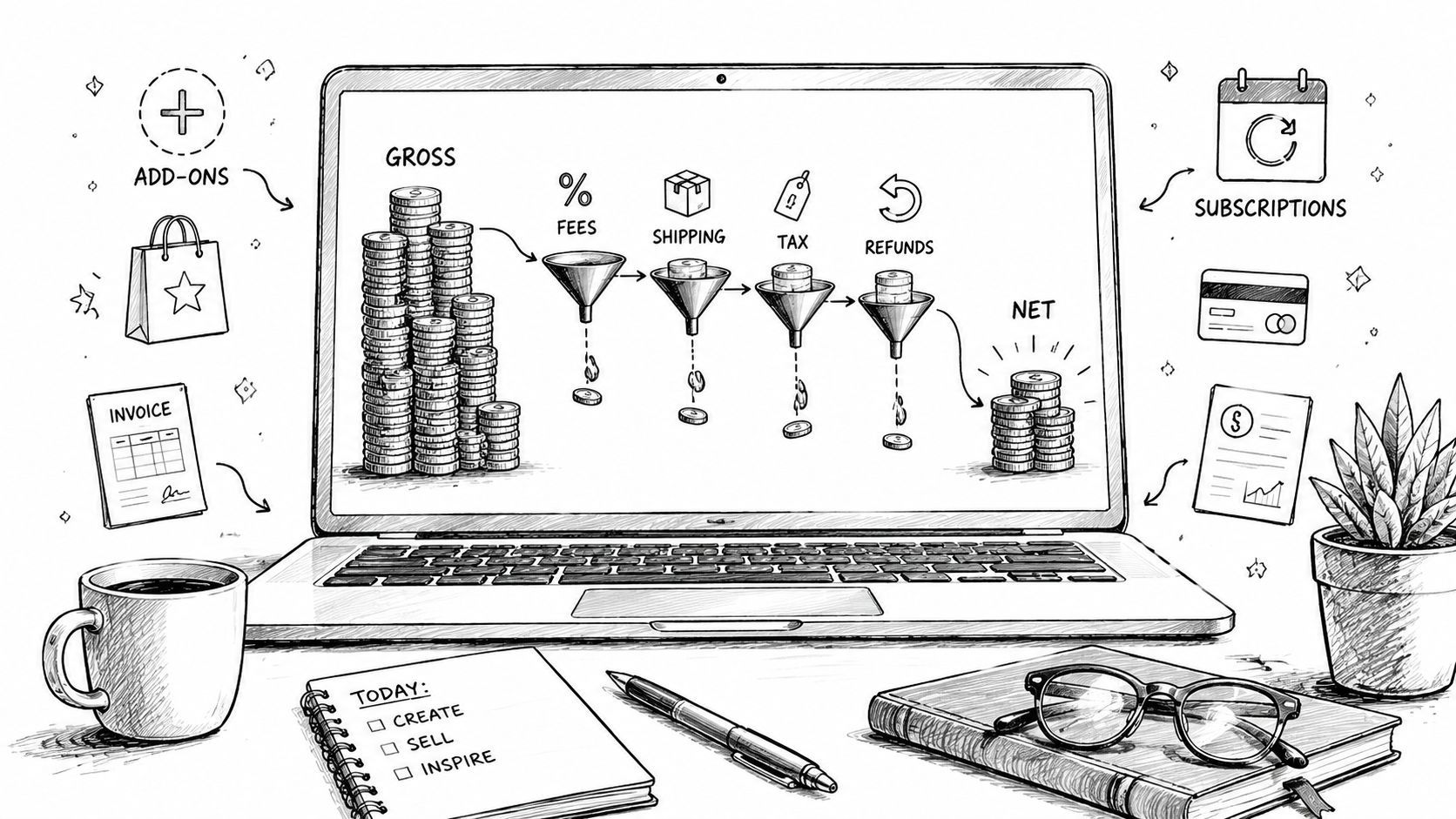
A creator can see a healthy pledge total on Monday and a much smaller bank deposit later that week. The gap usually comes from platform fees, processing deductions, refunds, taxes, shipping, and post-campaign orders. Build a gross-to-net waterfall that follows each amount from the campaign record through settlement and fulfillment.
Kickstarter states that successfully funded projects pay a 5% platform fee, plus payment processing fees of roughly 3% to 5%. No fees are collected when a project does not reach its funding goal. The Kickstarter's fee explanation sets out the fee treatment. Model these deductions separately instead of hiding them in one “expenses” line.
| Line Item | Reporting Basis | Source |
|---|---|---|
| Gross pledges | Campaign total | Campaign platform export |
| Kickstarter platform fee | 5% | See Kickstarter fee schedule above |
| Payment processing | Roughly 3% to 5% | See Kickstarter fee schedule above |
| Refunds and chargebacks | Transaction-specific | Platform and processor statements |
| Shipping collected | Campaign total | Campaign and pledge manager exports |
| VAT or sales tax collected | Jurisdiction-specific | Pledge manager and tax records |
| Add-ons and late pledges | Transaction-specific | Pledge manager export |
| Currency conversion differences | Transaction-specific | Processor settlement reports |
Gross pledges record commitments, not necessarily settled cash. Failed payments and refunds reduce the amount received. Platform fees reduce the deposit, while processing fees may appear in processor statements, platform deductions, or both. Match each deduction to its source before posting it, or the same fee can be subtracted twice.
Shipping is money collected for delivery and should remain separate from product revenue. That separation lets you compare the amount collected with fulfillment costs. VAT and sales tax also need distinct accounts because the business may be holding those funds for a tax authority rather than earning them.
Add-ons and late pledges create a second layer of transactions after the campaign closes. Give them separate product or revenue categories, then connect every sale to the backer and fulfillment SKU. Currency conversion can produce a variance even when both the original pledge and processor record are correct, because exchange rates and settlement dates differ.
Use this practical net revenue guide to clarify the gross-to-net calculation. For the operational review, the campaign performance reporting guide helps organize campaign data without replacing accounting records.
Your finance file should produce these figures:
They answer different questions. Net deposit supports cash planning. Net revenue supports performance analysis and accounting. Keeping them separate prevents production decisions from relying on money that was never available for production.
A revenue report can look finished while Stripe, PayPal, the pledge manager, and vendors still disagree. Start with a source map. List every system that handled the backer's money, then assign an export owner, date range, and matching field to each one.
The campaign platform export records the original pledge, reward selection, backer identity, currency, and campaign status. Stripe and PayPal statements confirm settlement activity, processor fees, refunds, and chargebacks. The pledge manager holds finalized survey responses, shipping, taxes, add-ons, and late-pledge transactions. Vendor invoices do not establish revenue, but they connect collected orders with production quantities, fulfillment costs, and shipment decisions.
Build the working file around four fields:
Add fields for currency, transaction date, refund status, payment source, reward tier, add-on SKU, shipping, tax, and fulfillment status. One row should show whether a mismatch came from a failed payment, refund, currency conversion, or legitimate post-campaign purchase.
Reconcile the transaction, not the dashboard. Dashboards summarize. Source exports explain.
The usual mismatches have identifiable causes. Currency conversion may happen at settlement rather than when the backer pledges. A refund may be issued outside the original campaign platform. A late pledge may exist only in the pledge manager. Shipping may be collected in the survey and later charged again by a third-party logistics provider when the handoff rules were not documented.
Create one folder per campaign, with subfolders for campaign exports, processor statements, pledge manager exports, tax records, vendor invoices, and final reports. Use consistent date ranges and UTC timestamps. Preserve original exports before cleaning them, then work from a separate copy.
Reconcile during fulfillment, not at tax preparation. A weekly review catches discrepancies while the operations team still remembers why a backer was refunded or why a shipping charge changed. It also gives production and fulfillment teams a current view of orders that need attention.
| Data Source | Primary Field | Common Variance |
|---|---|---|
| Kickstarter or Indiegogo export | Backer ID and pledge amount | Failed payments, refunds, late pledges |
| Stripe statement | Settlement, fee, refund | Currency timing and chargebacks |
| PayPal statement | Gross payment and net settlement | Holds, refunds, conversion differences |
| Pledge manager export | Final order and add-ons | Shipping, tax, survey changes |
| Vendor invoice | SKU, quantity, production cost | Order quantities and fulfillment scope |
| Bank statement | Deposit received | Aggregated settlements and timing |
Close the reconciliation only when every variance has a reason, an owner, and supporting evidence. “The totals are close” does not explain what happened.
Kickstarter's pledge manager is the Amazon model. It keeps the transaction inside the marketplace, gives backers a familiar continuation of the campaign, and handles core post-campaign collection. A dedicated pledge manager such as PledgeBox is the Shopify model, giving the creator more control over the storefront, survey logic, add-ons, post-campaign sales, and reporting structure. PledgeBox describes the distinction using that Amazon-versus-Shopify comparison in its pledge manager analysis.
Both approaches can collect the information needed to fulfill a reward. The reporting difference appears when the campaign has variants, add-ons, shipping changes, tax requirements, late pledges, or several vendor handoffs.
Kickstarter says its pledge manager has no additional upfront cost, and its usual fees are deducted from payments made inside the pledge manager. Its help guidance also explains that the tool becomes available after a project has launched and can collect taxes and shipping closer to fulfillment. That makes it convenient when the campaign is straightforward and the creator wants fewer systems.
PledgeBox's pricing page states that sending the backer survey is free and that it charges only 3% on upsell sales generated during the survey. It says there's no campaign fee and no charge when there are no add-on upsells. Its separate pre-order store upsell carries a 5% fee, so those two workflows shouldn't be combined in the same report line.
| Capability | Kickstarter Pledge Manager | Dedicated Pledge Manager, for example PledgeBox |
|---|---|---|
| Core survey | Reward and address collection | Configurable survey and order collection |
| Add-ons | More limited native upsell workflow | Dynamic add-ons and upsell reporting |
| Post-campaign selling | Connected to the Kickstarter ecosystem | Can support late pledges and post-campaign store activity |
| Export control | Platform-defined reporting structure | More control over fulfillment and accounting fields |
| Fees | Usual Kickstarter fees apply to payments in the tool | Survey is free, with 3% charged only on survey upsell sales |
| Operations | Convenient for simple campaigns | More flexible for segmented fulfillment and vendor exports |
The dedicated model saves work when the report can filter backers by reward, add-on, country, payment state, and fulfillment status. It also helps when the export lines match the categories already used in your campaign report. The trade-off is another system to configure and reconcile. More control is valuable only when someone owns the data model.
A solo creator doesn't need an elaborate finance department to create dependable books. They do need a dedicated business bank account, a chart of accounts that separates campaign activity, and a repeatable monthly reconciliation process.
At minimum, separate gross pledges, refunds, payment processing fees, platform fees, shipping income, sales tax or VAT collected, cost of goods, and fulfillment costs. Keep add-on sales identifiable by product or SKU. If all campaign money lands in one generic income account, your accountant has to reverse-engineer the campaign before preparing tax records or evaluating margin.
Cash arrival and revenue recognition aren't always the same event. For physical rewards, backer funds received before shipment are commonly treated as deferred revenue until the promised goods are delivered, although the correct treatment depends on the business, contract, accounting method, and advice from a qualified accountant.
U.S. sales tax and EU or UK VAT and GST can create separate obligations. Marketplace facilitator rules may shift collection responsibility to the platform, but that doesn't remove the need to retain the platform's reports and understand which jurisdictions were covered. Your records should show the amount collected, the jurisdiction, the transaction date, and the party responsible for remittance.
Use a monthly close during fulfillment, and preserve the source exports, cleaned workbooks, processor statements, refund records, invoices, and tax reports for at least seven years. The appropriate retention period can vary by jurisdiction and situation, so confirm it with your accountant rather than treating a general policy as legal advice.
Before the books go to a CPA, bring focused questions:
For workflows that automate tax-related records and campaign data, review tax compliance automation, then validate the final treatment with a CPA who understands crowdfunding.
Automation should remove repetitive stitching while keeping every variance visible. Build the report around the same categories as the gross-to-net waterfall, then make each output traceable to an order, payment record, and fulfillment decision. That structure turns reporting into a reconciliation workflow across Stripe, PayPal, the pledge manager, and vendors.
Start in the dashboard by enabling downloadable reports. Select columns for backer ID, order status, reward tier, SKU, quantity, add-on, shipping, tax or VAT, payment status, refund status, currency, transaction date, and fulfillment status. Avoid exporting every available field. Excess columns slow review and encourage teams to rely on fields they have not defined.

Create a founder report for cash and campaign performance, an operations report for orders and fulfillment, and an accountant report for categorized financial activity. Schedule recurring CSV deliveries for the people who need them, while retaining one controlled master export. Separate working copies otherwise become competing versions of the truth.
Vendor exports should stay narrow. A manufacturer needs SKUs and quantities. A fulfillment partner needs addresses, shipment selections, and add-ons, not the full payment history. Shipment tracking can update the fulfillment row when an order is marked shipped, allowing the operations team to isolate orders that are paid but incomplete.
The PledgeBox reporting functionality works best when its report structure follows the fulfillment process. The survey remains free to send, while the 3% fee applies only to upsell revenue. Show that fee as a deduction from upsell activity, rather than combining it with general campaign costs.
Set a review rule for differences above your approved rounding threshold. Compare the pledge manager order, Stripe or PayPal transaction, refund log, and bank settlement before changing any total. Record currency timing differences separately. For a duplicate refund, correct the source record and preserve an adjustment note.
Automation cannot resolve conflicting systems by itself. The practical safeguard is ownership: define which system controls each field, reconcile source totals on a schedule, and retain the reason for every manual adjustment. A polished dashboard still produces unreliable reporting if definitions, approvals, or audit trails are weak.
Give each report a named owner and a clear handoff. The founder can review cash movement, operations can resolve paid-but-unfulfilled orders, and the accountant can work from categorized activity without rebuilding the campaign from raw exports. That division keeps automated reporting useful after fulfillment begins, when payment records, vendor quantities, and order status stop changing at the same pace.
Reliable revenue reporting is a continuous reconciliation pipeline. Keep the gross-to-net waterfall, source exports, payment settlements, pledge manager activity, tax records, and fulfillment status connected throughout the campaign's life instead of rebuilding them at year-end.
PledgeBox lets creators send the backer survey for free, with only a 3% charge on survey upsell sales. That fee model means the survey itself doesn't create a per-backer or campaign charge, while the upsell deduction still needs its own reporting line.
Use this review checklist:
PledgeBox combines free backer survey delivery with structured reporting for shipping, taxes, add-ons, payments, and fulfillment exports, while charging 3% only when survey upsells generate sales. Visit PledgeBox to set up a post-campaign workflow that keeps your revenue records and fulfillment decisions aligned.
PledgeBox
The All-in-One Toolkit to Launch, Manage & Scale Your Kickstarter / Indiegogo Campaign