 PledgeBox
PledgeBox: Advanced Reporting Functionality for 2026
Unlock campaign potential with powerful reporting functionality. Track metrics, manage fulfillment, and boost revenue using PledgeBox's advanced tools.
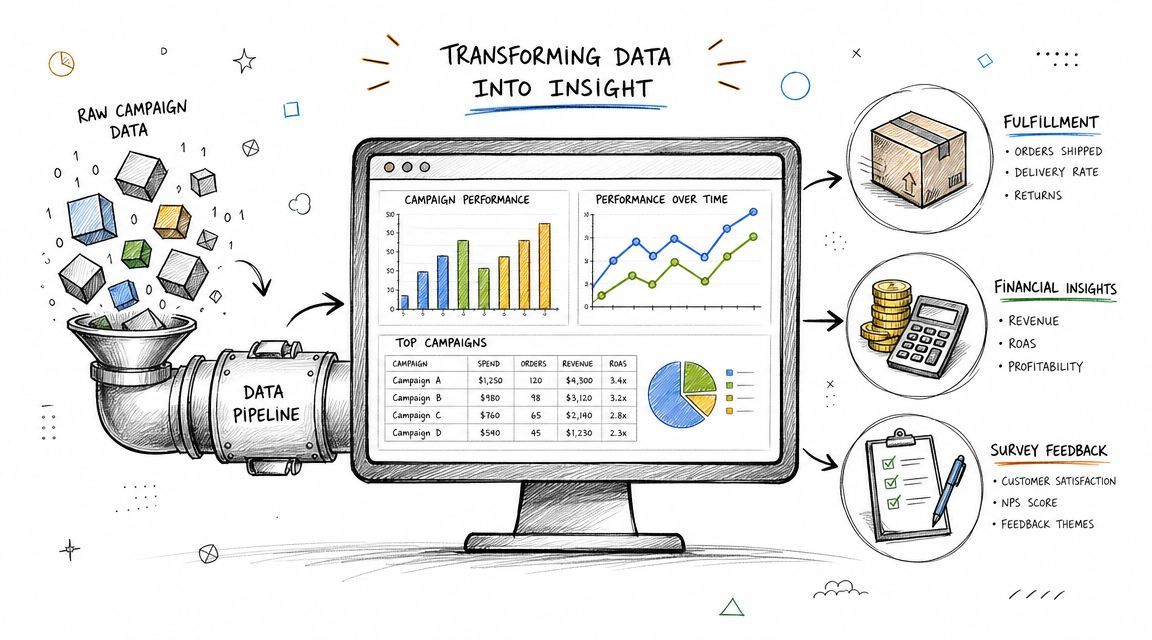
Unlock campaign potential with powerful reporting functionality. Track metrics, manage fulfillment, and boost revenue using PledgeBox's advanced tools.
Your campaign funded. That feels like the hard part.
Then the actual work begins. Backer surveys come in half-finished. Some addresses are invalid. A few people changed reward selections in messages instead of through a form. Shipping fees don't line up cleanly across countries. Tax, add-ons, and late pledges all need to reconcile before you send anything to a warehouse.
Most first-time creators lose margin at this stage. Not because the product is bad, but because post-campaign operations turn into a spreadsheet maze.
A lot of creators treat reporting like a final export. It's not. Good reporting functionality is an operating system for fulfillment. It tells you who still hasn't responded, which orders can't ship, where your shipping risk is concentrated, and whether your upsells are helping profit or just creating more complexity.
The easiest way to think about it is this. Kickstarter's native pledge management experience is like selling inside Amazon. You get access and convenience, but limited control. A dedicated pledge manager is more like Shopify. You control the store, the customer flow, the data, and the post-purchase revenue opportunities.
That control matters after funding more than during the campaign itself. And if you're evaluating tools, one practical detail matters: PledgeBox is free to send the backer survey and only charges 3% of upsell if there's any. For creators who want reporting, surveys, shipping collection, and add-on handling without adding fixed platform cost, that pricing model changes the risk calculation.
A campaign can fund on Friday and create operational problems by Monday.
Support inboxes fill up with address changes. Backers upgrade rewards after the survey goes out. A warehouse asks for a clean pick list while finance is still trying to confirm who paid shipping and who did not. Reporting is what turns that mess into a workable queue.
Post-campaign reporting is less about reviewing performance and more about running fulfillment without avoidable mistakes. A good reporting setup gives each team the version of the order data they need. Support can find missing responses. Operations can isolate orders that are ready to ship. Finance can reconcile collected funds against shipping charges, taxes, and add-ons.
That matters because small errors stack up fast. One invalid address can hold a package. One missed shipping payment can erase margin on an order. One backer recorded twice in different files can create a replacement shipment you should never have sent.
Practical rule: If your warehouse, support team, and finance sheet show different versions of the same order, fix reporting before you approve fulfillment.
A flat CSV can work for a small campaign with one reward tier and one shipping rule. It becomes fragile once you introduce variants, regional shipping, add-ons, late pledges, or partial survey completion.
Creators usually feel this at the exact moment they need speed. The warehouse wants a final file. Backers are still updating details. Customer support is checking messages for manual changes. Without reporting that separates clean orders from exception orders, the team either delays fulfillment or ships with known risk.
Dedicated pledge management tools handle this better because they organize post-campaign activity around decisions, not just exports. This value is practical:
Reporting earns its keep after funding closes. It helps creators catch errors early, ship cleaner batches, and protect profit while the campaign is still in motion.
A week after your campaign closes, the real work starts. Backers are still finishing surveys, support is correcting addresses, and your fulfillment partner wants a clean file by Friday. Reporting functionality is the system that keeps those moving parts aligned so one bad export does not turn into replacement shipments, refund requests, or margin loss.
Crowdfunding reporting functionality collects post-campaign data, applies rules to it, and turns it into views your team can act on with confidence. That includes survey responses, reward selections, shipping details, tax fields, payment status, and add-ons. Instead of forcing every team to sort the same raw spreadsheet in their own way, it gives each team the version of the order data they need.

The easiest way to understand it is as a controlled flow from raw backer activity to decision-ready outputs. Good reporting does four jobs in sequence. It captures the inputs, checks them against rules, organizes them by operational need, and produces reports that different teams can use without reworking the file first.
In crowdfunding terms, that flow usually looks like this:
| Stage | What happens in practice |
|---|---|
| Input | Backer selections, addresses, shipping choices, tax data, add-ons, payment status |
| Validation | Address checks, missing fields, incompatible reward combinations, unpaid balances |
| Structuring | Orders grouped by SKU, country, status, fulfillment batch, or financial category |
| Output | Fulfillment exports, exception lists, financial summaries, segment reports |
That structure matters because post-campaign data changes constantly. A backer updates an address. A payment fails and then clears. Support approves a manual adjustment. Finance needs shipping revenue separated from product revenue. Reporting functionality keeps those changes tied to one operational record instead of scattering them across separate team spreadsheets.
Creators usually ask for reporting when they really need control.
A simple export gives you rows. Reporting functionality gives you a way to decide which orders are ready, which orders need review, and which orders should stay out of the warehouse file until someone fixes them. That is the difference between handing your team a pile of order data and giving them a working system for fulfillment, support, and finance.
The Shopify versus Amazon comparison helps here. Shopify gives a merchant tools to run their own store operations. Amazon handles more of the customer-facing marketplace layer for you. Crowdfunding reporting sits closer to the Shopify side. It helps creators manage their own post-campaign operation by shaping raw backer activity into usable workflows, not just end-of-campaign exports.
If you want a broader view of the numbers creators should monitor alongside these workflows, review these crowdfunding campaign metrics and performance indicators.
Once surveys open, one master spreadsheet stops being practical. Support needs a report for incomplete or conflicting responses. Fulfillment needs a clean batch of shippable orders. Finance needs revenue broken out by pledge, shipping, tax, and upsells. If every team edits a separate copy, errors creep in fast and no one is fully sure which version is current.
Good reporting functionality becomes the operational layer between incoming backer data and the actions your team has to take next. It keeps clean orders moving and isolates exception orders before they create cost.
The common mistake is treating every order like it belongs in the same queue.
It does not. Some orders are complete. Some are missing an address field. Some need VAT review. Some include high-value add-ons that deserve a manual check before the batch locks. When reporting sorts those groups early, the warehouse can ship approved orders while support and finance work the exceptions. That saves time, reduces avoidable shipping mistakes, and protects revenue that often disappears in the cleanup phase after funding closes.
The right report depends on the decision in front of you. Don't ask one report to do everything.
The cleanest way to manage post-campaign work is to split reporting into three jobs: fulfillment operations, financial health, and marketing insight. If you keep those jobs separate, reports stay readable and your team knows what action each one should trigger.

Useful reports should include a clear overview, core findings, date range, and assumptions so decision-makers can verify what was analyzed and when. That matters because exported data often isn't automatically trustworthy across teams unless the report itself makes context explicit (guidance on decision-ready analytical reporting from Vizient).
This report family keeps products moving.
Survey completion status
You need to know who has not finished the process, who partially completed it, and who is fully ready for fulfillment. The action is simple. Remind incomplete backers first, not your entire list.
Address validation exceptions
Don't wait until labels fail. Pull a report for invalid, incomplete, or suspicious addresses and fix them before handing orders to a carrier or 3PL.
SKU or component counts
If a reward includes variants, modules, expansions, or bundled extras, count at the SKU level. This is the report that prevents under-ordering components and packing the wrong combinations.
If you can't answer “How many units of each specific item do I need to ship?” in one clean view, your fulfillment report isn't finished.
This set tells you whether the campaign is still making sense after operations are layered on top.
A creator should watch total funds captured across core pledges, collected shipping, taxes, and add-on purchases. That's not for vanity. It's how you confirm what has been collected versus what still depends on unpaid surveys or incomplete checkouts.
You also want a tax-oriented view and a shipping-charge view. Those reports help you spot where collected amounts may not match the operational burden of serving certain regions.
For a deeper planning lens, review crowdfunding campaign metrics that shape decision-making. The key is not collecting more metrics. It's pairing each metric with a next step.
Post-campaign reporting still affects growth.
Late pledge activity
This tells you whether momentum continues after the campaign closes and whether your post-campaign page is doing useful work.
Add-on popularity
Not every add-on deserves equal placement. Look for which items backers choose most often and which combinations appear together.
Segment response by backer type or region
Different audiences behave differently. Returning supporters may buy differently than first-time backers. Regional groups may create more shipping friction or more add-on demand.
A good marketing report after funding isn't abstract. It tells you which offer to feature next time, which audience to message differently, and which add-on might deserve to become a core reward in your next campaign.
A report is only useful if you can build it quickly without turning every question into a custom spreadsheet job.
Modern platforms increasingly treat automated scheduling and self-service report creation as standard capabilities, which reflects the move away from ad hoc spreadsheet reporting and toward governed systems that non-technical users can work with through interactive dashboards (reporting capabilities outlined by ServiceNow).

Start with the question, not the export format.
If the question is “What can ship this week?”, your report should focus on order readiness, not every field in your campaign. In PledgeBox, you can work from backer and order views, apply filters such as survey status, pledge level, and country, then export the subset that needs action. If you're still setting up your survey logic, this backer survey guide for crowdfunding creators helps map fields to the post-campaign decisions they'll later support.
Use a sequence like this:
That last step matters more than many creators realize. Warehouses don't want your entire campaign history. They want a clean operational file.
Most campaigns don't fail on standard orders. They fail on exceptions that were never isolated.
Create one report for orders ready to ship. Then create another for problem cases, such as missing address elements, unpaid shipping, or incomplete selections. This split keeps your fulfillment team moving while support handles exceptions in parallel.
Here's a good sanity check before exporting anything to a 3PL:
Later in the workflow, a visual walkthrough helps if you want to see a fuller product flow:
The smartest move is rarely the most complicated one. Save repeatable report setups.
If you send weekly fulfillment updates, don't rebuild the same filters each time. Keep one saved view for ready-to-ship orders, one for incomplete surveys, one for address exceptions, and one for financial reconciliation. That gives you consistency across the team and reduces accidental field changes right before export.
Most reporting headaches start much earlier than creators think. They begin when survey fields, reward logic, and fulfillment requirements are set up without a reporting plan.
Effective reporting functionality works best when it follows a formal requirements model that defines the report's purpose, audience, and data sources before implementation. That matters in crowdfunding because campaign, survey, shipping, and tax data often live in separate systems, and a requirements-driven setup helps translate them into a consistent schema with fewer mismatches between operational and financial views (reporting requirements guidance from Smartsheet).
Creators often ask for a report after the campaign closes, when what they really needed was the right field structure weeks earlier.
If your warehouse needs separate columns for item variant, phone number, and tax identifier, that requirement should shape survey design from the start. If finance needs shipping fees separated from add-on revenue, that logic must exist in the data model before orders begin flowing.
A simple planning grid helps:
| Report need | Who uses it | What must be captured early |
|---|---|---|
| Fulfillment export | 3PL or warehouse | Address fields, SKU mapping, quantity, shipping method |
| Finance summary | Creator or accountant | Shipping collected, tax collected, add-on revenue |
| Exception queue | Support team | Validation flags, unpaid balances, missing selections |
A first-time creator often reviews all backers in one giant list. That's too blunt.
Instead, segment by the operational problem you're trying to solve. Pull one report for EU backers with more complex orders. Another for backers who selected add-ons but haven't completed payment. Another for countries where address quality problems show up more often.
Small segments produce better decisions than giant exports.
Thus, experienced teams save hours.
Before you lock your report template, ask the fulfillment partner exactly what their import file expects. Field names, item grouping, phone formatting, country naming, and special instruction columns can all create avoidable rework. A clean export that matches their workflow is worth far more than a beautiful dashboard your warehouse can't use.
Two habits separate seasoned operators from stressed creators:
That discipline feels slow at the start. It usually saves much more time later.
Reports matter most when they stop a specific mistake.
The strongest use cases aren't abstract KPI dashboards. They're the reports that prevent a bad assembly run, a costly shipping batch, or a client update based on stale numbers. One of the most useful lenses here is locational and segment-level reporting, because creators can identify where shipping cost, address-quality issues, or tax complexity cluster by country, region, or backer segment (segment-level reporting approach described by MapBusinessOnline).

A hardware campaign usually looks simple from the outside and complicated from the warehouse floor.
One creator may sell a device with optional modules, plug types, or accessory bundles. If they only export by pledge tier, assembly gets messy fast. The useful report here is a component demand report that breaks each backer order into actual physical parts required for packing.
That report answers questions such as:
Without that view, teams over-focus on the finished reward name and miss what procurement and packing need.
Tabletop projects create a different kind of risk. One campaign can include core boxes, expansions, sleeves, minis, playmats, language editions, and retailer bundles.
A useful reporting setup splits the work in two. One report tracks item counts by SKU. Another tracks orders by region. That second report matters because shipping friction isn't distributed evenly. Some countries create more cost pressure, some need special tax handling, and some are ideal for split fulfillment from a local partner rather than a single central warehouse.
The right report doesn't just tell a publisher what sold. It tells them where shipping strategy needs to change.
Agencies need reports that are operationally useful and client-safe.
The common mistake is sending clients raw exports that require explanation on every line. A better approach is a scheduled summary with a date range, assumptions, current fulfillment status, unresolved exceptions, and outstanding decisions. That format keeps the client informed without drowning them in backer-level noise.
For an agency, reporting functionality becomes a communication tool as much as an operations tool. It helps the team answer three recurring client questions quickly: What's ready, what's blocked, and what needs approval right now?
A report has done its job only when it changes what you do next.
Post-campaign data should improve current fulfillment and make the next launch cleaner from day one. That means reviewing reports not as records, but as feedback loops. The backers who didn't complete surveys tell you where your reminder flow needs work. The regions that created shipping pain tell you where pricing or logistics assumptions were weak. The add-ons that sold consistently tell you what buyers wanted after the campaign ended.
Use your reporting functionality to answer these questions after the campaign settles:
Shipping review
Which countries or backer groups created the most fulfillment friction, and should future shipping fees or carrier choices change?
Survey workflow review
Where did backers stall, and do your reminder emails or field instructions need to be rewritten? This is also where conversion setup matters for tracking post-campaign behavior, so review your PledgeBox conversion setup process if you want cleaner attribution.
Add-on review
Which extras sold often enough to deserve stronger placement next time, and which ones added complexity without clear upside?
Exception review
Which order problems kept repeating, such as address issues or incomplete selections, and how can survey design prevent them earlier?
Finance review
Did collected shipping, taxes, and add-on revenue line up cleanly with your operational reality?
The goal isn't perfect reporting. It's fewer surprises. When creators build reports around real decisions, they stop reacting to chaos and start running a system.
If you want a single post-campaign workflow for surveys, upsells, shipping collection, and downloadable reports, PledgeBox is one option to evaluate. It's free to send backer surveys and charges 3% of upsell only if there's any, which makes it practical for creators who want more operational control after funding without adding upfront campaign fees.
PledgeBox
The All-in-One Toolkit to Launch, Manage & Scale Your Kickstarter / Indiegogo Campaign