 PledgeBox
Email Marketing Newsletters for Campaign Creators
Learn how email marketing newsletters move crowdfunding campaigns from pre-launch to fulfillment, with cadence, structure, and click-based results.
Learn how email marketing newsletters move crowdfunding campaigns from pre-launch to fulfillment, with cadence, structure, and click-based results.
You're three weeks from launch. The campaign page looks strong, ads are bringing clicks, and the prototype finally works the way you promised it would. But if those visitors leave without giving you a way to reach them again, launch day starts with whoever happens to notice you that morning.
That's the gap email marketing newsletters fill. They don't replace your page, your ads, or your community posts. They give you an owned thread you can pull at each phase, from the first teaser to the last shipping reminder, and you judge that thread by clicks and completed actions, not by whether a tracking pixel fired.
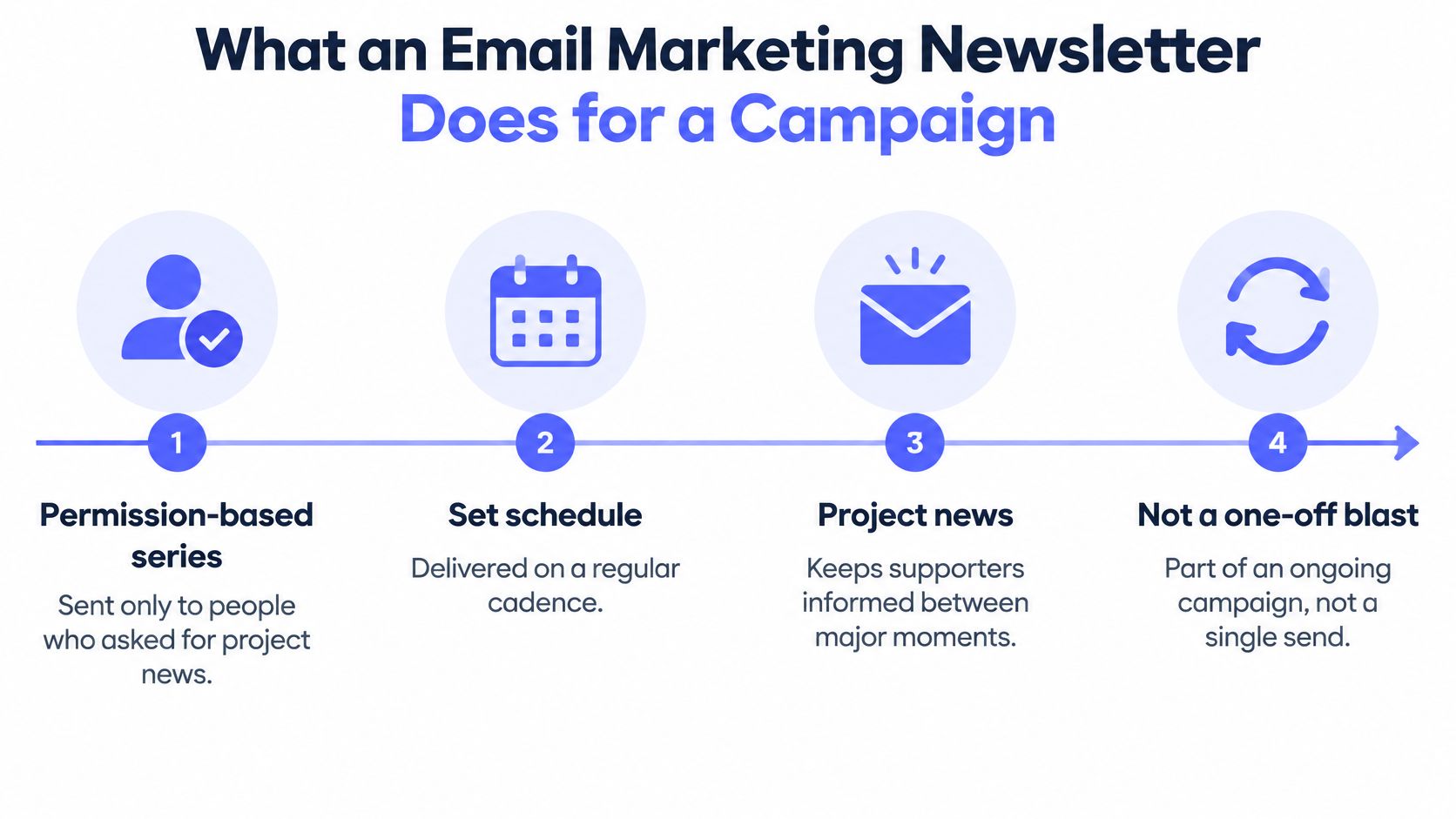
An email marketing newsletter is a permission-based series sent on a set schedule to people who asked for project news, not a one-off blast to strangers. Say you're that creator three weeks out. You don't need a bigger megaphone. You need a named list of people who already know what you're making and when it launches.
Pre-launch, it creates a warm start. Each letter turns ad clicks and referrals into subscribers, teaches one part of the product story, and repeats the launch date. By launch morning, your first pledges come from people who've been following along, not from cold traffic.
Live, it converts the undecided. The public campaign page shows everyone the same thing. Your newsletter can clarify a reward, answer the question backers keep asking in comments, and show proof to people who already trust the sender. That trust is why a short note about a prototype test can move someone a polished page couldn't.
After funding, it finishes the order. The same relationship now asks backers to confirm addresses, choose variants, and complete shipping or extras. If that thread breaks, you have funded pledges you can't ship.
Think of it this way. The campaign page is the window, and the newsletter is the conversation that gets someone to the door and through checkout. A good window makes people stop. It doesn't greet them by name, remind them when the sale ends, or walk them to the counter three months later to confirm their size.
That picture sets up everything that follows. You'll set up sending trust first, then read a cadence table you can plan against. You'll build each message around one action, measure it without trusting opens, and pick the survey checkout before you write the letter that points to it.
One confusion trips up many creators here. A newsletter isn't the same as a campaign update posted on the platform. Updates wait for backers to come back. Your newsletter goes to them, on your schedule, including people who haven't pledged yet and late backers who missed the campaign entirely.
Before you draft a single subject line, handle three conditions. Skip them and even a well-written letter can land in spam or draw complaints you can't undo.
Send from a domain you own, not a free inbox. SPF lists the services allowed to send for that domain. DKIM adds a cryptographic signature that verifies the message wasn't altered and keeps working when mail is forwarded. DMARC checks whether SPF or DKIM aligns with the visible From domain and tells providers what to do when it doesn't.
The cause and effect is direct. Without authentication, mailbox providers can't reliably separate your real campaign updates from spoofed pledge or payment notices, so filtering risk rises, as the Telnyx deliverability best practices guide explains. Start DMARC in monitoring mode, read the reports, then tighten toward quarantine or reject once every legitimate stream, including survey and fulfillment mail, shows as aligned. If you're setting this up inside a CMS, the steps to configure a custom newsletter sender domain walk through the sender side in plain terms.
At signup, say what the list receives, how often it arrives, and that backers will also get survey and shipping messages. Keep a record of when and how each address opted in. Put a working unsubscribe link in every letter and honor it promptly. A suppressed address costs you almost nothing. A spam complaint costs sender reputation you need on launch day.
Practical rule: If someone has to hunt for the exit, they'll use the spam button instead.
Finish this checklist before your first send, then use our guide to preparing your inbox for a campaign to double-check the order.
Start with the table. It's the plan you can use this month, and the rest of this section translates each row into a campaign phase.
Newsletter cadence and benchmark signals
| Pattern or audience | Open rate | Click-through rate | Creator use |
|---|---|---|---|
| One newsletter per week | 48.31% | 5.71% | Default pre-launch cadence |
| Two newsletters per week | 43.20% | 4.73% | Live-campaign ceiling if engagement holds |
| Newsletter average | 40.08% | Judge by segment | Baseline, not a success target |
| Triggered emails | 45.38% | Judge by completed action | Survey, reminder, and shipping mail |
| All email | 39.64% | Judge by segment | Context when comparing any send |
| United States | 45.62% | 4.34% | Strong opens, still judge the click |
| Germany | 40.35% | 2.37% | Opens hold while clicks drop |
| India | 25.84% | 8.22% | Lower opens, stronger clicks |
These figures come from GetResponse's 2024 email marketing benchmarks, which lists an average open rate of 40.08% for newsletters, compared with 45.38% for triggered emails, and an overall email open rate of 39.64%. The same report shows organizations sending one newsletter per week at a 48.31% open rate and 5.71% click-through rate, while two per week came in at 43.20% and 4.73%.
Read the frequency rows carefully. Sending more didn't destroy performance, but it didn't help either. Each extra letter has to earn its place, because you're spending attention you'll need later for the survey.
The United States recorded a 45.62% open rate and a 4.34% click-through rate, Germany recorded 40.35% and 2.37%, and India recorded a lower 25.84% open rate but a higher 8.22% click-through rate in that same benchmark data. That's the clearest warning in the table. If you'd judged the India segment by opens alone, you'd have called your strongest clickers your weakest readers.
So don't copy a US open rate onto an India-heavy list. Segment by geography and campaign interest, then compare clicks within each segment. Opens can be distorted by privacy protections and tracking limits. A click means a person did something you can count.
Pre-launch, send one letter a week. Give it a single ask, usually to follow the project or refer a friend. You're teaching the story in pieces and building the habit of opening your name.
Live, you can rise to two a week. Each one carries one pledge action, such as a reward clarification or a final-hours reminder. Watch unsubscribes and complaints as you go. If they climb, drop back rather than pushing through, because a damaged sender reputation follows you into fulfillment.
After funding, switch to triggered mail. Survey invitations, reminders to people who haven't finished, and shipping notices are triggered by a backer's status, not by your calendar. That pattern fits the stronger triggered performance in the table, and it respects backers who've already completed their survey.
Pick the row that matches your phase, then draft your next three subject lines before any design work. If you can't state three distinct reasons to write, you don't have three letters yet.
Give each email one job, then build it from the top down so every part serves that job.
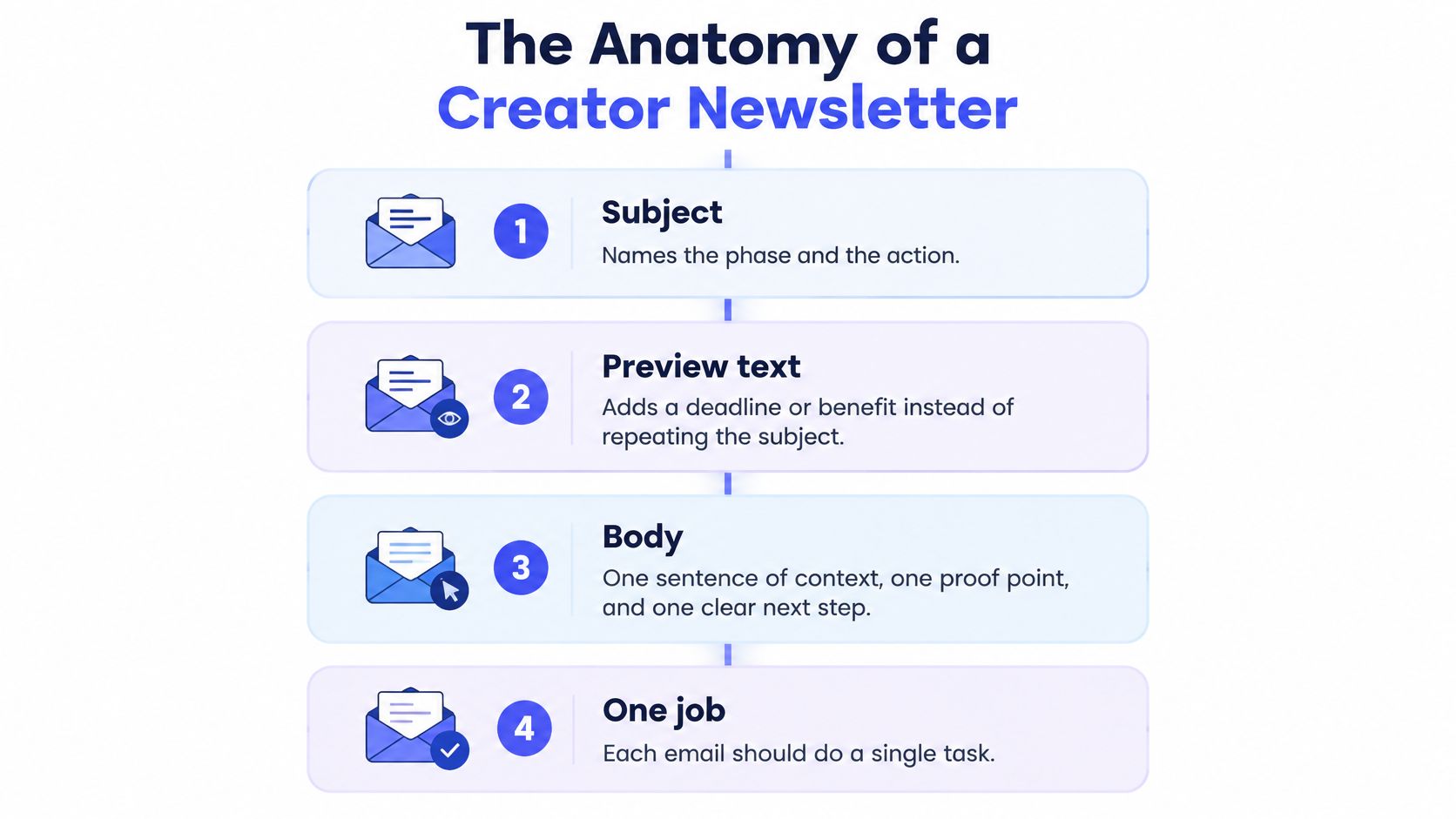
Your subject names the phase and the action. "Survey closes Friday, confirm your address" beats "Big update!" because a backer scanning a crowded inbox knows instantly whether it applies to them.
Your preview text adds a deadline or benefit instead of repeating the subject. If the subject names the survey, the preview can name the lock date or the add-on that won't be available later.
Your body stays short. Use one sentence of context, one proof point, and one button. The proof point changes by phase. Pre-launch, it's a prototype result. Live, it's a backer count or a stretch goal within reach. In fulfillment, it's a shipping window or the date orders lock.
Your button carries the single action. Pre-launch, it says get launch news or see the reward. Live, it says back the project. In fulfillment, it says complete your survey. Place it high enough to see without a long scroll.
One email, one action.
That rule resolves the most common draft problem. When a letter asks readers to watch a video, read a long update, share the campaign, and pledge, readers pick none of them. Move the second ask to next week's letter.
Build for the phone first. Use a single-column layout, readable body text, short paragraphs, and a high-contrast button that's easy to tap. Write descriptive link text, so "confirm your shipping address" replaces "click here." Compress images and give them meaningful alt text, because some readers will see the alt text instead of the picture.
This isn't cosmetic. The Nielsen Norman Group email newsletter design report draws on six rounds of usability studies across 16 years and produced 199 design guidelines. Its earlier testing found an 85% task-success rate with an average task time of 3 minutes 32 seconds, and flagged poorly formatted newsletters as a major problem on small mobile screens.
Translate that to your campaign. A backer who can't quickly find the update, the survey deadline, or the checkout button leaves before reaching your page. The letter did its writing job and failed its layout job.
Test the actual HTML in Gmail, Apple Mail, and common phone widths before you send. Then score the send by click-through and completed actions, not opens, since privacy features and image blocking make opens unreliable.
Before your campaign goes live, sketch three templates, one each for pre-launch, live, and survey. Each needs the same skeleton and a different button. Building them early means you're filling in blanks during launch week instead of designing under pressure.
Retire the open rate as your main score. Apple Mail Privacy Protection and blocked images can inflate it or hide it, so a high open rate can describe a letter nobody acted on. You'd celebrate, send more of the same, and wonder why pledges didn't move.
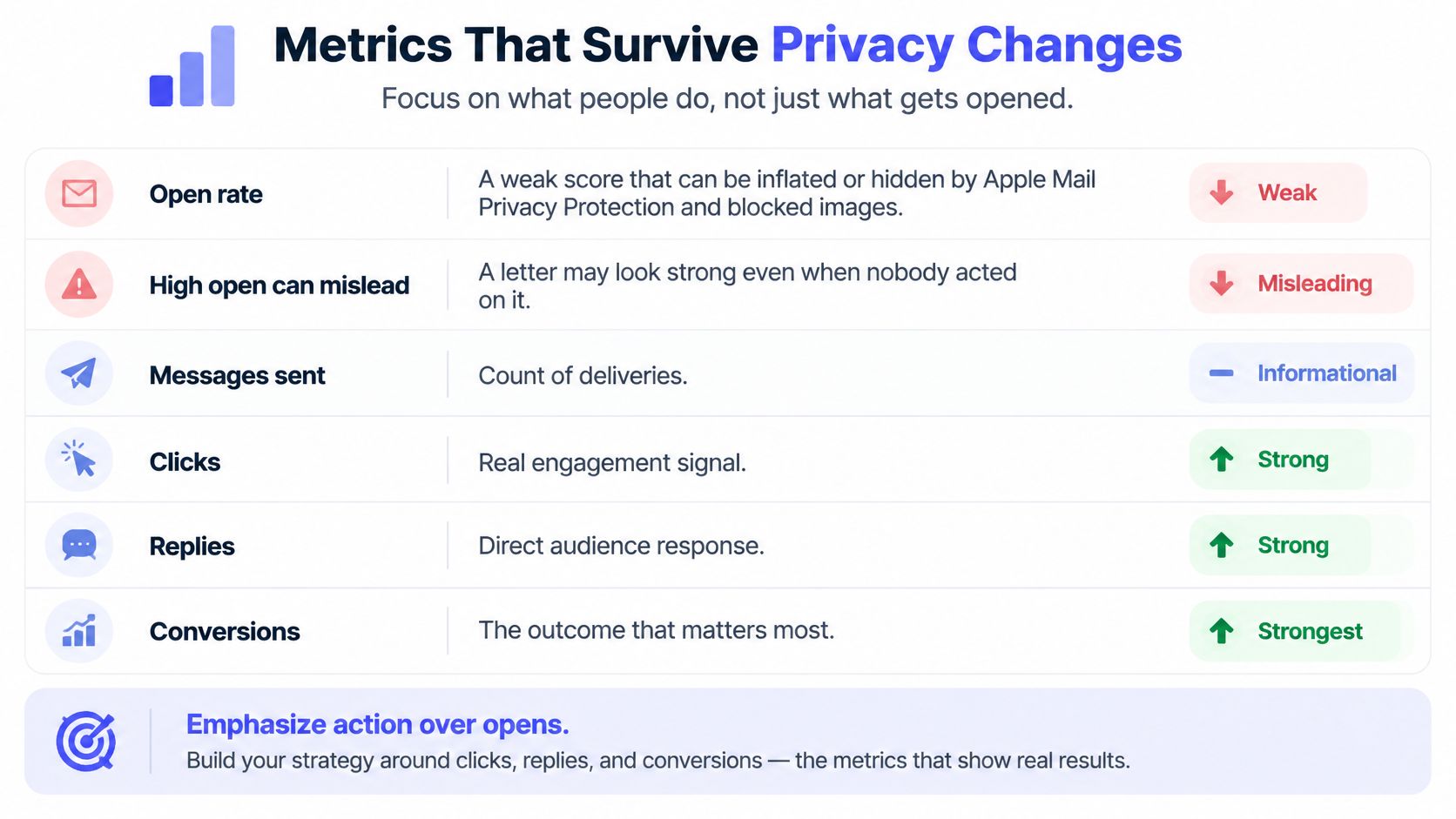
Track five things after every send.
That last row is the point of the whole exercise. Our breakdown of email marketing KPIs worth tracking goes deeper on pairing each metric with a decision.
A smaller list of people who click can beat a large list of passive subscribers. Deliberately removing low-intent addresses can improve your results even when the list shrinks, because providers watch engagement, and engaged lists get better placement. Don't fear the smaller number. Fear the silent one.
Set a baseline separately for pre-launch subscribers and funded backers before comparing sends. Those groups want different things, so blending them hides what's working. Then run a randomized holdout on one message. Send it to most of a segment, hold back a random slice, and compare pledges or completed surveys between the two groups. That tells you what the letter caused, rather than what would've happened anyway.
Email still earns this attention. In survey findings covered by CleverReach's email marketing trends for 2026, 59% of surveyed consumers still prefer email for marketing messages, while 32% identified data privacy as their top AI-related concern and 21% worried about feeling monitored. People want the channel. They don't want surveillance dressed up as service.
After your next send, record five numbers in a plain spreadsheet: delivered, clicked, unsubscribed, surveys or pledges completed, and revenue or pledged amount per recipient. That habit, kept for a month, teaches you more than any dashboard you glance at once.
Personalize from what people volunteer, not from silent guesses. That single choice keeps your letters relevant without making readers wonder how you know so much about them.
Adobe's 2025 research found that 98% of consumers wanted personalized experiences but also wanted control over the process. The most acceptable data categories were past purchases at 56%, viewed products at 53%, and language at 37%.
Notice the pattern. People accept data that's visibly connected to the relationship. They resist data they didn't know they gave you. That trade-off should shape every field on your signup form.
For a crowdfunding list, stick to zero-party data, meaning information subscribers hand you on purpose.
Skip inferred income, health, or other sensitive traits. You don't need them to sell a reward, and guessing wrong in a subject line costs more trust than a generic greeting ever would.
Use those splits by phase. Pre-launch readers get the story. Live readers get the pledge path for their tier. Funded backers get the survey and only the extras that fit what they already chose. The value exchange stays concrete. A country answer produces the right shipping note, and a reward answer produces the right button.
AI is already in the workflow, since that same Adobe reporting notes 49% of marketers used generative AI for static copy in 2025, while 70% expected up to half of their email operations to become AI-driven by 2026. Treat it as a drafting tool, not an author. Have a human read every send, never let it invent specifications or shipping dates, and add a plain note when automation drafted the copy.
Give subscribers a way to correct or erase what they shared, and keep your handling consistent with the commitments in our guide to data privacy compliance. Control isn't a settings page nobody finds. It's a preference link in the footer that works.
This week, add one preference question to your signup form and use the answer on your next letter only. One question, used visibly, teaches subscribers that answering is worth it.
Patterns beat theory when you're deciding what to send on Tuesday. Here are three you can copy, one per phase.
The creative work behind those sends starts long before anyone opens an editor.
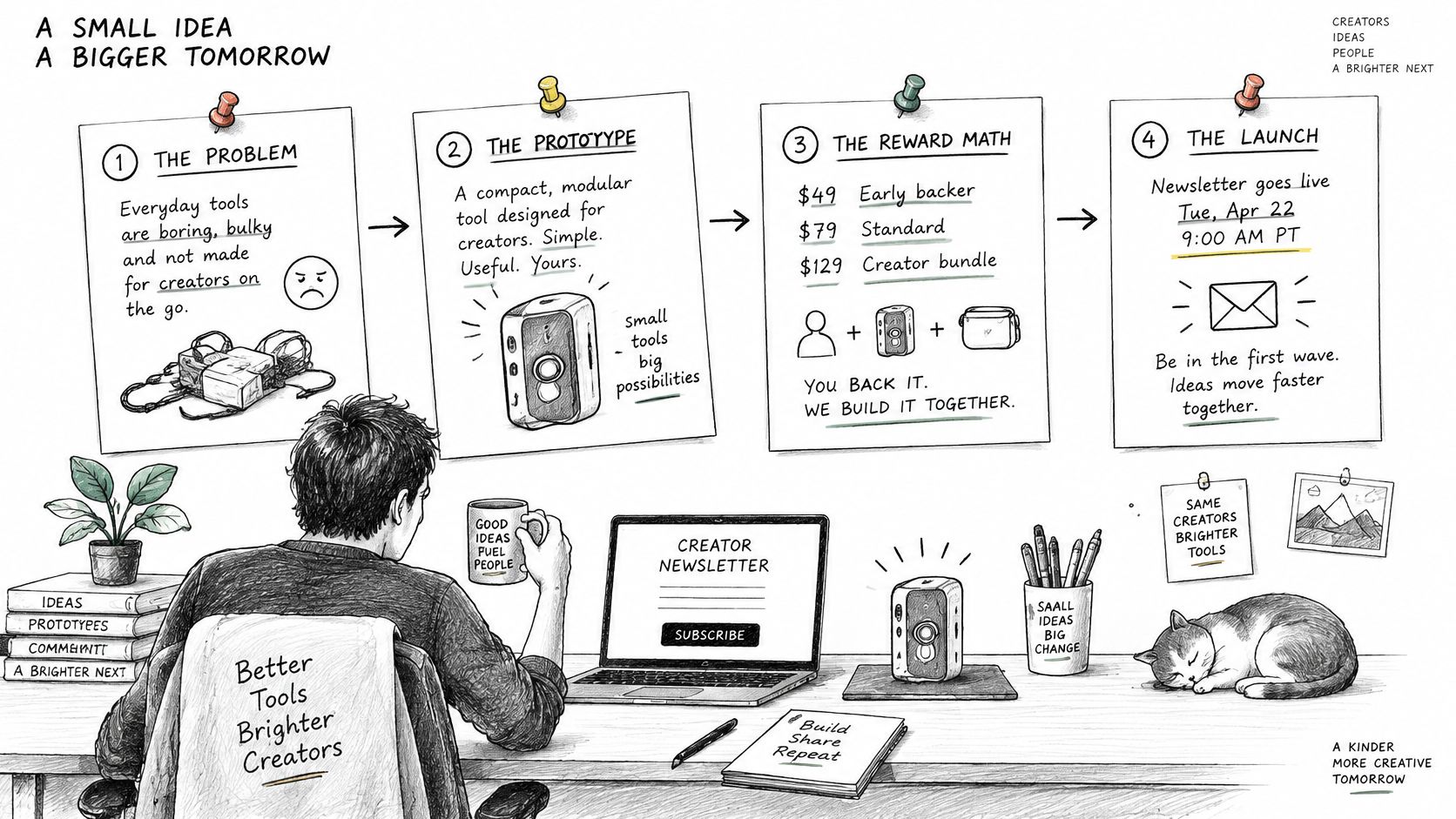
Pre-launch, a gadget creator sends four weekly letters. Letter one names the problem. Letter two shows the prototype solving it. Letter three explains how the reward math works. Letter four gives the exact launch time. The owned list, not the last ad, produces the first-hour pledges, because those readers already know the date and the tier they want.
Live, a tabletop publisher sends two letters a week. One clarifies a rule backers keep asking about. The other, near the end, says 48 hours remain. Each carries a single back-this button. The letter they cut is the third one, the just-checking-in note with nothing new to say. That filler trains people to skip the sender, right when you need them to act.
After funding, a hardware team changes the logic entirely. The survey invitation goes to every backer. The reminder goes only to people who haven't finished. The shipping note goes out when a tracking event exists. Reminding the whole list every few days creates ignores and complaints from backers who already did what you asked.
If you want to see phase planning discussed end to end, this walkthrough is worth your time.
With a list under a few hundred subscribers, write fewer letters and answer replies by hand rather than automating a drip. At that size, a personal reply converts better than a polished sequence, and you'll learn your backers' objections in their own words.
Watch for the late backer who missed the campaign page. Send that person the survey and pre-order path, not the pre-launch story. They don't need convincing from the beginning, they need a door that's still open.
Map your next 30 days onto one of these patterns and write the subject lines only. Leave design until every subject names a clear action.
Your fulfillment newsletter only works if its button lands on a checkout that can collect the order. So choose the checkout first, then write the letter.
Kickstarter's pledge manager is like Amazon. It's a familiar marketplace checkout attached to the platform. According to Kickstarter's pledge manager page, it's included with no additional upfront cost and supports dynamic questions customized to each pledge, automated SKU management, and flexible address collection that backers can update before orders are locked. On fees, Kickstarter's fee help page states a 5% platform fee on funds collected through the manager, except taxes, while Stripe separately charges variable card-processing fees of roughly 3% to 5% on the full payment, including taxes.
PledgeBox's pledge manager is like Shopify. It's your own branded shop for the work after the campaign, covering add-ons, upgrades, shipping, tax, and late backers. PledgeBox is free to send the backer survey and only charges 3% of upsell if there's any. Per PledgeBox's pricing page, a survey collecting only addresses and product choices carries no setup fee, campaign fee, or per-backer charge, and a $100 survey payment produces a $3 platform fee before payment-provider charges, with the 3% never applied to the original Kickstarter or Indiegogo pledge.
Pledge manager fee comparison
| Checkout | Upfront cost | Platform fee on extra payments | Payment-provider fees |
|---|---|---|---|
| Kickstarter Pledge Manager (Amazon-style) | No additional upfront cost | 5% on funds collected, except taxes | Stripe roughly 3% to 5% on full payment including taxes |
| PledgeBox pledge manager (Shopify-style) | Free to send the backer survey | 3% only on additional payments, none if the survey collects no payment | Payment-provider charges apply on top |
The newsletter itself can also drive pledges before fulfillment. The LaserPecker 4 campaign had $164,231.57 in Newsletter-attributed pledges and the Night Storm X3 campaign had $145,207, both PledgeBox Newsletter Boosting customer stories. Newsletter Boosting reaches a campaign's returning backers, and creators can explore campaign results, check project fit, and apply for a slot.
One practical note on the survey form itself. If you're weighing standalone form tools for pre-survey questions, it helps to compare Typeform with Kiwiform before committing, since the form experience shapes completion. Then write your survey letter so its button, deadline, and fee expectations match the checkout you picked.
Your newsletter is the thread that carries a backer from first teaser to delivered reward, and PledgeBox keeps that thread in one place with pre-launch capture, email tools, and a pledge manager that's free to send your backer survey and charges only 3% on upsell revenue. If you're planning your next send or your survey checkout, visit PledgeBox to set up your campaign workspace and write your first letter against a checkout that can finish the order.
PledgeBox
The All-in-One Toolkit to Launch, Manage & Scale Your Kickstarter / Indiegogo Campaign