 PledgeBox
Personalization at Scale for Crowdfunding Campaigns
A step-by-step framework for personalization at scale across every stage of a crowdfunding campaign, from pre-launch capture to fulfillment and upsells.
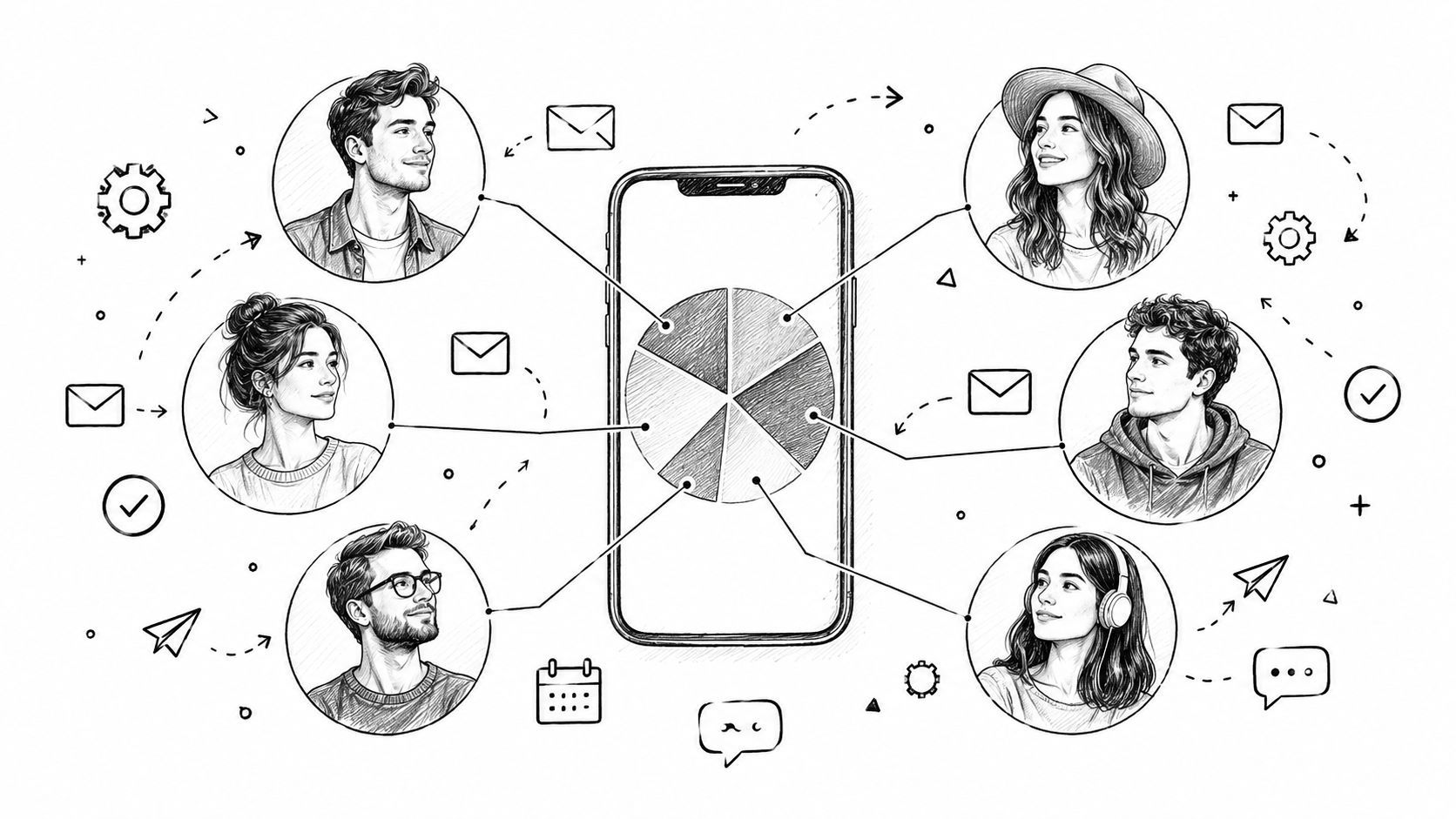
A step-by-step framework for personalization at scale across every stage of a crowdfunding campaign, from pre-launch capture to fulfillment and upsells.
You've just watched your crowdfunding campaign close successfully. The updates are published, backers are celebrating, and your team is ready to move into fulfillment. Then the messages begin: shipping questions, requests to change colors, confusion about add-ons, and late backers asking whether they can still access the original reward tiers.
That's the point where personalization at scale stops being a marketing phrase and becomes an operating problem. Every backer has a different pledge, location, survey status, add-on history, and reason for joining. If you treat them as one audience, your team will spend the post-campaign period repairing confusion instead of increasing revenue and protecting the customer experience.
A campaign can close with strong momentum and still create an operational mess. The celebration email goes to everyone, but digital-only backers receive shipping information they don't need. A late-pledge supporter gets the same message as someone who pledged early. Someone who already bought every add-on sees another generic upsell, while a backer who missed the campaign never receives a clear path to purchase.
The common diagnosis is that the creator needs better software. Usually, the deeper problem appears earlier. The team hasn't decided how to segment people before the campaign closes, so the pledge manager becomes a sorting tool instead of an execution layer.
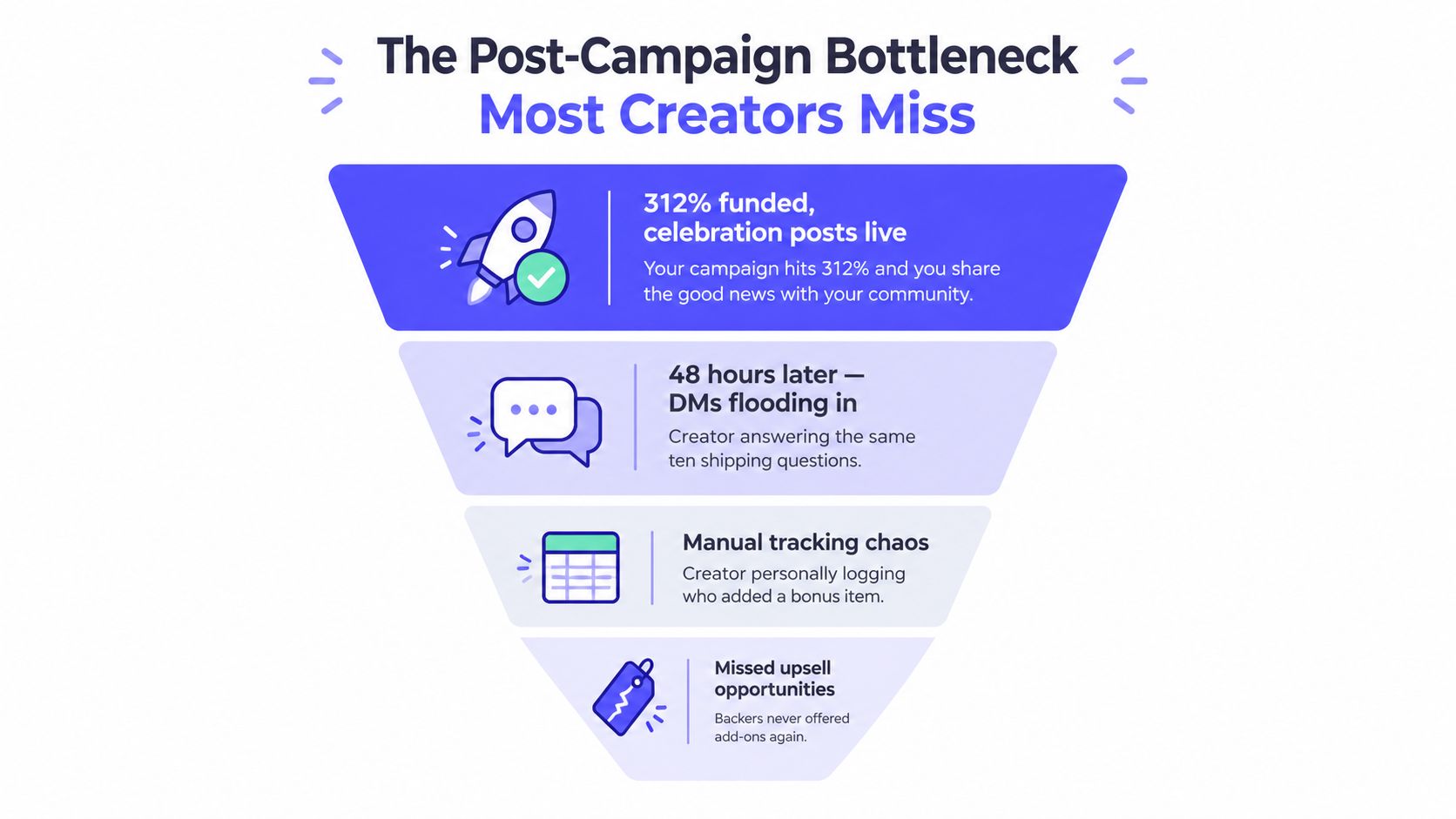
A useful post-campaign sequence starts with recognition, then moves into confirmation, selection, payment, and fulfillment. The acknowledgment message should reflect what the person backed. The survey should ask only questions relevant to that reward. The upsell should account for what they already purchased.
That sequence depends on timing. Sending a survey immediately after a campaign closes may work for a simple product, but a complex tabletop game, hardware product, or apparel campaign often needs a short acknowledgment first. Backers should understand what happens next before they receive a form asking for address details, taxes, sizes, or add-ons.
Practical rule: Segment before you write the message. If the copy comes first, every later branch becomes an awkward exception.
The three layers are straightforward. Static data comes from the original pledge. Behavioral data records what a person did during the campaign. Survey data confirms what the backer wants after the campaign. Together, they turn one large audience into practical groups that can receive different messages without requiring a one-to-one workflow.
Start with the information you already have, then add signals as the campaign develops. Writing messages before defining these layers usually leads to broad copy with a few superficial merge fields. The better approach is to decide what each segment should receive and why.
The first layer comes from the transaction itself. Record the reward tier, pledge status, add-on selection, and shipping destination or region. These fields should determine the first post-campaign branch.
A digital reward holder shouldn't receive a shipping-fee reminder. A physical-product backer may need address confirmation, tax information, or a delivery estimate. A supporter who selected several extras needs a receipt and survey that clearly separates the core reward from optional purchases. The pledge is the source of truth for this layer, so define it before the campaign goes live.
The second layer captures intent. Useful signals include whether someone clicked a stretch-goal update, opened several campaign emails, visited the late-pledge page, or asked a question about international delivery. A non-backer who repeatedly engaged with updates deserves a different message from a subscriber who never opened anything.
Use behavior to change the next action, not merely to create an impressive dashboard. Someone who clicked an add-on announcement but didn't purchase could receive a focused explanation of that add-on. Someone who already pledged may need a thank-you and a relevant upgrade, not another campaign overview.
For a broader explanation of how behavioral groups can support audience segmentation for X engagement, look for the same principle in a crowdfunding context: engagement is useful when it changes the message or timing.
The final layer arrives through the post-campaign survey. Ask for the information needed to complete the reward, including size, color, shipping address, or consent for future marketing. Keep operational questions separate from optional promotional choices where possible. A backer should understand which answers are required for delivery and which choices add something to the order.
PledgeBox's audience segmentation guidance fits into the workflow PledgeBox's audience segmentation guidance. The survey can turn a broad reward category into more useful fulfillment groups, such as a particular shirt size, console preference, regional shipping route, or add-on combination.
Build in this order:
That order keeps the campaign efficient. You aren't asking a prospect for shipping information before they pledge, and you aren't forcing a paid backer through questions that don't apply to their reward.
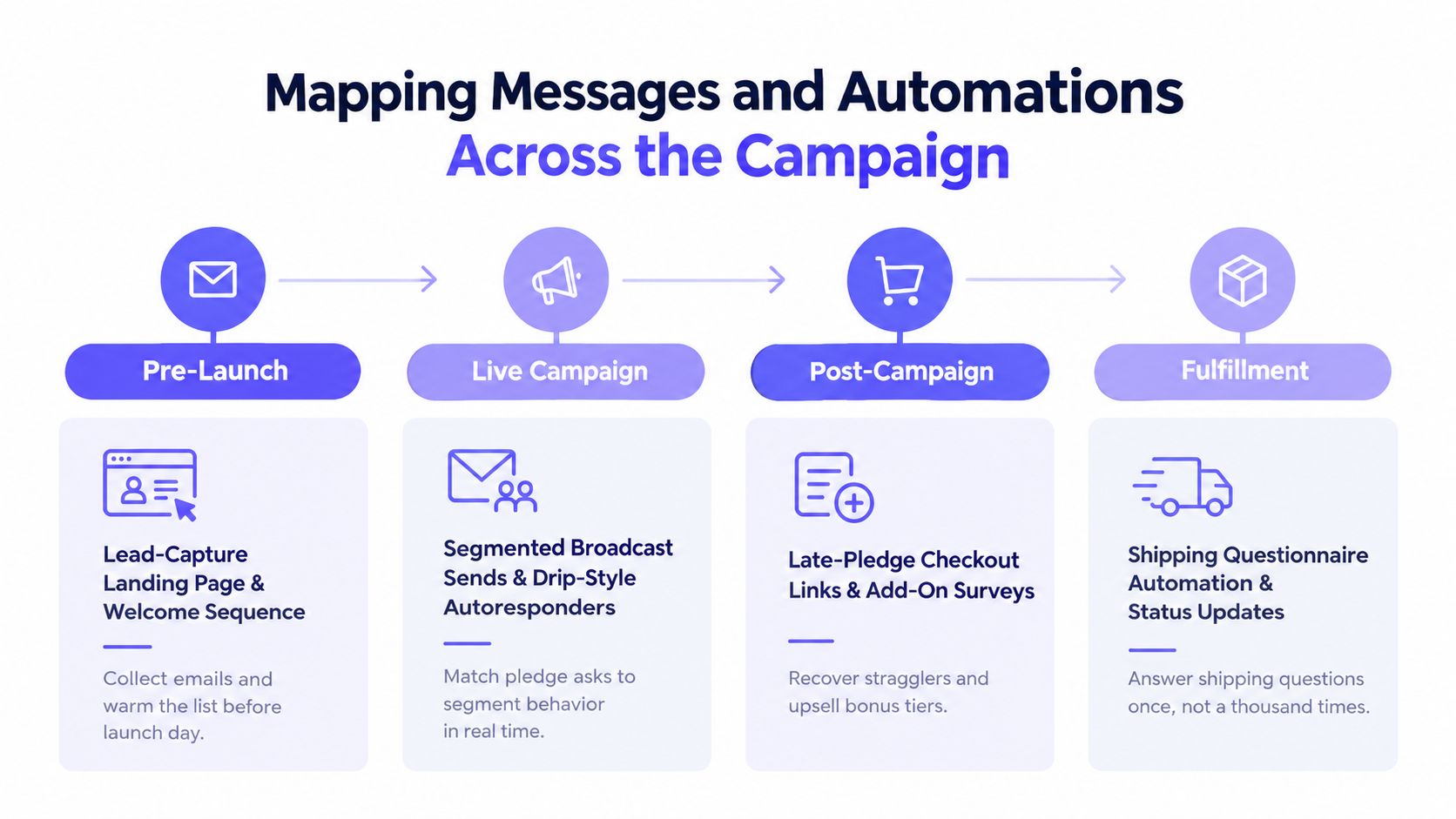
Personalization works when every campaign window has a trigger, an owner, and a measurable outcome. Without those three elements, automation becomes a collection of disconnected emails.
The trigger is a new waitlist signup. The feature owner is the lead-capture page and welcome sequence. The success metric is qualified list growth by source, not the total number of subscribers.
Tag each signup by referral source, such as a podcast, community post, creator newsletter, or referral link. You can then introduce the campaign differently depending on what brought the person in. Someone who joined through a product explanation may need specifications, while someone who arrived through a creator story may respond better to behind-the-scenes content.
A referral waitlist also creates a useful distinction between people who volunteered early and people who discover the project after launch. Don't give both groups an identical first message.
The trigger is a pledge, an update click, an abandoned checkout, or a stretch-goal milestone. The feature owner is the segmented broadcast and Drip-style autoresponder system. The success metric is click-to-pledge conversion by segment.
A current backer might receive a progress update and a thank-you tied to their reward level. A non-backer who clicked the campaign page should see a clear reason to act. A supporter who abandoned a pledge needs reassurance about the product or checkout process, not another general announcement.
Conditional content blocks are useful here because they preserve one campaign structure while changing the relevant section for each audience. Keep the branch logic simple enough that someone on the team can audit it before sending.
The trigger is campaign closure, a completed pledge import, or survey completion. The feature owner is the pledge manager survey and late-pledge checkout flow. The success metric is completed surveys, recovered late pledges, and add-on revenue by segment.
The survey should confirm the reward, collect the shipping address, handle applicable taxes or shipping charges, and show relevant upgrades. Someone who missed the live campaign can receive a late-pledge offer, while an existing backer can see compatible add-ons. Kickstarter's own Pledge Manager fee information confirms that the service is included with no additional upfront cost and applies the same fees to Pledge Manager payments as to successful projects, including a 5% platform fee plus Stripe processing of roughly 3% to 5%, with no platform fee applied to taxes.
The trigger is a completed questionnaire, carrier event, delivery confirmation, or unresolved address. The feature owner is shipping questionnaire automation and status messaging. The success metric is reduced support volume, completed delivery information, and relevant post-delivery purchases.
Regional shipping emails should answer the question each group is most likely to ask. After delivery, a companion-product sequence can target customers who received the original reward but didn't select the related item. Keep that sequence separate from shipping updates so a transactional message doesn't feel like an advertisement.
If your email stack uses Klaviyo, a connector such as Disputely's Klaviyo connector can help connect campaign events with lifecycle messaging. The important decision isn't the connector itself. It's the event naming. “Survey complete,” “add-on purchased,” and “delivered” are more useful triggers than a vague label such as “customer.”
A campaign can finish successfully and still create weeks of manual work. The choice of pledge manager becomes visible when you need to send a survey, separate reward variants, collect add-ons, handle late backers, or reconcile payments across regions. Kickstarter's built-in Pledge Manager and PledgeBox address these tasks through different operating models.
Kickstarter Pledge Manager is like Amazon. The campaign and post-campaign transaction remain inside a large marketplace environment. PledgeBox Pledge Manager is like Shopify. The creator uses a dedicated commerce tool around the campaign, survey, customer, and fulfillment workflow.
The comparison has limits. Shopify explains the distinction between an ecommerce platform and a marketplace in its guide to platforms versus marketplaces. A platform gives merchants tools for their own store, while a marketplace brings multiple sellers together.
| Dimension | Kickstarter Built-in | PledgeBox |
|---|---|---|
| Cost structure | Included with no additional upfront cost. Kickstarter states that payments use a 5% platform fee plus Stripe processing of roughly 3% to 5%. | Free to set up, with no campaign fee on original Kickstarter or Indiegogo funds. Pricing applies to add-on revenue collected through backer surveys. |
| Survey customization | Collects shipping addresses, reward preferences, taxes, shipping and tariff surcharges by request, plus optional add-ons or upgrades. | Supports branded surveys, reward-specific questions, add-on offers, shipping data, and post-campaign preference collection. |
| Late pledges and pre-orders | Useful for Kickstarter-backed payments and campaign follow-up. | Built to support late-backer offers, add-on upsells, and pre-order flows across crowdfunding campaigns. |
| Integrations | Fits naturally inside the Kickstarter environment. | Can sit alongside ecommerce, payment, email, and fulfillment workflows when the creator needs a separate operational layer. |
| Reporting | Suits a focused Kickstarter follow-up. | Better suited to campaigns that need survey, add-on, and fulfillment information in one workflow. |
The built-in option fits a simple campaign with a narrow reward structure and limited branching. A separate tool becomes more useful when the campaign includes multiple regions, reward variations, late backer pre-orders, or post-campaign sales that would otherwise require manual reconciliation.
PledgeBox's published pricing states that it is free to set up, takes no campaign fee on original Kickstarter or Indiegogo funds, and charges 3% only on add-on revenue collected through backer surveys. It is also free to send the backer survey. For a fuller decision framework, see our guide to how to select the right pledge manager.
Before changing tools during an active campaign, audit the migration rather than assuming the records will map cleanly:
A solo creator doesn't need a warehouse full of dashboards. They need a small set of connected measurements that reveal where the journey is leaking.
Track pre-launch opt-in rate and source attribution. The first metric tells you whether the page persuades visitors to join. The second shows whether your strongest subscribers come from a community, a referral, a creator channel, or an existing email list.
A high opt-in rate with weak pledge conversion may indicate that the promise on the waitlist doesn't match the campaign offer. Source data helps you find that mismatch.
Compare open rate by segment with click-to-pledge conversion. A strong open rate isn't enough if the message attracts attention but doesn't move the reader toward a suitable reward. Compare segmented sends with broad broadcasts so you can see whether the extra setup changes behavior.
Measure survey completion, add-on attachment, and late-pledge activity by segment. A high overall add-on rate can hide a problem if only a small, highly engaged group is buying. Conversely, a modest total may be healthy if many first-time backers are completing their core purchase without confusion.
Monitor delivery-information completion, support questions by region, post-campaign revenue per backer, and repeat participation on the next launch. These measures connect personalization to the customer relationship rather than treating the campaign as finished when payment arrives.
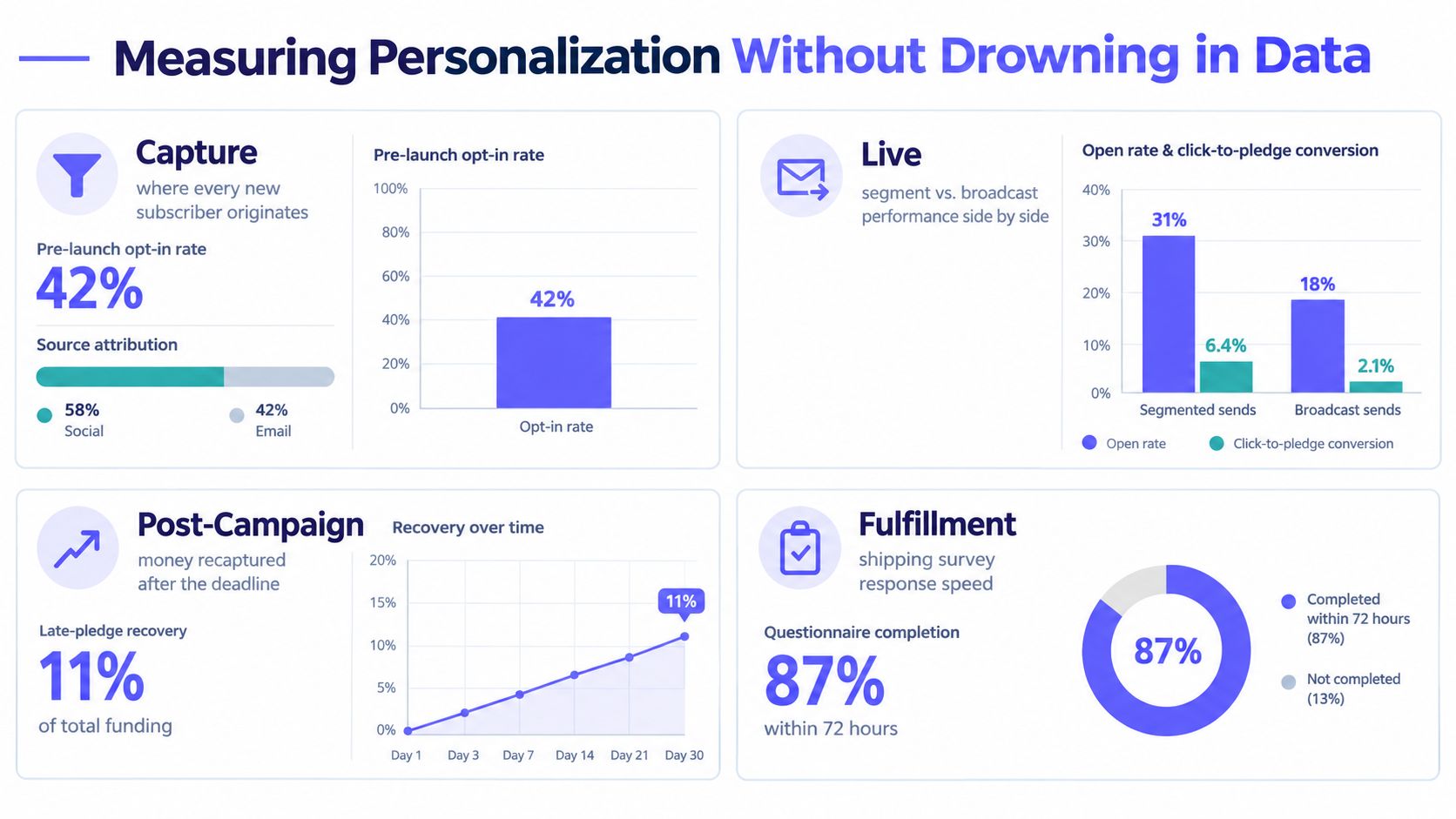
Review the numbers weekly while the campaign is active and on a fixed cadence after closure. On a Monday morning, a solo creator can usually work from three headline figures:
The point isn't to prove that every message worked. It's to identify which audience needs a different message, a different offer, or no message at all.
Broadcasting one message to every backer feels safe because it avoids complicated rules. In practice, it creates irrelevant communication and makes it harder to honor preferences. Personalization should reduce unnecessary messages, not give you an excuse to send more of them.
Collect consent at signup with clear language about what the person will receive. Provide a visible unsubscribe path, maintain suppression lists across the campaign and fulfillment systems, and distinguish operational messages from promotional follow-up. A backer who opted out of marketing may still need a shipping notice, but they shouldn't be added to an unrelated product sequence.
More fields don't automatically create better targeting. A clean segment such as “late backer, physical reward, survey incomplete” is more useful than a large profile containing unlabeled interests and stale campaign activity.
Use one source of truth for identity and define tags before launch. At minimum, establish consistent labels for:
Data hygiene also means deleting what you no longer need and correcting conflicts between the campaign tool and email service provider. For a practical reference point on privacy handling, review how LunaBloom handles data, then compare the principles with your own retention, access, and deletion process.
The PledgeBox data privacy and compliance resource is useful when you're documenting consent and campaign data handling. The operational standard is simple: every field should have a purpose, every tag should have a definition, and every promotional flow should have a suppression rule.
Print the following sequence beside the campaign checklist and assign an owner to each line.
Capture email addresses through a waitlist and tag the referral source. Add interest tags for likely reward families and geographic regions only when you can use them in a real message. Build the welcome sequence around education, not constant reminders to pledge.
Create behavior triggers for abandoned pledges, stretch-goal milestones, and meaningful update engagement. Send a stretch-goal message to the reward group that benefits from it, and send a conversion prompt to engaged non-backers. Don't make backers reread the entire campaign every time you publish an update.
Group customers by reward, add-on status, and survey completion. Send the appropriate survey, offer compatible upgrades, and create a separate late-pledge path for people who missed the live campaign. Use shipping and tax questions where they belong, inside the fulfillment workflow.
Tie status messages to actual delivery events. A customer whose address is incomplete needs a different email from someone whose parcel is already in transit. After delivery, offer a companion product only when the original order and customer consent make that message relevant.
Your final rehearsal should use a sample backer for each important path. Test a digital-only order, a physical reward with an add-on, a late pledge, an international address, and a survey non-responder. Confirm that each person receives the right message, sees the right questions, and is excluded from flows that no longer apply.
The checklist is short:
PledgeBox brings pre-launch capture, campaign messaging, branded surveys, add-on upsells, late-backer pre-orders, and fulfillment workflows into one crowdfunding operating layer. Visit PledgeBox to map your next campaign around the backer's actual journey instead of treating every supporter as the same customer.
PledgeBox
The All-in-One Toolkit to Launch, Manage & Scale Your Kickstarter / Indiegogo Campaign