 PledgeBox
Stripe vs PayPal for Crowdfunding: Fees, Payouts and Fit
Stripe vs PayPal for crowdfunding creators: compare fees, checkout, currency costs, disputes and payouts, and see which fits your PledgeBox campaign.
Stripe vs PayPal for crowdfunding creators: compare fees, checkout, currency costs, disputes and payouts, and see which fits your PledgeBox campaign.
The most popular advice about Stripe vs PayPal is to pick the processor with the lower headline fee. For a crowdfunding campaign, that can be the wrong decision: a cheaper authorization may produce fewer completed orders, while an international payment, refund or dispute can change what you keep.
A better ranking is effective cost per fulfilled backer. Start with the provider fee, then account for currency conversion, payment completion, refunds, disputes and the extra work required to reconcile orders. The comparison below gives you a fee table you can rebuild using your own pledge amounts and backer mix.
A $50 U.S. pledge makes the fixed-fee difference visible. At Stripe's commonly reported domestic-card baseline, the processing fee is about $1.75. PayPal's published U.S. Checkout rates produce about $1.99 for a standard card payment, $2.24 for a PayPal or Venmo wallet payment, and $1.74 for a card processed through expanded customizable checkout. The cheapest line isn't automatically the cheapest completed order, especially once international charges or campaign platform fees enter the calculation.
| Fee item | Stripe | PayPal | What it means on a $50 pledge |
|---|---|---|---|
| U.S. domestic card | 2.9% + $0.30, commonly reported baseline | 2.99% + $0.49 standard; 2.89% + $0.29 expanded checkout | Stripe: about $1.75. PayPal: about $1.99 standard or $1.74 expanded |
| PayPal or Venmo wallet | No single wallet rate; depends on the method enabled | 3.49% + $0.49 | PayPal or Venmo: about $2.24 |
| International card surcharge | +1.5% | Varies by market and agreement | Stripe: +$0.75; PayPal's additional charge is set by its terms |
| Currency conversion | +1% when conversion is required | About 3% above the base exchange rate in one comparison | Stripe: +$0.50; PayPal's reported spread is about $1.50 |
| Dispute received | $15 per dispute | Not specified in the cited U.S. rate table | Applies per case, not per pledge |
| PledgeBox survey payments, including add-ons | 3% platform fee plus provider fees | 3% platform fee plus provider fees | No charge to send the survey; the platform fee applies to payments collected through it |
| PledgeBox pre-order store sales | 5% platform fee | 5% platform fee | Applies to late backer pre-orders |
The provider prices in the table come from Stripe's U.S. payment guidance, PayPal's U.S. Checkout pricing and a comparison of Stripe and PayPal fees. The PayPal conversion spread is an estimate reported in one comparison, not a universal rate. PayPal's charges can depend on market, account agreement, settlement currency and transaction type.
For a survey payment, payment-provider fees and platform fees are separate. PledgeBox's standard survey platform fee is 3% on payments collected through surveys, including add-ons, shipping and tax. There's no fee just to send the backer survey, and no 3% charge if the survey collects no payment. Pre-order store transactions carry a 5% platform fee. Provider pricing can also change with the country, account, payment method and contract, so don't treat any U.S. baseline as a global quote.
Practical rule: Rebuild this table using your average pledge, typical add-on and backer countries. Published rates show what a payment costs under stated conditions, not what it costs to fulfill an order.
The headline fee is only one part of checkout cost. A payment method can affect whether a backer completes the order, while the integration determines how clearly the creator can track payments and fulfill pledges. Those effects belong in a comparison of effective cost per fulfilled backer, alongside processing fees, refunds and disputes.
A card checkout asks for card details unless another payment method is displayed. A PayPal wallet can let a backer pay with stored account details instead. That familiar route may suit mobile backers who prefer not to enter card information for a reward that will ship later.
Stripe and PayPal grew around different strengths. Stripe offers configurable payment infrastructure, while PayPal's wallet gives backers a familiar way to pay. The products can overlap without being interchangeable. Fortune's account of Stripe's growth and company history provides context for Stripe's focus on configurable merchant workflows.
Stripe's Payment Methods API lets a platform support multiple payment methods through one integration. Payment status, webhook handling and reporting can then follow a common operational model instead of requiring a separate custom system for each payment method. Stripe's documentation also describes accepting PayPal through a server-created PaymentIntent with a specified amount and currency.
That approach can suit pledge managers handling surveys, add-ons or multi-step checkout. PledgeBox is verified by Stripe for secure payments. For details on combining payment methods in a pledge workflow, see Stripe and PayPal integration in PledgeBox.
Creators who don't need a custom form can use Stripe Payment Links. Stripe describes them as hosted checkout pages that can be shared by email, social media or a website. Depending on availability, they support local language and currency, along with many payment methods.
The choice affects both the backer's route to payment and the creator's operational control. PayPal offers a wallet backers may already use, while Stripe can support configurable checkout flows and campaign logic. For either route, track payment events with provider-specific webhooks and reconcile orders by campaign, backer, currency and order ID. Use idempotency keys to help prevent duplicate charges, and record authorization and capture states separately.
Think of Kickstarter's pledge manager as Amazon and PledgeBox's pledge manager as Shopify. The comparison is about the business model, not a claim that the products are identical: Kickstarter keeps the campaign and backer experience anchored in its marketplace, while PledgeBox gives creators a branded survey and post-campaign store for collecting shipping, tax or VAT, and add-on orders in a connected flow.
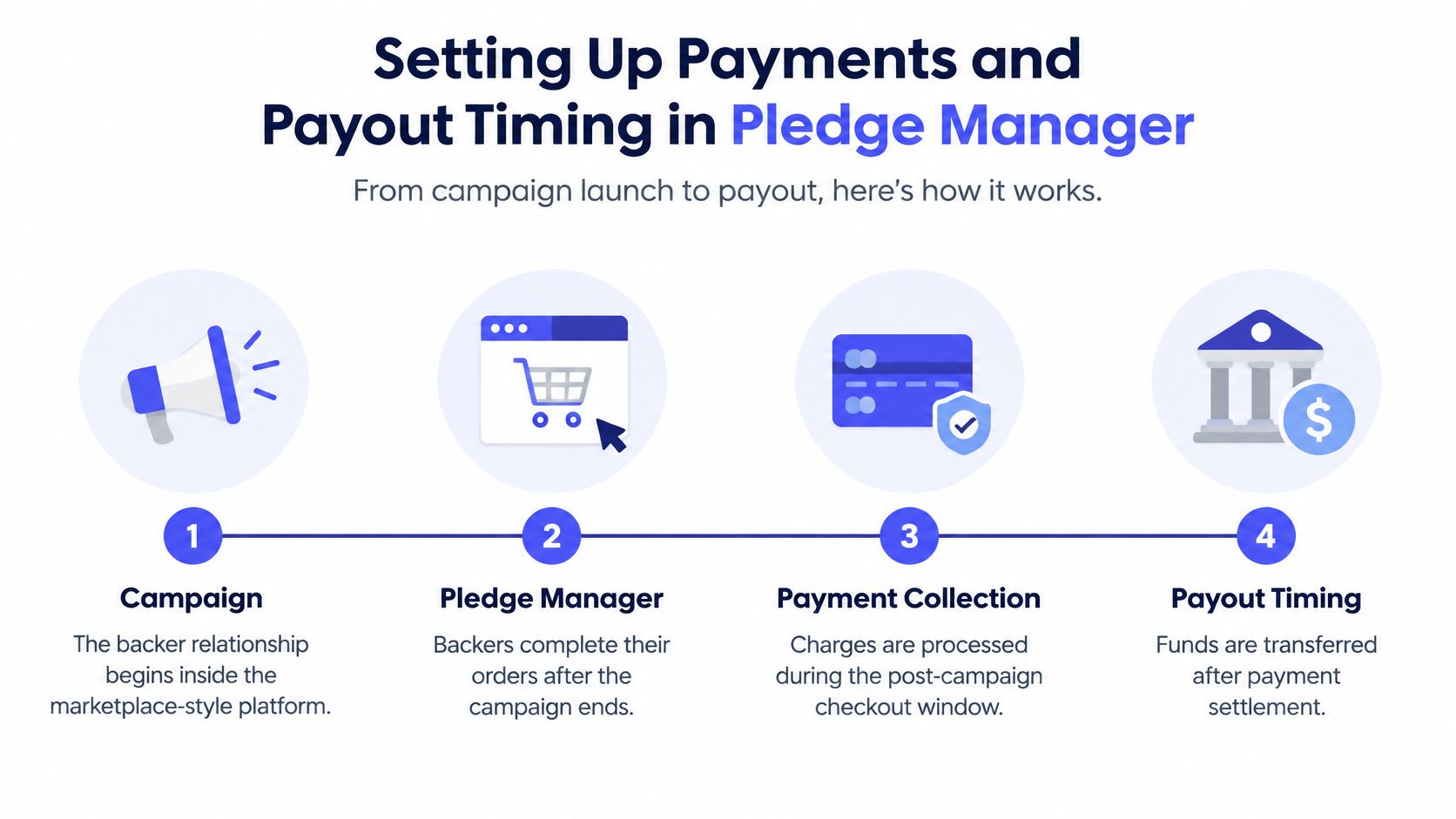
Pledge Manager accepts Stripe and PayPal for additional survey payments. Payments use the creator's connected receiving account, so check that account's provider fees and terms rather than assuming the pledge manager sets the processor's charges.
A declined payment can prevent a backer from completing the survey, so make a plan for handling failed charges and communicating with customers. PledgeBox's guide to credit card decline codes can help you interpret what a failed card payment means.
A successful charge, money available in the receiving account and money deposited into a bank account are three different stages. Holds and timing are controlled by the provider and the receiving route. For example, the Bank Account payment option uses Stripe Express with its own payout settings; it shouldn't be assumed to follow the same payout path as a card or wallet payment.
| Payment stage | What it means | What controls the timing |
|---|---|---|
| Successful payment | The backer's survey or pledge payment is completed | The backer's card or wallet authorization |
| Available balance | Funds are ready in the creator's connected receiving account | Provider holds, account standing and the fee breakdown |
| Bank payout | Money reaches the creator's bank account | Payout settings of the receiving route, such as Stripe Express for bank account payments |
If a backer paid only on Kickstarter or Indiegogo, that payment doesn't qualify for a PledgeBox invoice. An invoice is tied to an order that includes a payment made through PledgeBox, not to the original marketplace payment alone.
Take a €40 pledge from a German backer, paid by card and settled in U.S. dollars, with a $10 shipping add-on collected later in the survey. The domestic card rate alone doesn't describe the cost: the international card surcharge may apply, and settlement in a different currency can add conversion costs. If the shipping add-on is collected as a separate survey payment, it has its own processing cost too.
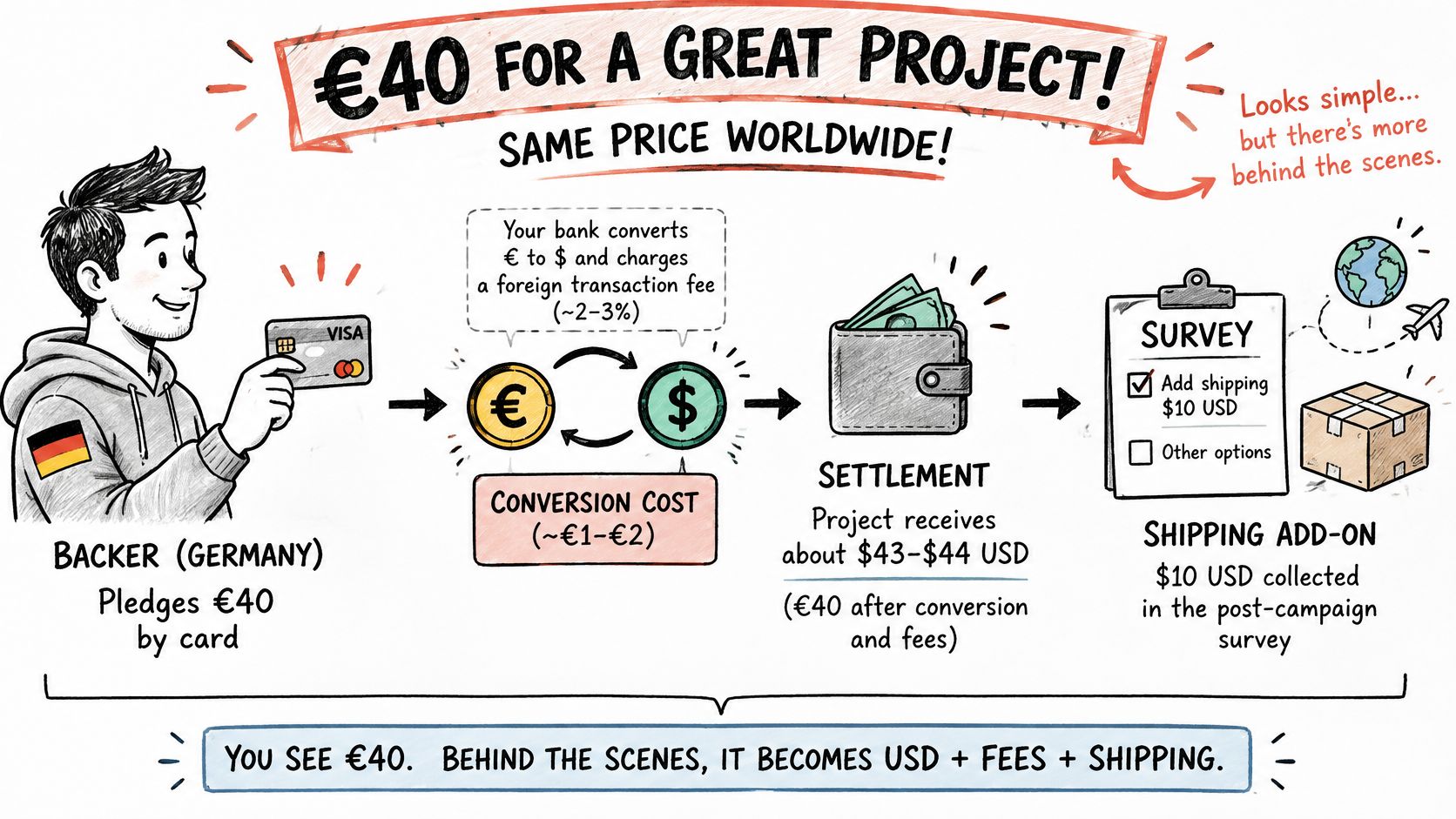
For U.S. Stripe pricing, published comparisons commonly report an additional 1.5% for international cards and 1% when currency conversion is required. One comparison reports PayPal's conversion spread at about 3% above the base exchange rate, though exact charges depend on market, account agreement, settlement currency and transaction type. Stripe's information on local payment methods and currency choices illustrates why international economics can outweigh a domestic rate comparison.
A useful benchmark is effective cost per successfully settled order. Segment results by backer country, funding currency, payment method, refunds, disputes and whether funds settle locally or are converted. That analysis may show that a provider with a higher-looking fee is still worthwhile in a market where its wallet makes checkout easier, or that frequent conversions are eroding the margin on otherwise strong sales.
Stripe's local-currency and multi-currency capabilities can reduce forced conversion where the business is eligible to hold balances in those currencies. PayPal may be familiar to backers in some markets, but repeated conversion can raise the total cost. The key is to use actual settlement destinations and transaction types in the comparison rather than extrapolating from one domestic card payment.
Remember that shipping-only and tax-only payments still have a collection fee. A small add-on isn't free to process just because it isn't the reward itself, and several small charges can have a different cost profile from collecting one combined order total.
Run a fair provider test using identical basket values and settlement destinations. Model add-ons, shipping, VAT or tax, subscriptions, refunds and late pledges separately, then compare the amount retained after settlement. Provider processing fees can vary by account, country, payment method and currency, so use the terms that apply to the receiving account.
A low fee at authorization doesn't settle the question of which processor costs less. Crowdfunding creates a long interval between payment and fulfillment, and plans can change as creators update shipping, taxes, addresses or delivery estimates. A backer may dispute a charge well after checkout, when the creator needs to connect the transaction to the right campaign records and communications.
Stripe's current pricing information lists a $15 dispute-received fee and a separate manual counter-dispute fee, which is returned only when the dispute is won. It also lists cross-border card and currency-conversion charges, making a one-line domestic comparison incomplete. Stripe's pricing page gives the relevant fee details. Don't assume that a nominally lower transaction rate produces lower costs after refunds, chargebacks and recovery efforts.
Use total realized cost per fulfilled backer, not cost per authorization. Include provider fees, conversion, failed payments, refunds, disputes, customer-support time and recovery success. Then preserve evidence with the order: pledge terms, delivery estimate, tracking record, confirmed address, refund policy and backer messages.
A delivery complaint isn't the same as fraud, and neither is the same as an accidental duplicate charge. A delivery dispute calls for order and shipping records; a suspected fraud case needs evidence tied to the payment; a duplicate charge calls for checking transaction IDs and refunding the extra payment where appropriate. For practical context on reducing payment risk, MANDATE's guide to checkout fraud prevention discusses prevention approaches, while PledgeBox's payment gateway security overview addresses payment security in the pledge-management setting.
Count the transaction that caused the problem. The original pledge and a payment requested in a PledgeBox survey are separate transactions. Refunding one doesn't automatically refund the other.
For long-lead hardware, board games and pre-orders, a method that increases initial checkout completion may still produce a worse result if it creates more disputes or leaves the creator with weaker order visibility. Ask both providers how long a dispute window lasts, what evidence they accept and how they report recovered funds. Then compare the answers against your fulfillment records and realized costs.
The useful question isn't which provider wins every campaign. It's which payment route fits the backers and the way the campaign collects money. Use this as a starting decision table, then test it against completed payments and post-fulfillment outcomes.
| Campaign situation | Lead processor | Add the other provider when | Measure to track |
|---|---|---|---|
| Domestic backers, mostly cards, add-ons in the survey | Stripe | Backers in your market ask for PayPal | Completed payment rate by device |
| International backers across several currencies | Stripe with local or multi-currency settlement | Conversion costs rise and wallet use is high in target countries | Effective cost per settled order by country |
| Market where a local wallet dominates | Stripe as the operational platform | PayPal is offered selectively to those backers | Incremental completed pledges and upsells |
| Long-lead hardware, board games or pre-orders | Stripe for operational control | Backers show distrust of unfamiliar checkout | Dispute and refund rate after delivery |
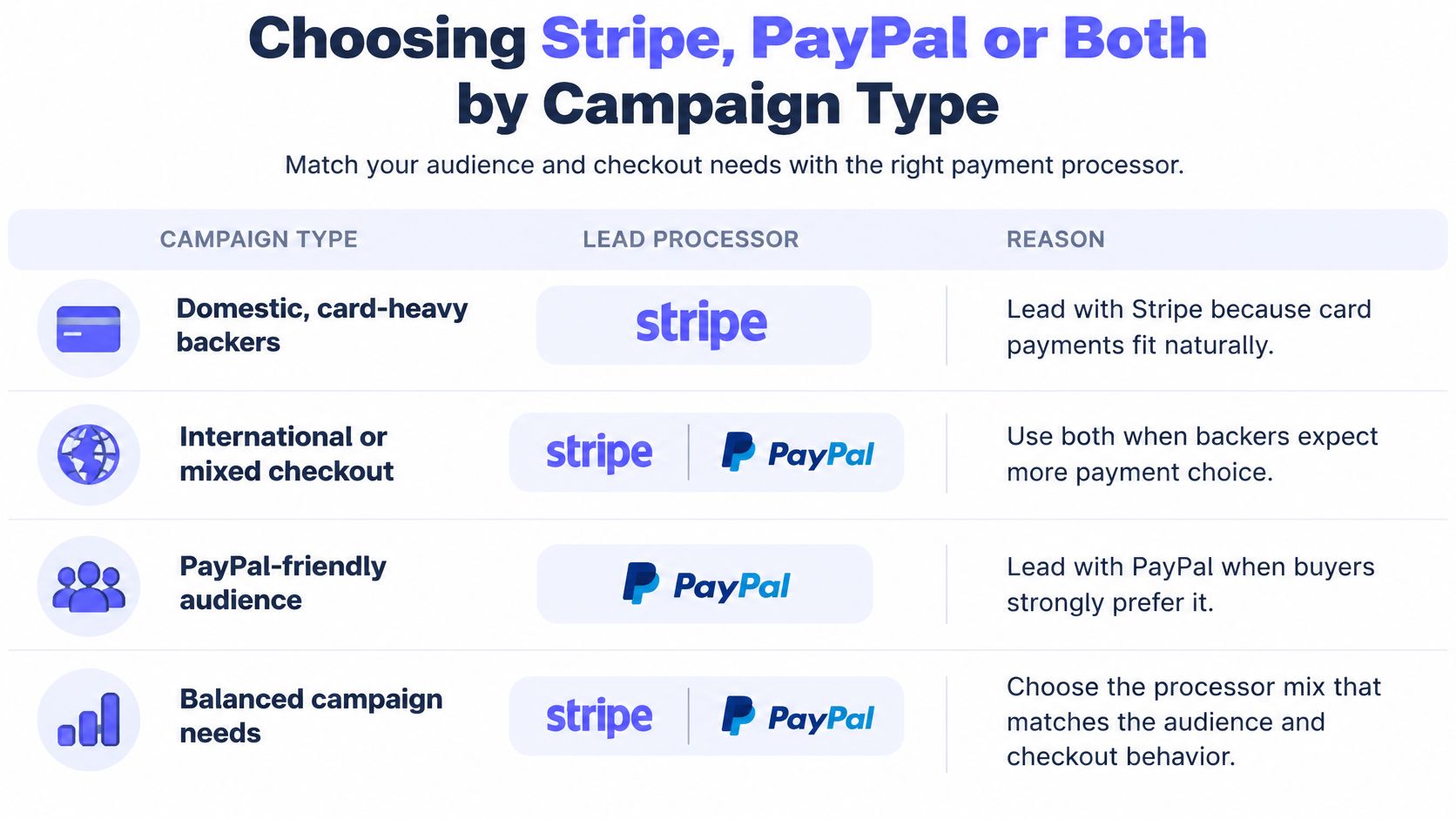
For domestic, card-heavy backers, Stripe can lead while PayPal is added when the audience demonstrates wallet demand. For a global audience, compare effective cost by country and settlement currency instead of treating all international orders alike. If a local wallet is common in a target market, keep the operational workflow consistent and show PayPal selectively where it could remove a trust barrier.
The same logic applies to long-lead products. Stripe's configurable checkout can support campaign operations, but the creator should judge payment methods by their performance through fulfillment, not just at the point of purchase. That means monitoring completed payments alongside later refunds and disputes.
Stripe's payment-method testing found that showing at least one relevant non-card method raised conversion by 7.4% and revenue by 12% on average; the lift was particularly large when local wallets or bank methods matched the market. Stripe's study of conversion across global payment methods also reports a 47% conversion increase when PayPal was offered to German buyers of digital products. Those results are specific to the tested settings, not a guaranteed uplift for a crowdfunding campaign.
Test by country, device, currency, reward price and checkout stage. Count completed payments, upsells, refunds and disputes, not checkout clicks alone. PledgeBox accepts both Stripe and PayPal, so the practical choice is which payment methods the backer sees, not whether the survey can collect payment. Its pre-order store fee covers the hosted storefront, payment-processing integration and order-management tools.
Use your own campaign history to decide which provider should lead. A short, controlled test can reveal problems that a headline fee table won't show.
PledgeBox is free to send the backer survey and charges a 3% platform fee on payments collected through surveys, including upsells, shipping and tax. If the survey collects no payment, there's no fee; pre-order store sales have a separate 5% platform fee. Testing the survey itself doesn't require a platform fee when it collects no payment.
Start today by sorting your last year of pledges by backer country and payment method. That one comparison will show whether Stripe should lead everywhere, or whether PayPal belongs in specific markets.
PledgeBox gives crowdfunding creators a branded pledge manager for surveys, payment collection, shipping, tax and add-ons, with support for both Stripe and PayPal. Use it to test a checkout that fits your backers and review how payments move through post-campaign fulfillment. Visit PledgeBox to explore the pledge manager.
PledgeBox
The All-in-One Toolkit to Launch, Manage & Scale Your Kickstarter / Indiegogo Campaign