 PledgeBox
Best Email Marketing Software for Crowdfunding in 2026
Compare email marketing software for crowdfunding by segmentation, automation, pledge manager fit, pricing and fees, and campaign stage.

Compare email marketing software for crowdfunding by segmentation, automation, pledge manager fit, pricing and fees, and campaign stage.
You've funded the campaign, and 4,000 backers are now waiting on a survey, a shipping charge and an add-on offer. Which of your tools knows who pledged, which one knows what they owe for shipping, and which one can send the reminder without corrupting the list?
Most email marketing software comparisons answer a different question. They rank templates, automations and headline open rates, then stop exactly where a crowdfunding campaign gets expensive, at the post-campaign point where surveys, upsells, shipping fees and tax all land in the same inbox.
That gap costs creators money. A tool that can't see pledge status can't segment by tier, and a platform fee you never modeled can swallow the margin on an add-on you fought hard to sell. Everything below is costed per dollar raised and per backer, not per thousand contacts.
| Platform | Best for | Crowdfunding strength | Pledge or payment link | Pricing model |
|---|---|---|---|---|
| PledgeBox (InBox and Pledge Manager) | Kickstarter and Indiegogo creators | Pre-launch to fulfillment in one toolkit | Native pledge manager with Stripe and PayPal | Free backer survey; 3% on add-on sales during surveys |
| Kickstarter Pledge Manager | Kickstarter projects only | Surveys, upgrades and add-ons inside Kickstarter | Built into Kickstarter checkout | 5% platform fee on funds collected except taxes |
| Mailchimp | General senders and small lists | Broad automation and templates | No native pledge link | Free tier; paid plans by contact count |
| Klaviyo | Stores with shopper data | Behavioral flows and segmentation | Ecommerce integrations | Free tier; paid plans by profile count |
| MailerLite | Creators on a budget | Automation and landing pages | Payment links through integrations | Free tier; paid plans by subscriber count |
Match your stage to the strongest column first, then check which tool can see your pledge data. A creator with a landing page and 300 waitlist signups needs list capture and a free backer survey, not an enterprise automation suite. A creator who closed a $400,000 campaign three weeks ago needs the opposite: backer-level records, shipping fees, add-on upsells and tax by location.
The pledge or payment column is the one generic comparisons skip. A platform with no native pledge link forces you to reconcile two systems by hand, which usually means exporting a CSV, matching email addresses to backer records, and hoping nobody checked out with a different address than the one they subscribed with.
This is a crowded category. The global email marketing market was valued at USD 9.375 billion in 2024, according to Credence Research, and crowdfunding creators are a thin slice of it. If the vocabulary of customer data, automation and attribution is new to your team, this martech explainer for performance marketers walks through what each layer of a stack does before you buy any of it.
Treat these five rows as a shortlist of two or three tools to test, not a verdict. General platforms build lists well and send reliably, but they need a separate fulfillment tool bolted on once the money lands, and that seam is where backer data goes missing.
| Capability | Generic email platforms | PledgeBox | Kickstarter Pledge Manager |
|---|---|---|---|
| Segmentation and campaign engagement | Strong on tags and custom fields | Drag-and-drop builder with click and conversion tracking per campaign | Survey and reward data only |
| Event-triggered automation | Strong on custom triggers | Backer reminders and notifications | Survey and pledge reminders |
| Domain authentication and inbox checks | Set up by the sender | Connects to the creator's own Amazon SES account; no per-email fees or sending limits | Not applicable |
| Event-level reporting | Available on most paid plans | Tracks clicks, conversions and engagement across every campaign a creator sends | Pledge and survey reports |
| Drag-and-drop builder without HTML | Available on most platforms | Available | Limited to survey forms |
| Accessibility checks | Test a sample send | Test a sample send | Not applicable |
Segmentation determines whether each message fits its audience. A backer who chose a tier with a signed print may need different shipping instructions from someone who chose an early-bird tier. A subscriber who clicked a survey invitation but did not finish may also need a different follow-up from someone who completed it. This guide to email data segmentation explains how to structure audience groups and filters.
Automation is useful when it responds to a real event. Check which actions a platform can trigger, such as a confirmed pledge, an unfinished survey or a shipping notification. A broadcast-only tool relies on scheduled sends, so the creator must keep rebuilding lists to distinguish completed actions from stalled ones.
Reporting should focus on actions, not opens alone. The 2025 DMA benchmark, compiled from anonymized data across seven UK email service providers, put the average open rate at 35.9% and the unique click rate at 2.3% (DMA email benchmark report). Apple Mail Privacy Protection can inflate open counts by loading images through a proxy, so clicks and conversions provide more useful signals for comparing campaign performance.
Benchmarks also vary by audience. MailerLite's 2025 dataset, covering more than 3.6 million campaigns from 181,000 accounts, reported a 43.46% average open rate, a 6.81% click-to-open rate and a 2.09% click rate. Software and web-app senders averaged a 39.31% open rate and a 1.15% click rate (MailerLite email performance benchmarks). Hardware and gadget campaigns may be more usefully compared with that narrower category than with the overall average.
A useful report shows delivered, clicked, unsubscribed, bounced and converted contacts at the event level. A campaign with a 45% open rate and twelve conversions has produced fewer results than one with a 30% open rate and ninety conversions.
InBox, PledgeBox's email marketing tool, has a drag-and-drop campaign builder that requires no HTML coding. It tracks clicks, conversions and engagement across every campaign a creator sends. The Kickstarter Pledge Manager reports on pledges and surveys, while general-purpose email tools offer different segmentation and automation options.
Test shortlisted tools with a matched audience before committing. Send a comparable campaign through each one, then compare clicks and conversions. The matrix below shows the capabilities worth checking.
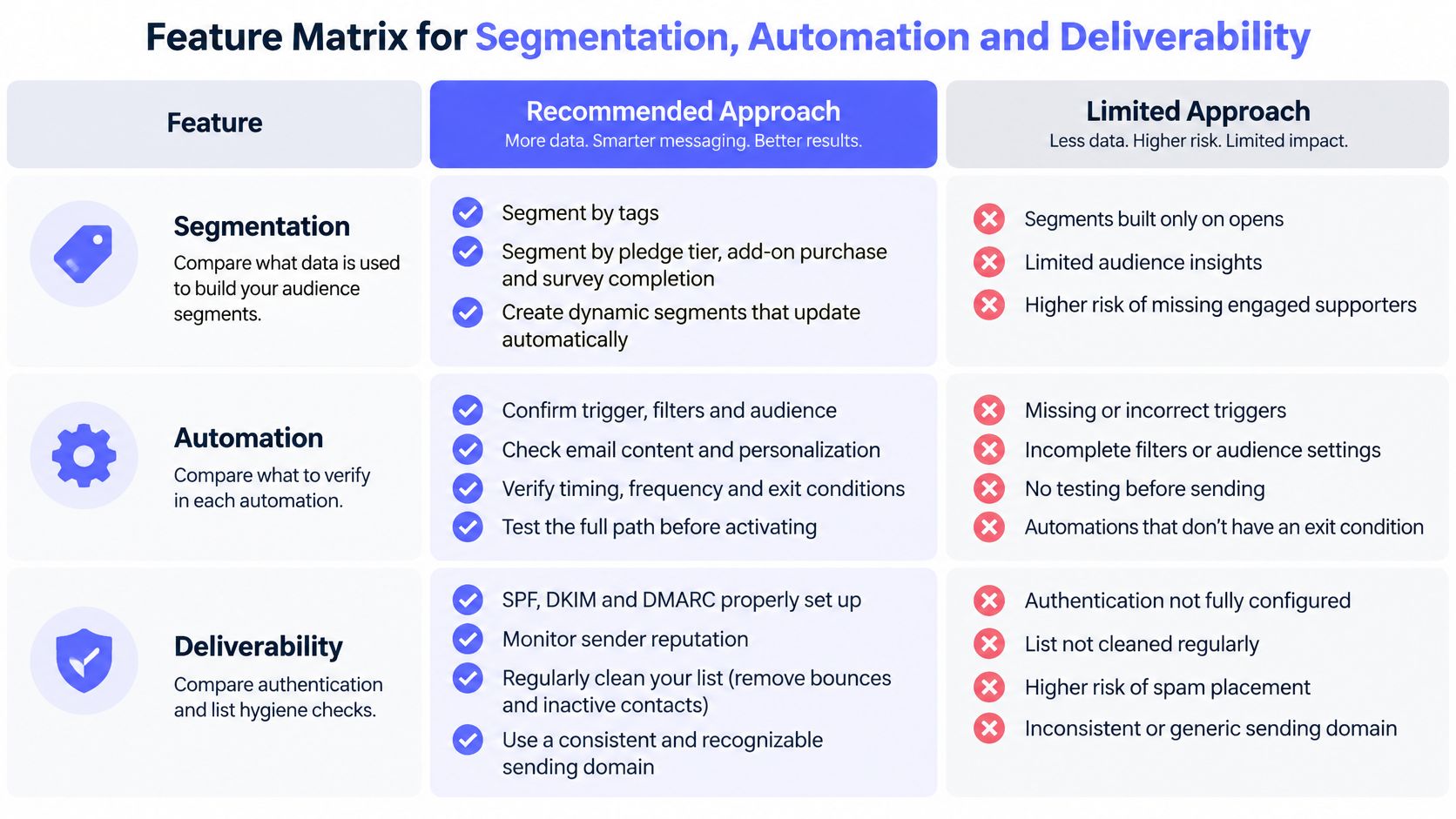
Deliverability. A 2026 report from Verified Email puts average deliverability at 83.1%, meaning 16.9% of messages never reach the inbox, with 10.5% landing in spam and 6.4% undelivered or missing. Set up authentication and maintain list hygiene before adding more automation.
Accessibility. The World Health Organization estimates that 1.3 billion people, 16% of the global population, experience a significant disability, as noted in this email accessibility guide. Use clear structure, alt text, keyboard-accessible links, strong contrast and dark-mode testing for time-sensitive reminders and survey invitations.
What happens to your email list when a campaign ends? For a crowdfunding business, the answer shapes how you choose email software. The list has three jobs: build a waitlist before launch, support backers during the live campaign, and connect post-campaign communication to surveys and fulfillment.
Email is one of the most widely used digital channels worldwide. A list built for one product can become the launch engine for the next, whether that campaign is twelve months away or three years away.
The practical test is whether your tools preserve the relationship between a subscriber, a pledge, an add-on and a shipment. If the waitlist lives in one platform and survey invitations come from another, teams can lose that context and ask backers to provide information twice. A pledge manager linked to email can help carry campaign data into the post-campaign backer lifecycle.
A platform with strong general email features may still miss the needs of a crowdfunding campaign if it cannot account for pledge status. Look for workflows that connect a reminder to a specific action, such as completing a survey or returning to an unfinished pledge. This guide to email workflow automation covers ways to structure those messages.
A waitlist that converts and a survey that gets completed are linked stages of the same backer relationship.
Kickstarter's Pledge Manager keeps post-campaign checkout within Kickstarter. A standalone pledge manager gives creators more control over the backer experience and the data it collects. The trade-off is between a familiar, contained checkout and a separate, configurable workflow.
In a platform-run checkout, backers can complete post-campaign steps without moving to another service. With a separate pledge manager, creators configure the branded portal, products, variants, reward mapping and payment settings. That offers more control, but adds setup work.
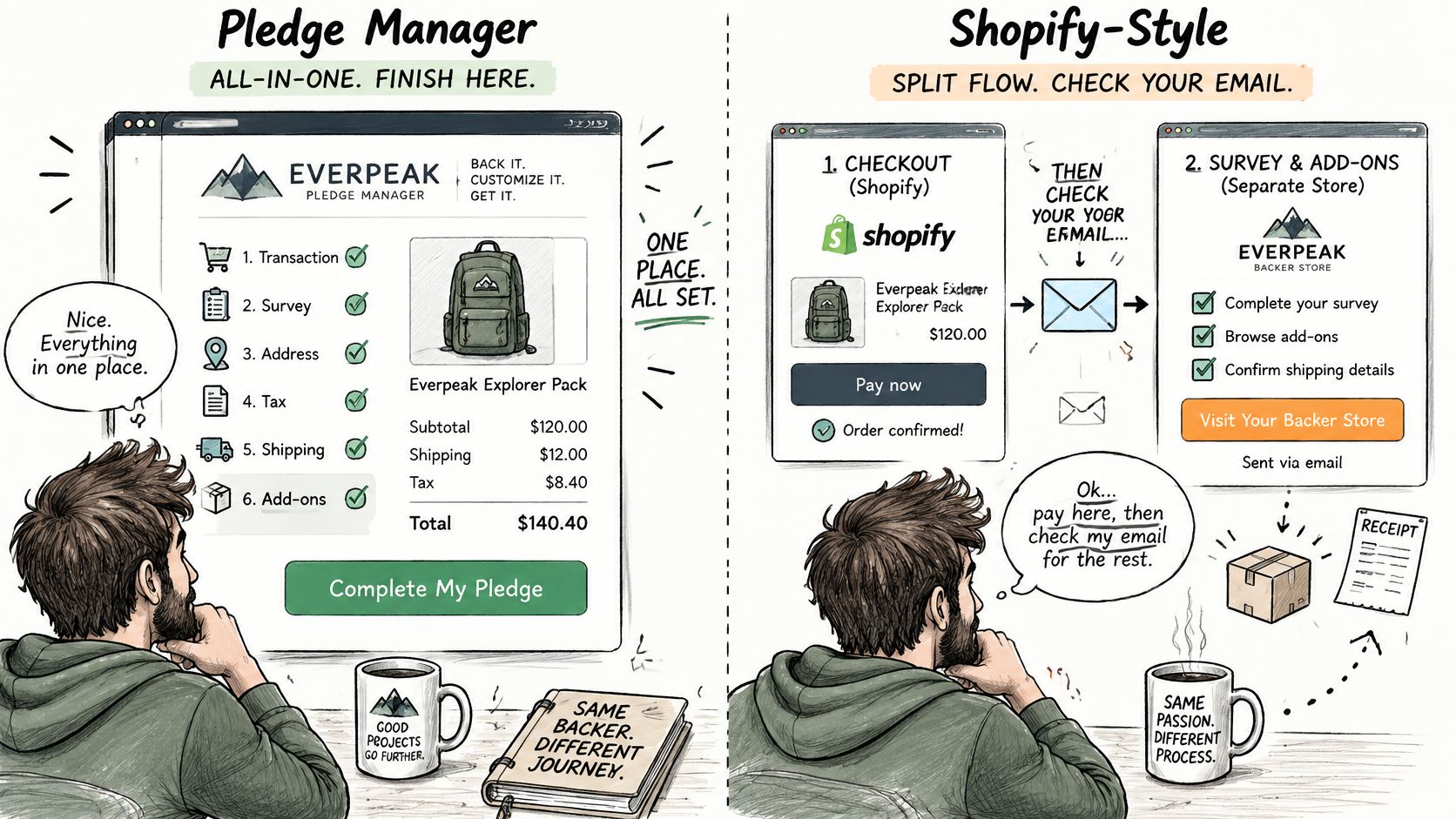
A platform-run checkout reduces setup decisions and keeps the process in one place. A standalone system gives creators more control over branding and backer data, which can help connect email follow-up to survey completion, add-on purchases and fulfillment. The right choice depends on whether that added control justifies the extra configuration.
Before sending survey invitations, configure products, variants, reward mapping, shipping, tax and payment settings. Then preview the backer experience and resolve any blocking checklist messages.
PledgeBox Pledge Manager manages backer surveys, upsells, shipping fees and tax/VAT collection. Creators can also upsell add-on products in a survey and collect reward upgrades. The setup takes more attention than a single checkout, but it connects the post-campaign backer journey to the work of fulfilling orders.
| Pricing model | Who pays | Typical trigger | What to check |
|---|---|---|---|
| Monthly subscription | Creator | Flat monthly plan | Contact limits and team seats |
| Per-contact pricing | Creator | Growth in list size | Costs rise as the pre-launch waitlist grows |
| Platform fee on pledges | Creator | Successful funding | Kickstarter 5% on funds collected except taxes |
| Payment processing | Creator | Each collected payment | Stripe generally about 3-5% |
| Revenue share on upsells | Creator | Add-on sales in surveys | PledgeBox 3% on add-on sales; backer survey free to send |
| Sending through own Amazon SES | Creator | Each email sent | No per-email fee from PledgeBox; Amazon bills SES usage |
Kickstarter's native Pledge Manager has no upfront cost, but Kickstarter still applies its standard fees to payments collected through it. For successfully funded projects that means a 5% platform fee on funds collected except taxes, plus Stripe payment processing generally around 3% to 5%, and those charges apply to Pledge Manager payments too (Kickstarter Help).
Take $100,000 collected through a pledge manager. The 5% platform fee is $5,000 before any processing fee. Add Stripe at 3% to 5% and you're looking at $8,000 to $10,000 gone before a single backer receives a parcel. On a hardware campaign with thin margins, that's the difference between a viable second production run and a stall.
Now the same math under the add-on model. Say you collect $50,000 of add-on sales during surveys. A 3% share is $1,500, and if no backer buys an add-on, the charge is zero. The survey itself costs nothing to send. The fee tracks revenue rather than existing, which matters during the quiet weeks when you're collecting addresses and answering support tickets.
Compare total cost per dollar raised, not plan prices per month. Write down every fee that fires between funding close and final shipment: platform percentage, processing percentage, subscription, per-contact growth, and sending costs. Then divide by net revenue collected in the same window.
One more line item that rarely appears in comparisons is sending cost. InBox connects to a creator's own Amazon SES account with no per-email fees or sending limits from us, so Amazon bills SES usage separately at its own rates. For a creator sending 60,000 fulfillment updates, that separation is worth modeling before launch rather than discovering mid-survey.
Add-on mechanics feed the same calculation. Upselling add-on products in a survey and collecting reward upgrades is where the incremental revenue comes from, and it's also the only place the revenue share applies. A campaign with no add-ons pays nothing beyond processing.
Practical rule: if a fee isn't triggered by money arriving, it should be small, fixed and known before you launch.
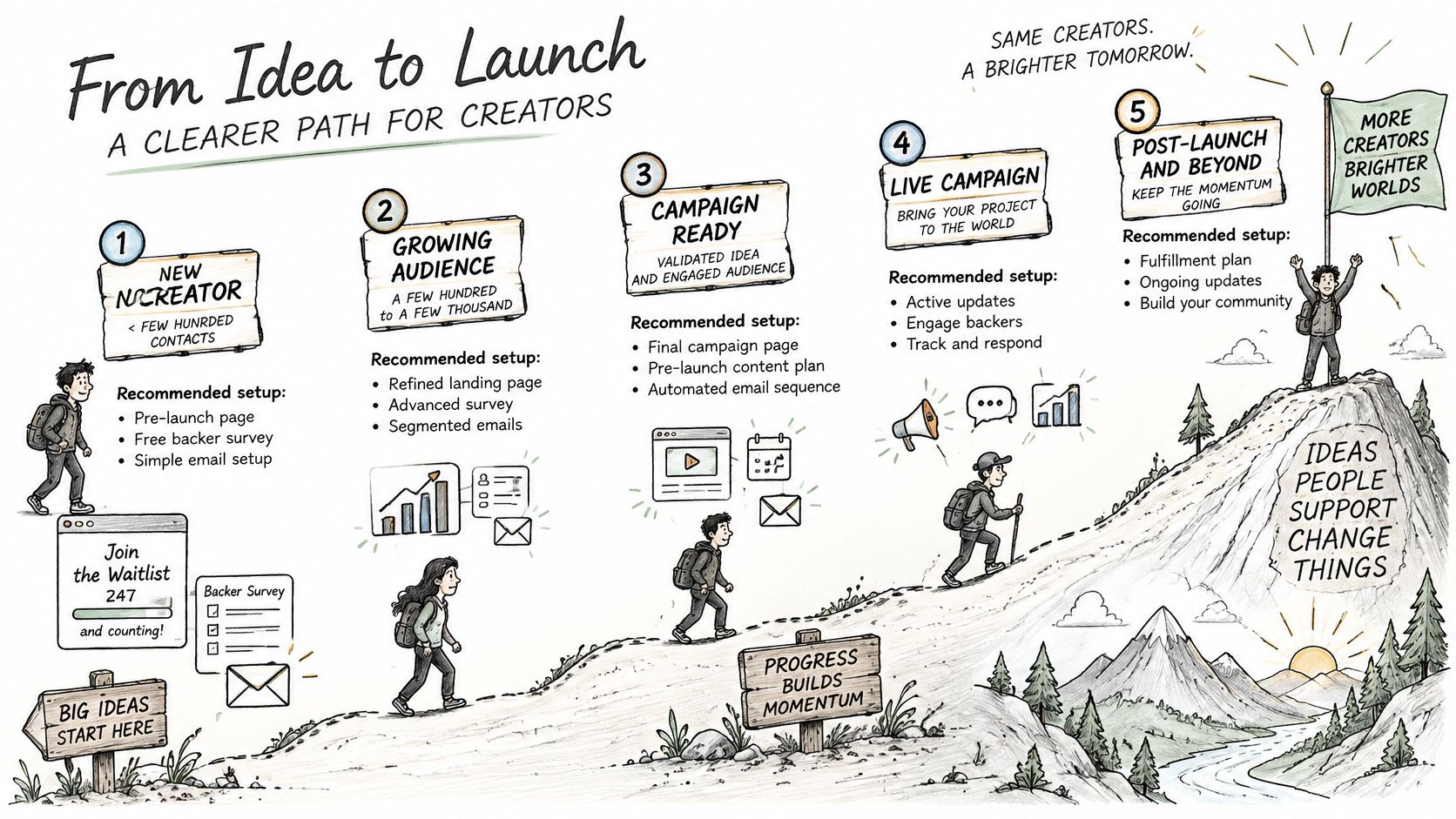
Five setups cover most of the creators reading this, and each one changes shape once the list passes a few thousand contacts.
A first-time Kickstarter creator with a few hundred waitlist signups. Build the pre-launch page and the backer survey inside one toolkit, and don't buy a bigger email tier to feel prepared. Per-contact pricing punishes optimism. The free backer survey does the heavy lifting after funding, and a list of 300 doesn't justify an enterprise automation plan.
An Indiegogo hardware startup planning several phases. Keep separate workspaces for pre-launch, live campaign and email marketing, then reuse the backer list for each phase without rebuilding segments from scratch. Hardware teams typically run a launch, a late-pledge window and a pre-order phase, and folding all three into one workspace turns reporting into guesswork.
A board game publisher with many reward variants. The job here is reward mapping and volume. Use multiple backer survey sends, lock survey records once a backer confirms, and check tax by location before the launch, because a tabletop campaign with 6,000 backers shipping to 40 countries is where manual corrections become a full-time job.
An agency running several client campaigns. Isolation is the whole game. Keep each client's data separate, export reports per project, and erase project data when the engagement ends rather than leaving it in a shared account. A single misdirected survey invitation to the wrong client's backers is the kind of mistake that loses the account.
An ecommerce brand that also sells on Shopify. Use two tools for two jobs. Keep a general platform with ecommerce integrations for store customers, since 78.76% of retail and ecommerce marketers reported using email as a marketing channel in 2025, according to MoEngage's industry research, and use a pledge tool only for crowdfunding backers. Merging the two lists pollutes both.
Per-contact pricing starts to bite, segment refreshes slow down, and any workflow that relies on you personally checking a list breaks. The fix is usually to move from manual broadcasts to event-triggered sequences, and to route returning backers into something that reaches them specifically. Newsletter Boosting exists for that second job, reaching a campaign's returning backers, and creators can explore campaign results, check project fit and apply for a slot.
The differentiator that decides the choice isn't the feature list. It's whether the tool holding your email list can also read your pledge data.
If pre-launch list growth is the weak point rather than post-campaign fulfillment, this guide to email marketing lead generation covers the capture side.
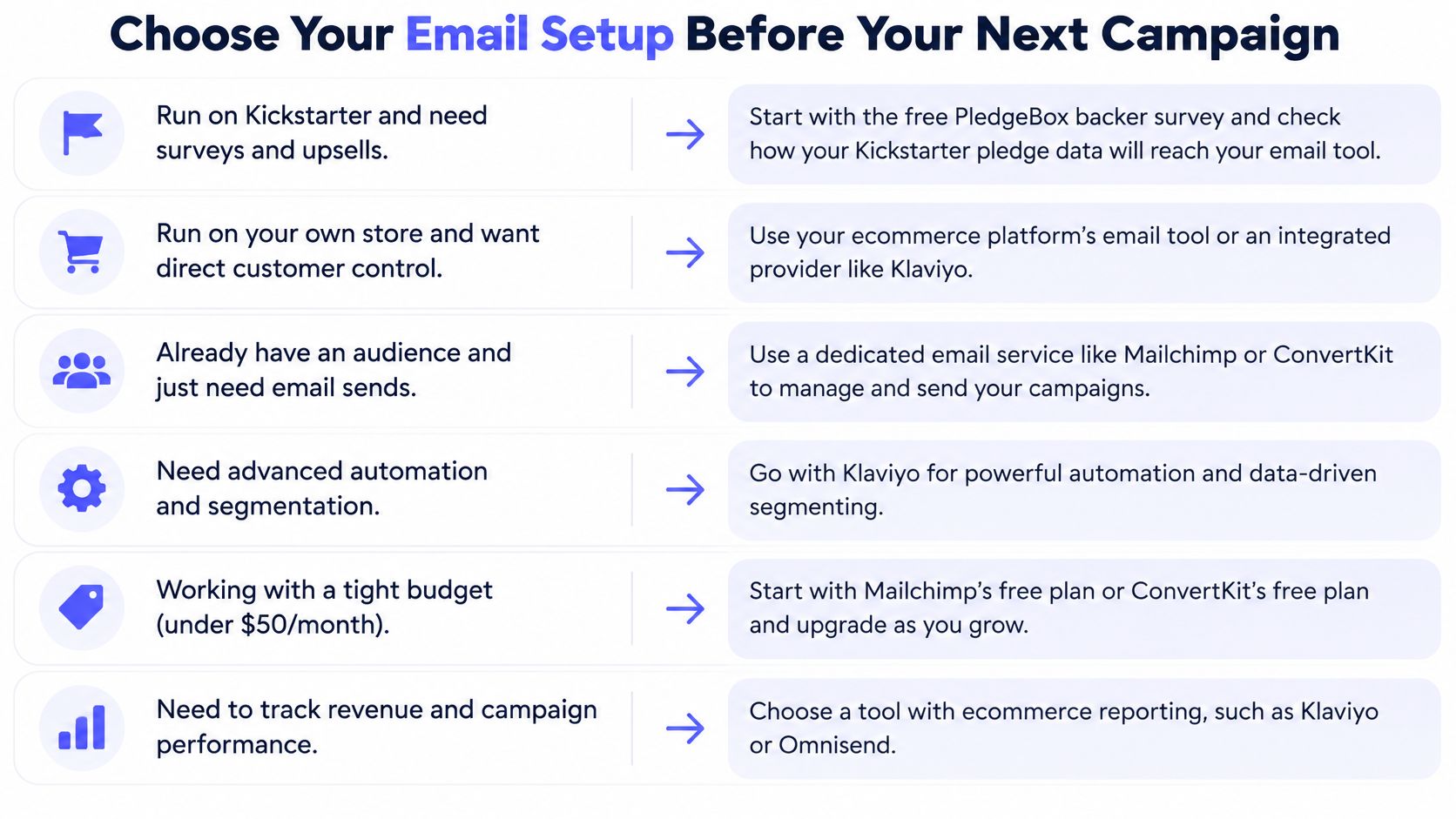
If you run on Kickstarter and need surveys, shipping fees and upsells, start with the free backer survey and confirm how your Kickstarter pledge data will reach your email tool. That's the decision that saves the most money, because the survey is where most creators either collect revenue or lose it to a broken flow.
If you have a large list, broad automation needs and no pledge data to manage, pick a general platform and connect a separate fulfillment tool. Accept the seam. If fulfillment and backer data are the main job, keep email and pledge data in one toolkit and skip the reconciliation work entirely.
Our InBox tool processes over 10 million emails per month, which is the volume argument for keeping sending inside a purpose-built crowdfunding toolkit rather than stitching one together.
"PledgeBox is our go-to partner, elevating crowdfunding with branded surveys, late backers, payment collection, and exceptional support.", Boz
The fee structure matters less than people expect once it's modeled properly. Sending the backer survey costs nothing, and the 3% applies only when a backer buys an add-on during a survey. Test the setup on one campaign before you commit the next launch to it.
PledgeBox combines InBox email marketing with a pledge manager built for the post-campaign stage, so your waitlist, backer surveys, add-on upsells and shipping updates live in one place instead of three. Sending the backer survey costs nothing, and the only fee is 3% on add-on sales during surveys, charged when a backer buys one. If you're planning your next Kickstarter or Indiegogo launch, visit PledgeBox to see how the pre-launch, live campaign and fulfillment tools connect.
PledgeBox
The All-in-One Toolkit to Launch, Manage & Scale Your Kickstarter / Indiegogo Campaign