 PledgeBox
Campaign Email Marketing for Crowdfunding: A Playbook
Learn campaign email marketing for crowdfunding with a step-by-step playbook. Pre-launch capture, launch drips, mid-campaign wins, and post-campaign upsell
Learn campaign email marketing for crowdfunding with a step-by-step playbook. Pre-launch capture, launch drips, mid-campaign wins, and post-campaign upsell
Six weeks before launch, a creator can have a spreadsheet full of names and still have no campaign email marketing system. The list might contain 412 subscribers, but that number doesn't answer the questions that matter: Who's ready to pledge, who needs more proof, and what should each person receive next?
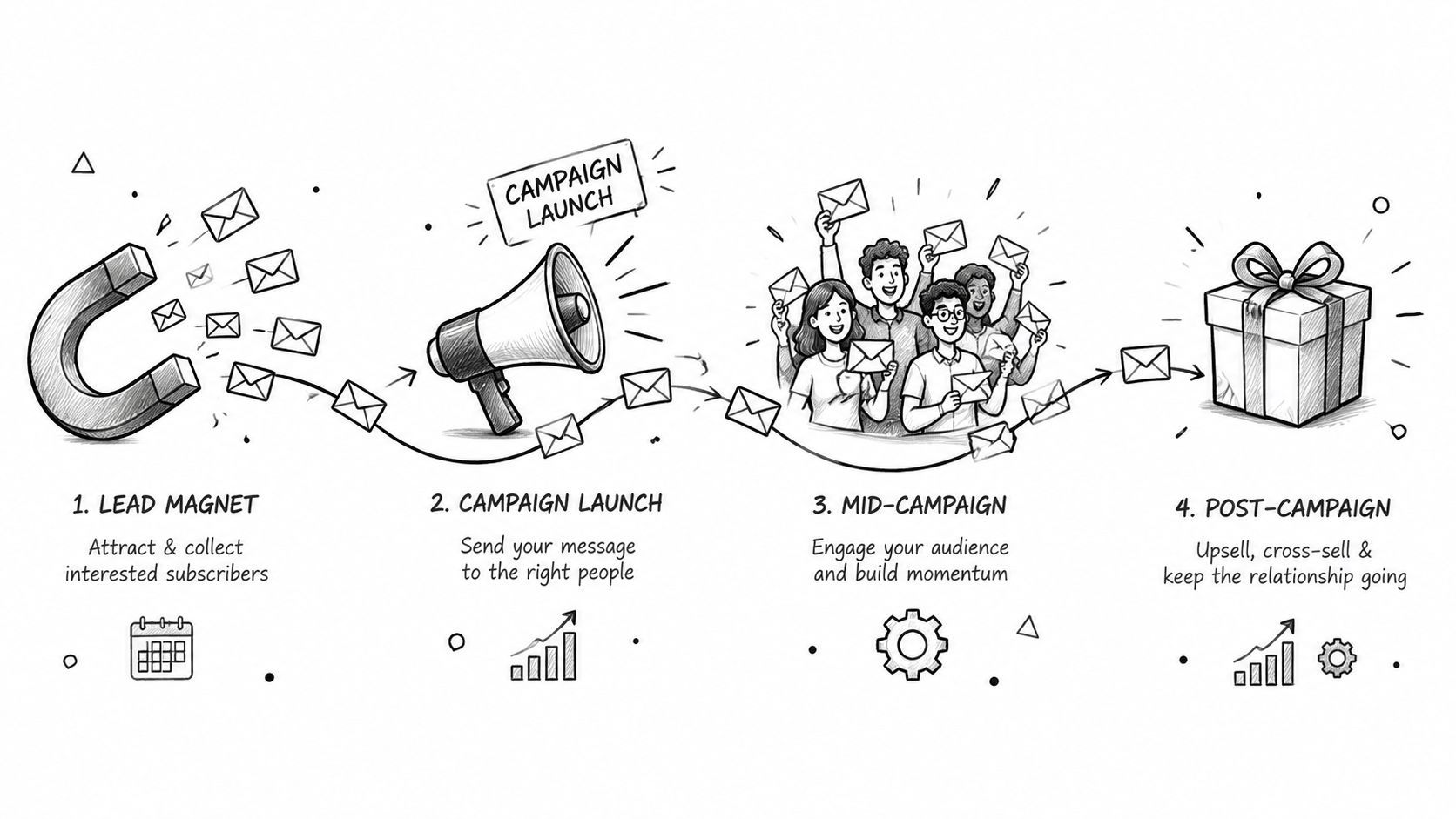
Crowdfunding email works best as lifecycle plumbing. You capture qualified attention before launch, convert that attention when the campaign goes live, restore momentum when engagement cools, then turn backers into customers through surveys, fulfillment updates, and relevant add-ons. Each phase needs its own automation and its own measurable outcome.
The first phase is pre-launch capture. Your job isn't to collect the largest possible list. It's to build a permission-based audience with a reason to care about the reward. The measurable outcome is a pool of qualified subscribers who are willing to click through and pledge on day one.
The second phase is the launch announcement drip. A launch email sent once to everyone leaves too much revenue on the table. Subscribers open at different times, miss messages, or need a different reason to act. The outcome here is conversion from attention to pledges during the opening window, with clicks and completed pledges carrying more weight than opens alone.
Mid-campaign engagement is the third phase. Backers have seen the core pitch, and some subscribers have gone quiet. Use project updates, social proof, creator notes, and stretch-goal triggers to give people a new reason to return. The outcome is reactivated clicks and pledges from subscribers who didn't convert during launch.
The fourth phase is post-campaign survey, fulfillment, and upsell. A backer isn't finished with your brand when the campaign closes. They still need to complete the survey, confirm shipping information, choose options, and possibly add products. The outcome is a higher rate of completed surveys, cleaner fulfillment data, and additional revenue from relevant add-ons.
Practical rule: Every email should have one primary job. If the message is trying to announce an update, sell an accessory, request an address, and explain shipping at once, the reader won't know what to do first.
This structure also keeps your reporting honest. A pre-launch email shouldn't be judged by the same conversion event as a fulfillment reminder, and a mid-campaign update shouldn't be treated like a launch announcement. Define the next action before writing the copy, then build the automation around that action.
Start with a lead magnet that matches the reward. A prototype sneak peek works for a hardware product, a behind-the-scenes video suits a creative project, and a launch-day discount can work when the economics support it. The offer should make sense to someone who might pledge, not just attract people who collect free downloads.
Create a dedicated landing page using ConvertKit, Leadpages, or a simple Carrd form. Connect the form directly to a tagged audience in your email service provider, and make the source visible in the contact record. A subscriber from a product review, a creator interview, and a paid ad shouldn't disappear into one undifferentiated list.
A practical four-email sequence looks like this:
The sequence should become more specific as launch approaches. Early messages earn attention through usefulness and transparency. Later messages establish the date, the reward, and the action you want the subscriber to take.
| Step | Trigger | Send Timing | Primary CTA |
|---|---|---|---|
| 1 | New opt-in | Immediately | View the promised preview |
| 2 | Step 1 delivered | After the subscriber has received the asset | Read the creator story |
| 3 | Step 2 completed or link clicked | During the build-up to launch | See the latest build update |
| 4 | Launch date confirmed | Near the launch countdown | Join the VIP early-access list |
Segment subscribers into hot, warm, and cold tiers using clicks and recent engagement. Hot subscribers clicked on the reward or launch details. Warm subscribers read or opened messages without taking a meaningful action. Cold subscribers haven't engaged recently and shouldn't receive the same cadence as your most responsive prospects.
Use a launch countdown in every relevant message. The useful pre-launch question isn't “How many people are on the list?” It's “How many subscribers have seen the reward, understand the launch date, and have a reason to act when the page opens?” For a more detailed list-building workflow, use this guide to build a campaign-winning Kickstarter email list.
Launch day needs a schedule that your email service provider can execute without manual guesswork. Tag VIP subscribers first, then give the broader list a message built around one clear pledge action. Keep the landing page, campaign page, and email promise aligned, because a mismatch creates hesitation at the moment you need momentum.

T-minus 24 hours, VIPs only: Send a personal note that confirms the launch time and explains the early-access window. If you have a private preview link, give it to this segment. The CTA can be “Get early access”.
Launch hour, full list: Tell subscribers the campaign is live. State the reward, the campaign goal, and the reason to act now. Test a direct subject line against a curiosity angle, such as “It's live” versus “Which reward would you choose?” Use preview text to answer the subject line rather than repeat it. The button should say “Back the campaign”, not a vague phrase such as “Learn more.”
Twenty-four hours later, non-clickers: Change the angle instead of resending the same message. Lead with a press mention, a new backer update, a product video, or the clearest benefit of the reward. The CTA can be “See how it works”.
Day three, openers who didn't pledge: Focus on one reward tier and remove distractions. Pair social proof with a concrete explanation of what's included. Try “Choose your reward” or “Claim this tier”.
Use four practical formulas:
Don't assume opens tell the whole story. Apple Mail Privacy Protection can inflate open measurements, so judge the launch sequence primarily through clicks, pledge conversions, and revenue outcomes. The Indiegogo email marketing tips can help you adapt this sequence to that platform's campaign flow.
A short video can make the second or third message feel different from the launch announcement. Use it after the initial email has established the action you want the reader to take.
The sequence should stop treating every subscriber as identical after the first send. A click, pledge, reply, or unsubscribe is a routing signal. Let behavior determine the next email.
Mid-campaign fatigue usually appears as a gap between attention and action. A subscriber may open several updates but never click, or click the campaign page without selecting a reward. Open rates can help identify patterns, but privacy features make them noisy, so use click-through rate, conversion rate, and pledge behavior for decisions.
Recent benchmark data places average campaign open rates across industries at roughly 31%, while the top 10% of performers reached 45.1%. Hardware and home-improvement categories were around 30.9%, electronics around 29.3%, and food and beverage around 31.2%, according to Salesforce's email benchmarks. These are planning references, not targets you can apply without context.
A stretch-goal achievement deserves an automated trigger as soon as the milestone is confirmed. Don't wait for the next newsletter slot. A social-proof roundup can quote backer comments, show the latest production detail, or explain what a new milestone enables. A creator diary works when the audience wants to understand the decisions behind the product.
| Segment | Signal | Message Angle | Send Timing |
|---|---|---|---|
| Opened and clicked | Visited the campaign or reward details | Recommend the relevant tier or add-on | Shortly after the click, unless they pledge |
| Opened only | Read the subject but took no tracked action | Replace the hook with proof, a demo, or a sharper benefit | In the next campaign window |
| Clicked, no pledge | Reached the page but didn't convert | Address price, reward clarity, shipping, or objections | After the next meaningful update |
| Never opened | No reliable engagement signal | Test a new subject line and sender framing | Day seven, then again in a later sweep |
Run a day-seven re-engagement sweep with a new reason to return. Use a day-twenty-one sweep for subscribers who remain valuable but inactive, especially if a new stretch goal or product demonstration changes the story. Subscribers who ignore three consecutive sends should enter a sunset path, such as a final preference or re-engagement message followed by suppression.
A clean final push beats a larger list full of people who never interact with your mail.
This approach protects deliverability while preserving attention for the audience most likely to pledge. Creators who want broader signals on new audiences and growth channels can also browse startup opportunities, then use the ideas as potential partnership or referral sources rather than treating every visitor as a qualified backer.
The post-campaign sequence starts with reassurance. Send a thank-you message after pledges close, confirm what happens next, and give backers a realistic path to the survey. The first message should reduce uncertainty, not immediately push another product.
Deploy the backer survey with the shipping address, selected reward, taxes where applicable, and add-on choices organized clearly. Ask only for information you can use, and make the mobile experience easy to complete. A survey that feels like an administrative maze creates support tickets and slows fulfillment.
Use reminders for unfilled surveys in waves:
Once a backer confirms the survey, route that person into a separate upsell flow. Offer late pledges, accessory bundles, or add-on SKUs that fit the reward already selected. Don't show a beginner accessory to a backer who already chose the complete kit, and don't send an upsell before the survey has captured the information needed for fulfillment.
PledgeBox is free to send the backer survey and only charges 3% of upsell revenue if there are any upsells. If no upsells happen, the survey remains free, as described in its pricing information. Kickstarter's pledge manager is included with no additional upfront cost, while payments collected in that environment still follow Kickstarter's fee structure, as explained on its pledge manager page.
Kickstarter's pledge-manager approach is like Amazon. The sale and order flow stay inside the platform ecosystem. PledgeBox's pledge manager is like Shopify, giving the creator more control over the storefront and customer relationship. That distinction affects customization, data handling, and the way you build a post-campaign audience.
| Platform | Survey Cost | Upsell Fee | Best For |
|---|---|---|---|
| PledgeBox | Free to send the backer survey | 3% of upsell revenue when upsells occur | Creators who want a controlled storefront and survey-led add-ons |
| Kickstarter late pledge | No additional upfront cost for the pledge manager | Kickstarter's own fee structure applies to payments collected there | Campaigns keeping the order flow inside Kickstarter |
| Amazon-style flow | Varies by the marketplace's terms | Varies by the marketplace's terms | Buyers who value a familiar platform-led checkout |
| Shopify-style flow | Varies by the selected setup | Varies by the selected setup | Creators who need more storefront and customer-relationship control |
Pricing models differ across pledge-manager tools. One independent software guide gives an example of a tool charging a base fee of $0.35 per backer plus a 5% add-on commission, showing why you should model survey volume and upsell revenue separately before choosing a platform. See the pledge-manager pricing comparison for that example and its surrounding context.
A workable automation stack doesn't need to be complicated. Connect an ESP with behavioral tagging, a landing-page tool, an opt-in form, and a webhook bridge that passes relevant events into your crowdfunding workflow. The point is to move people based on actions, not to build a maze of tags nobody maintains.
Useful segmentation includes geography, reward interest, engagement, and referrer source. Geography matters when shipping or launch timing differs by region. Reward interest matters when a subscriber has viewed a specific tier. Engagement separates active readers from people who need a reactivation message. Referrer source helps you see which partnerships or content channels produce pledges instead of just signups.
For practical ideas beyond basic workflows, creators can browse marketing automation and compare those concepts with the capabilities already available in their ESP.

Use open rate as unique opens divided by delivered emails, then add click-through rate, bounce rate, unsubscribe rate, conversion rate, spam complaints, and revenue attribution. A campaign can show healthy opens while failing at clicks or pledges, especially when privacy features affect open tracking. Salesforce's benchmark guidance places all-industry campaign open rates around 31%, with the top 10% at 45.1%, but those figures should only serve as directional references.
Deliverability needs its own dashboard. One 2026 benchmark set estimated global inbox placement at 83% to 85%, while another reported a global inbox rate of 87.2%, including 89.8% for Gmail, 87.3% for Yahoo, 82.0% for Apple Mail, and 77.4% for Microsoft, according to the 2026 deliverability benchmark. Server acceptance isn't the same as inbox placement.
Authentication is a priority. The same benchmark associated fully authenticated domains using SPF, DKIM, and DMARC with 89.1% inbox placement, compared with 44.2% without full DMARC authentication, and reported open rates around 34.2% for fully authenticated domains. Treat those figures as benchmark observations, then monitor your own complaint rate, hard bounces, and placement by mailbox provider.
For bounce hygiene, a rate below 0.5% is commonly treated as excellent and a rate above 3% as poor in the cited benchmark guidance. Suppress hard bounces, remove complainers immediately, and stop mailing contacts who repeatedly ignore your re-engagement path. The email workflow automation guide is a useful reference when wiring those triggers.
A campaign is ready when someone else can inspect the workflow and understand what happens after every important subscriber action. Use the checklist below before launch, then keep it beside your campaign dashboard during the live period.

Campaign email marketing becomes easier to manage when every send maps to a phase, a segment, and a measurable outcome. Review the list before launch, audit the live triggers during the campaign, and treat the post-campaign survey as the beginning of the customer relationship rather than the final administrative task.
PledgeBox offers creators a campaign email marketing workflow alongside backer surveys, fulfillment coordination, late backer pre-orders, and add-on upsells. Visit PledgeBox to connect your post-campaign communication with the survey and revenue steps that follow a successful launch.
PledgeBox
The All-in-One Toolkit to Launch, Manage & Scale Your Kickstarter / Indiegogo Campaign