 PledgeBox
Survey Skip Logic for Crowdfunding Backers Explained
Learn how survey skip logic streamlines backer surveys, cuts fulfillment errors, and boosts upsell revenue. Real rules, examples, and QA tips inside.
Learn how survey skip logic streamlines backer surveys, cuts fulfillment errors, and boosts upsell revenue. Real rules, examples, and QA tips inside.
You're staring at a backer survey that should have been simple, but it's full of questions that only half your audience can answer. One backer is in the EU, another picked the deluxe tier, a third added shipping late, and a fourth is being shown VAT prompts for a domestic address. That's the point where survey skip logic stops being a survey feature and starts being a fulfillment control.
In crowdfunding, the job isn't just making the survey shorter. It's making sure each backer sees the right path, the right fee rules, and the right upsell opportunities without creating messy exports or frustrated support tickets. That's why skip logic matters in pledge managers, especially when shipping, VAT, add-ons, and tier-specific offers all live in the same flow.
A backer survey with survey skip logic sends each person down the path that matches their answers. In a post-campaign flow, that means a $200 backer can skip a premium reward question meant for a higher tier, and a U.S. backer can avoid VAT prompts built for another region. The result is a cleaner survey and fulfillment data that stays easier to work with.
Campaign operators often call the same mechanism branching logic, conditional logic, or survey routing. The practical difference from display logic matters in pledge managers, because skip logic changes the route a backer takes, while display logic only hides a question on the same screen. If the next step should be a different page, section, or end point, skip logic is the tool that does the routing.

Skip logic belongs inside the post-campaign survey, after the pledge is locked and before fulfillment is finalized. That is the point where shipping details, region-specific tax information, and optional add-ons all need to be collected without sending every backer through the same set of questions. If the routing is set up well, the survey feels shorter and more relevant, and modern questionnaire design treats skipped items as structural missing data rather than blanks or zeros, as described in SRI International's 2008 paper Missing by Design: Questionnaire Skip Logic (SRI International, 2008).
Practical rule: if a question does not affect fulfillment, it usually should not appear to that backer.
Campaign operators also use skip logic as a revenue and fulfillment control. It keeps the right upsell in front of the right backer, and it prevents domestic backers from seeing VAT prompts or shipping branches that do not apply to them. For a more campaign-specific walkthrough of how this fits into a Kickstarter post-campaign flow, see the Kickstarter post-campaign survey guide.
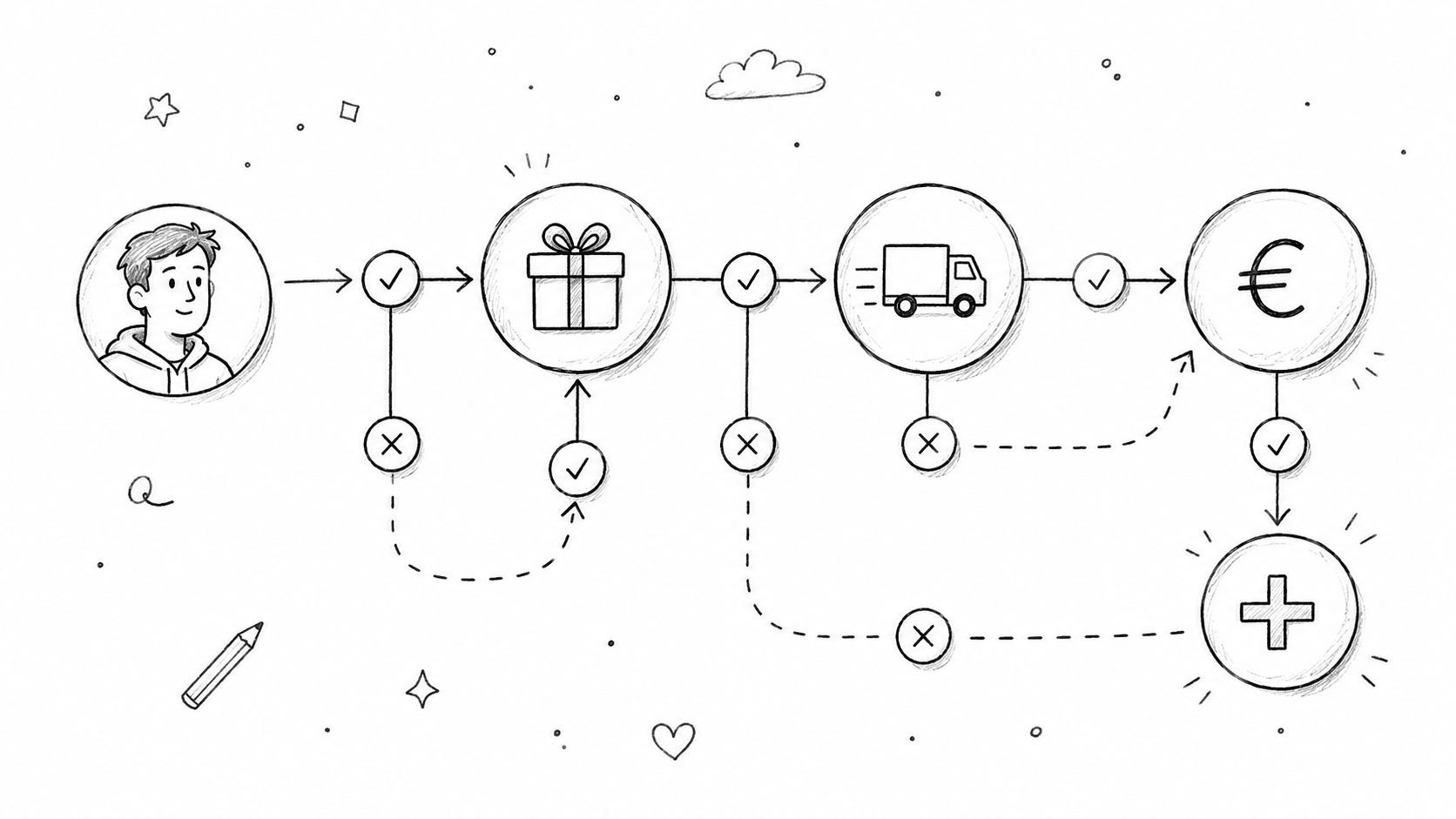
A backer does not get routed by guesswork. The platform moves through four parts in order, the trigger question, the recorded response, the rule the system evaluates, and the destination route. In a pledge-manager survey, that sequence decides whether someone sees shipping, VAT, an add-on upsell, or a final thank-you screen.
The main technical limit is that skip logic is forward-only in many platforms. A backer can be sent to a later question, a later page, a thank-you screen, or the end of the survey, but not backward. QuestionPro's documentation describes that forward-only behavior, and PublicInput's documentation shows that some builders require the skip target to sit later in the flow (QuestionPro skip logic, PublicInput skip logic). That shapes the whole setup, because once a rule fires, the path is one-way.

A shipping question can drive the whole route. If the trigger asks, “Where should we ship your reward?”, and the backer selects European Union, the recorded response can activate a VAT page and send them there. If the backer selects United States, the platform can skip that tax step and move straight to shipping details. One answer changes the next screen.
Some builders are strict about how the rule is placed. In PublicInput's setup, the question you are skipping from must be the last question on the page, and the skip-logic function has to sit directly below it, as described in the PublicInput skip logic documentation. Page structure matters because a rule in the wrong spot can create a dead end or send a backer to the wrong branch.
A rule that looks fine in the editor can still fail if the target question sits on the wrong page.
The downstream effect shows up in survey data too. SurveyMonkey's controlled experiment on TV show ratings found an average rating of 4.15 stars when non-viewers were excluded by skip logic, compared with 2.98 stars when viewers and non-viewers were forced into the same question, a difference of 1.17 stars (SurveyMonkey skip logic guide). The topic changes in a backer survey, but the problem stays the same. If you force people through irrelevant questions, the answers get messier, and the route becomes less useful for fulfillment decisions.
For survey flow design that keeps those paths clean, this survey design guide is a useful reference.
A backer hits the survey, enters a shipping country, and suddenly the rest of the flow either helps or hurts the order. If the rules are set up well, the survey can protect revenue through add-ons and keep fulfillment clean by sending each person to the right shipping or tax step. That is where skip logic earns its keep in a pledge manager.
Use tier routing to keep premium-only questions away from lower pledge levels. A basic backer can go straight to shipping, while a deluxe backer may need to see collector options, upgrade screens, or other tier-specific prompts. The risk is overmatching the condition, because a rule that catches too many backers can hide a question that still matters for a mid-tier order.
Use destination-based routing to show the right shipping path. A domestic backer can skip customs screens, while an international backer can be shown the fee or address check that applies to their order. The mistake usually comes from mixing country rules with shipping method rules, and that can send a backer into the wrong fee page or leave fulfillment with incomplete address data.
VAT prompts should appear only where they belong, such as EU or other tax-sensitive destinations. The logic needs to follow destination, not the language a backer uses or the card they paid with. If tax questions are attached to the wrong field, the survey can look tidy and still collect the wrong information or ask for a tax step that never should have appeared.
Show upsells only to backers whose tier can accept them. A deluxe backer might qualify for a collector add-on, while a basic backer should move past that page without seeing it. That matters because an ineligible upsell creates support tickets, confuses checkout, and can interrupt a buyer who was otherwise ready to finish the order.
If the campaign includes a subscription, membership, or recurring offer, route only eligible backers into that path. The offer should appear only where it makes sense, usually after the pledge details are already confirmed. That keeps the survey tied to the original pledge instead of making it feel like a separate storefront bolted onto the middle of fulfillment.
For broader survey structure guidance, the best practices for survey design guide is useful when you are deciding how much logic to add without overbuilding the flow.
A simple way to map these rules is below:
| Goal | Sample condition | What the backer sees |
|---|---|---|
| Tier protection | If pledge tier is basic | Skip premium add-ons |
| Region handling | If country is in EU | Show VAT or tax page |
| Shipping | If destination is domestic | Skip customs-related prompts |
| Upsell gating | If tier supports add-ons | Show upgrade options |
| Subscription offer | If creator enabled recurring offer | Show membership page |
Marta backs a board game at the mid-tier. She's in Spain, she's eligible for shipping, VAT, and a small add-on upgrade path, but she isn't seeing every question the deluxe tier sees. Her survey starts with a region question, then a tier confirmation, then a shipping screen, and only after that does the platform decide whether to show VAT and add-on options.
Because Marta selected European Union, the survey routes her to the VAT page. Because her tier allows an add-on, she also gets the upsell screen after the tax step. She never sees the premium-only questions reserved for the top reward tier, because skip logic already routed her around them.
That flow matters because it keeps her from answering questions that don't affect her order. It also keeps your back-end cleaner. She finishes with a shipping address, a tax-confirmed order, and one optional upgrade decision.
Devon is different. He's in the United States and picked the same mid-tier. He still sees the shipping path, but the VAT page is skipped entirely because his destination doesn't require it. He may still see the add-on offer if the tier qualifies, but he won't be pushed through a tax screen that doesn't apply to him.
The survey didn't become shorter by luck. It became shorter because the rules made it shorter for the right people. That's the difference between a generic form and a pledge manager flow that respects fulfillment reality.
When you're shipping campaigns with multiple regions and reward levels, skip logic pays off. It trims irrelevant paths without removing the parts that change cost, compliance, or revenue.
The surveys that break are usually the ones that looked neat in the editor. A rule can point to a deleted question, depend on a field the backer never reaches, or route someone into a page with no valid exit. Once that happens mid-campaign, support gets the email, and the team starts manually fixing what logic should have handled.

Start by previewing the survey as each major backer persona. Test a domestic backer, an EU backer, an add-on buyer, and a gift recipient if your campaign has one. Then run a small internal pilot using real teammates, because logic that reads cleanly on-screen can still fail when someone changes an answer mid-flow.
After that, trace every branch to a known destination. Every path needs an exit, and every skipped item should be stored as not applicable rather than blank or zero, so the export stays analytically clean. As noted earlier, that matters for structural missing data, and it also matters when you are trying to keep fulfillment, VAT, and add-on records readable after launch. If your tool exports skipped items inconsistently, you need to know that before backers start responding.
Do this before launch, not after the first angry support ticket.
The Backer Tester page is a useful reference point if you're building a repeatable pre-launch QA habit. Keep the logic simple enough that one person can explain every branch without opening a spreadsheet.
A practical checklist helps:
One late-stage mistake is building rules in the wrong order. Skip logic is forward-only, so anything that depends on an earlier answer has to be reachable from that earlier position. If you get that sequence wrong, the backer won't see the path you thought they would.
The most common failure is the dead end. A backer answers a screening question, gets routed forward, and lands on a page with no valid next step. The fix is blunt, every branch needs an exit, even if that exit is just the thank-you page or the next required section.
Another frequent issue is contradictory rules. One branch hides a question while another branch depends on it, so the platform can't evaluate the path cleanly. The fix is to review rule order and make sure no later condition depends on a question the backer was already skipped past.
If VAT or shipping appears for the wrong region, the cause is usually a mismatched trigger field. The fix is to tie the rule to destination data, not to language, browser, or payment method. If add-ons show up for a tier that can't upgrade, the condition is too loose and needs to be narrowed to eligible tiers only.
Forgotten edge cases cause the messiest support threads. APO addresses, backer-added funds, and unusual destination formats can slip through if you only test the obvious paths. The fix is to add one edge-case test for each rule family before launch.
Because skip logic is forward-only in most platforms, every fix has to respect that direction. You don't patch a broken branch by sending people backward, you patch it by making the forward path valid.
PledgeBox's backer survey is free to send, and the platform only charges 3% on add-on upsell revenue if there's any, so the survey itself can stay a no-cost fulfillment tool while upsells stay tied to actual order value. That pricing structure matters because it lets creators treat the survey like a second storefront, not just a form. It also fits the way pledge managers work in practice, a Kickstarter pledge manager often behaves more like Amazon, while a PledgeBox pledge manager gives creators a storefront-style setup more like Shopify, where the creator controls the branding, offers, and post-purchase path.
| Aspect | Kickstarter Pledge Manager | PledgeBox Pledge Manager |
|---|---|---|
| Storefront control | More marketplace-like | More storefront-like |
| Survey cost | Platform-specific structure | Free to send the backer survey |
| Upsell handling | Limited by platform flow | 3% only on add-on upsell revenue if any |
| Logic use | Useful, but often less flexible in practice | Built for conditional routing through the survey |
| Fulfillment focus | Order collection | Order collection plus branding and offer control |
That's where the earlier skip logic rules turn into money and fewer mistakes. Use conditional paths to gate add-on upsells to eligible tiers, collect VAT and shipping through the same survey, and keep late backer pre-orders or subscriptions inside the flow instead of sending people elsewhere. If you want to hear how creators phrase these pain points in their own words, the voice of the customer guide is a good reminder to build around real backer language, not internal jargon.
Clean logic doesn't just reduce support work, it keeps the order sheet honest.
If you're running post-campaign surveys this month, set the rules first, test the routes second, and only then open the survey to backers. That's how you get cleaner exports, fewer fulfillment errors, and more revenue from the people already in your campaign.
If you want a pledge manager that lets you control survey routing, collect shipping and VAT with conditional logic, and capture add-on revenue without adding tool sprawl, visit PledgeBox. It's built for creators who need the backer survey to do real operational work, not just collect answers.
PledgeBox
The All-in-One Toolkit to Launch, Manage & Scale Your Kickstarter / Indiegogo Campaign