 PledgeBox
Data Encryption Standards: A Creator's Guide
Protect crowdfunding backers with essential data encryption standards. A 2026 guide for creators on compliance, risks, & secure tools.
Protect crowdfunding backers with essential data encryption standards. A 2026 guide for creators on compliance, risks, & secure tools.
Your campaign has ended. Funding came through, comments are buzzing, and now the actual operational work begins. You're collecting names, addresses, phone details, maybe tax-related information, and often purchase preferences through surveys, add-ons, and fulfillment tools.
That backer data is part of your product experience now.
For creators, data encryption standards can sound like something only an IT manager should care about. But if you run a crowdfunding campaign, they shape a very practical question: when your backers trust you with personal information, what keeps that information safe while it's stored, sent, and shared with the tools you use after the campaign?
A good way to think about it is this. You already obsess over packaging, production tolerances, late pledge flows, and shipping damage. Encryption belongs in the same category. It protects the thing your backers can't inspect with their eyes, but would absolutely care about if it went wrong.
The most fragile part of a campaign often starts after funding, not before. A creator may spend months refining stretch goals and ad creatives, then hand post-campaign operations to a chain of tools without asking how those tools protect backer data.

A backer usually sees one brand: yours. They don't separate your survey platform, payment processor, shipping spreadsheet, and support inbox into different buckets of responsibility. If something leaks, they won't say, “the vendor had a technical issue.” They'll say, “this creator didn't protect my information.”
A campaign doesn't just collect money. It collects identity details tied to a purchase relationship.
That can include:
If you use a third-party tool, your responsibility doesn't disappear. It shifts into vendor selection, process control, and policy discipline.
Practical rule: If a tool touches backer data, treat security review as part of procurement, not an optional technical extra.
Creators sometimes assume privacy is handled “somewhere in the platform.” That's too vague. You need to know how the tool stores data, who can access it, and what happens when data should be deleted. A public-facing privacy policy, like the one in PledgeBox privacy policy details, is a useful starting point because it shows whether the platform treats data handling as a visible business commitment rather than hidden boilerplate.
Security failure doesn't only create technical cleanup. It can disrupt fulfillment, support, and reputation at the exact moment you need trust most.
A creator can recover from a delayed factory run with transparency. Recovering from mishandled backer data is harder because the damage feels personal. That's why encryption matters. It's one of the foundations that keeps your campaign from turning a successful funding story into a trust problem.
Most creators don't need to learn cryptography. They need a simple mental model so they can ask better questions when a platform promises “secure checkout” or “encrypted storage.”
Start with the basic idea. Encryption turns readable information into unreadable information unless the right key is used to decrypt it.

There are two core patterns creators should recognize.
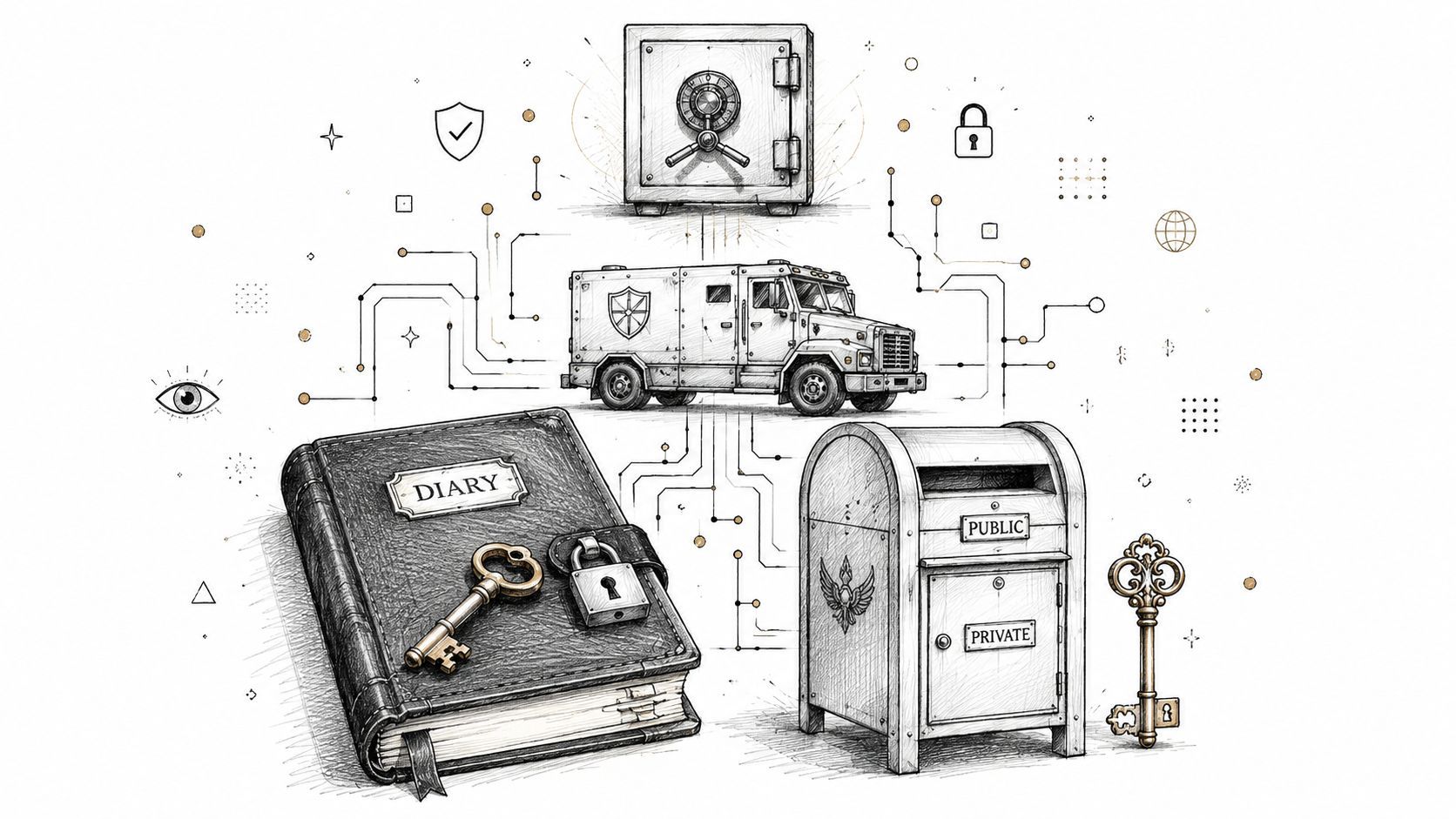
Symmetric encryption is like a safe with one key. The same key locks and opens the contents. It's efficient, which is why it's commonly used to protect stored data.
Asymmetric encryption is more like a secure mailbox outside a building. Anyone can drop mail in through the public slot, but only the owner with the private key can open it and retrieve what's inside. This model is useful when systems need a secure way to connect without first sharing the same secret key.
If you want a creator-friendly comparison from the payments side, this explainer on securing crypto payments with keys does a nice job of showing why public and private keys solve a different problem from one shared key.
Think of symmetric encryption as protecting a stored treasure chest. Think of asymmetric encryption as protecting the handoff before the chest reaches the vault.
Many non-technical teams find this part confusing, so keep it visual.
Data at rest means information sitting somewhere, such as a backer survey database or archived order record. This is vault protection.
Data in transit means information moving between places, such as from a backer's browser to a survey page or from a dashboard to a payment service. This is armored-car protection.
Both matter. A campaign can use a secure connection while data is traveling, then store it poorly after it arrives. Or it can store data well, but use weak protection while the data is moving.
Here's a simple way to map it:
| Situation | Plain-language meaning | What you care about |
|---|---|---|
| Data at rest | Stored in a system | If someone reaches the storage, can they read it? |
| Data in transit | Moving across networks | If someone intercepts traffic, can they understand it? |
A practical overview of this issue also shows up in discussions of payment gateway security for crowdfunding, because payment flows often combine both storage risk and transmission risk.
For a quick visual walkthrough, this video gives a beginner-friendly introduction without burying you in jargon.
When a pledge manager, CRM, or survey tool says “we use encryption,” that statement is incomplete by itself. You want to know:
You don't need to inspect the code. You do need enough understanding to spot vague claims and push for specifics.
A creator comparing tools can get lost fast in acronyms, badges, and security pages that sound impressive without saying much. The practical question is simpler. Does this platform use current protections for the kinds of backer data your campaign collects, or is it relying on older methods that create avoidable risk?
For most crowdfunding workflows, two standards deserve your attention: AES-256 for stored data and TLS 1.3 for data moving between a backer's browser and the tool they are using. You do not need to know the math behind either one. You need to recognize them the way you would recognize quality materials on a prototype. They are signs that a vendor is using current, widely accepted protection where campaigns are exposed.
AES-256 is the name you want to see when a vendor explains how it protects records sitting in storage. That usually includes databases, backups, exported files, and the systems holding survey responses or shipping details after a backer clicks submit.
For a campaign creator, that matters anywhere private backer information may sit for weeks or months while you finalize production and fulfillment, including:
A simple way to read this is: if someone got access to the storage layer, would the information still be unreadable without the proper key? AES-256 is a strong sign the vendor has taken that question seriously.
TLS 1.3 matters during the handoff. A backer opens a pledge manager, signs in, fills out a form, updates an address, or confirms add-ons. Their data is traveling at that point, and transport security is what protects it on the way.
TLS 1.3 works like a sealed courier route instead of an open postcard. For your campaign, that means fewer chances for outdated connection methods to expose logins, form submissions, or account details while they move between systems.
This is why a vendor saying only “we use encryption” is still too vague. You want to hear both kinds of answers. One for storage. One for transmission.
Modern encryption standards help you judge whether a platform is protecting the points where your campaign actually carries risk, not whether its security page uses enough technical terms.
Older names can still appear in vendor documentation, and that is where creators need a basic filter. DES, the Data Encryption Standard, is the classic example.
DES was an important early standard, but it is now obsolete. Its history is useful because it shows how something once accepted can become too weak for real-world use. Rapid7's summary of DES explains that it was eventually retired after its limitations became clear, and AES replaced it as the modern standard (Rapid7 on DES history and retirement).
That lesson applies directly to platform vetting. “Encrypted” is not a pass by itself. A creator choosing software should care whether the encryption is current, whether it covers the right parts of the workflow, and whether the vendor can explain it plainly.
Here is the short field guide:
| Standard | Best use case in plain language | Creator takeaway |
|---|---|---|
| AES-256 | Protecting stored data | Good sign for survey responses, saved addresses, and backer records |
| TLS 1.3 | Protecting data while it moves | Good sign for forms, logins, checkout steps, and account updates |
| DES | Historical standard, now obsolete | Red flag if presented as current protection |
You do not need to study cryptography to make a sound campaign decision. You need enough pattern recognition to separate current standards from old labels, and enough confidence to ask a vendor for a straight answer.
Many creators think of encryption as a technical best practice. Regulators don't see it that narrowly. For privacy compliance, encryption is also a business control.
GDPR Article 32 explicitly names encryption of personal data as an appropriate technical and organizational measure, and the UK ICO advises organizations to use encryption aligned with recognized standards such as FIPS 197 (AES) for stored and transmitted data (GDPR Article 32 and ICO-aligned encryption guidance).
If you sell to backers across regions, you're no longer operating in a tiny hobby bubble. You're handling personal data across borders, through payment systems, fulfillment workflows, support tickets, and survey tools.
That means your risk isn't only “could someone hack this?” It's also:
A lot of campaign teams focus on product liability and shipping errors. Data handling deserves the same seriousness.
Compliance doesn't reward vague effort. If a platform uses weak or deprecated encryption, the fact that it was “encrypted” may not be enough to reassure regulators or backers.
Backers judge behavior, not legal nuance. If they hear that personal data was mishandled, they won't care whether your campaign technically relied on a third-party workflow. They'll care that you asked them to trust you and didn't choose your stack carefully.
Good encryption supports compliance. Good operational judgment makes that compliance believable.
You don't need to become a privacy lawyer. You do need to build habits that show reasonable care:
For a creator brand, compliance is part of trust design. It affects how comfortable backers feel giving you their details after the campaign ends.
Security marketing is full of broad promises. “Enterprise-grade.” “Military-grade.” “Advanced protection.” None of those phrases tell you what you need to know.
A stronger approach is to ask vendors direct questions and listen for direct answers.

The UK ICO warns that encryption isn't a complete solution by itself. Real failures often come from poor key management, weak access controls, and outdated review practices, which is why a secure platform has to address the full protection lifecycle, not just the algorithm (UK ICO guidance on encryption and operational risk).
Use that idea as your filter.
A solid vendor usually gives concrete explanations. A weak vendor falls back on slogans.
Here's a quick comparison:
| If the answer sounds like this | Treat it as |
|---|---|
| “We use current encryption for stored and transmitted data, and we control access to keys” | Promising, ask follow-up questions |
| “Our systems are secure and trusted by many businesses” | Too vague |
| “Only certain roles can access campaign records, and we review those permissions” | Promising |
| “Security is a top priority for us” | Marketing, not evidence |
This same mindset helps in other sensitive-document workflows too. If you've ever looked into understanding deal rooms, you've seen the same pattern: the important question isn't whether files exist in a platform, but who can see them, how access is controlled, and what audit discipline surrounds them.
When you evaluate a new tool, don't let the decision live only in the ops lead's inbox. Keep a short written record of the answers.
Include:
That small habit turns security from vague intention into a repeatable buying process.
Your campaign funds. Surveys go out. Backers start entering shipping addresses, selecting add-ons, and updating payment details. At that moment, your pledge manager stops being a convenience feature and becomes part of your risk stack.
That matters because this tool often holds the most usable version of your backer data. It is where names, addresses, order contents, and post-campaign changes come together in one place. For a creator, that creates a practical question. Are you choosing a tool that only helps collect money, or one that can safely carry the administrative load that starts after the campaign ends?
A helpful comparison is to view Kickstarter's built-in pledge flow as a standardized marketplace environment, while a standalone pledge manager gives you more of the brand control and operational freedom of running your own store. One route limits some decisions for you. The other gives you more room to shape the backer experience, connect outside tools, and structure post-campaign sales.
More control can be good for revenue and brand experience. It also means you should look more closely at how data is protected, who can access it, and what happens when your team exports information for manufacturing or fulfillment.
The security question is not only, “Does this platform use encryption?” The better question is, “Where does my backer data travel after it lands there?”
A native platform may keep more of the process inside one system, which can reduce complexity. An independent pledge manager may give you stronger customization, but it can also introduce more handoffs between apps, spreadsheets, support tools, and fulfillment partners. Every handoff is another place sensitive data can be exposed through a weak login, a broad permission setting, or an unnecessary export.
For your campaign, encryption standards still matter. A pledge manager should protect data in storage and while it moves between the backer's browser and the platform. But from a creator's point of view, the business risk usually shows up somewhere less technical. A contractor downloads a backer CSV to a personal laptop. A support assistant gets full account access when they only need order notes. An old export sits in cloud storage long after fulfillment ends.
That is why platform choice and operating habits belong in the same decision.
Pricing, upsell tools, and survey design often get the attention first. Security deserves equal weight because a post-campaign data problem can cost more than any software fee you saved.
As you compare options, ask how the pledge manager handles account permissions, exports, third-party integrations, and data retention. Look at the daily workflow, not just the sales page. If a tool makes it easy to control who sees what, remove old data, and keep records inside the platform instead of scattered across downloads, that lowers your exposure in real terms.
If you are still sorting through the tradeoffs, this guide on how to choose the right pledge manager can help frame the decision.
Some creators also prefer pricing models that charge only when the platform helps generate extra post-campaign revenue. That can be attractive from a budgeting standpoint. It should not distract from the security review. A low upfront cost is not a bargain if the tool creates messy data practices your team has to patch later.
The plain-language takeaway is simple. Choose the pledge manager that fits the kind of post-campaign operation you can run safely. If your team is small and needs tighter defaults, a more contained system may reduce mistakes. If your campaign needs more customization and brand ownership, a standalone option may fit better, but only if its security controls are clear and your team will use them properly.
A campaign can feel under control right up until the week you send surveys, export backer data for fulfillment, and add a contractor to help with support. That is the moment simple security habits matter most. Encryption standards set the floor, but your day-to-day decisions decide how much backer information is exposed if something goes wrong.

For a creator, the practical baseline is clear. Look for AES-256 to protect stored data and TLS 1.3 to protect data as it moves between a backer, your platform, and your team. As noted earlier, those are strong modern benchmarks. Then make sure your workflow does not weaken them.
Use this checklist before launch, during fulfillment, and again when the campaign winds down:
The safer campaign is the one with clear rules, fewer copies of backer data, and tighter control over who can see what.
Treat encryption like the lock on your stockroom door. A strong lock helps, but it does not protect much if five extra keys are floating around, the door is propped open with exports, and no one remembers who still has access.
That is the creator's version of encryption risk management. Choose tools with current standards. Set up permissions with intention. Keep backer data inside the system whenever possible. Those steps lower the odds that a technical detail turns into a trust problem, a compliance problem, or a public problem during your campaign.
If you want a post-campaign system that supports creator control, branded workflows, and privacy-aware operations, explore PledgeBox. It's free to send the backer survey, and it only charges 3% of upsell if there's any. For many creators, Kickstarter's pledge manager feels like Amazon, while PledgeBox feels more like Shopify. You get a more independent, brand-centered way to manage surveys, add-ons, and fulfillment without adding upfront survey cost.
PledgeBox
The All-in-One Toolkit to Launch, Manage & Scale Your Kickstarter / Indiegogo Campaign