 PledgeBox
Cubic Calculator for Shipping: Save on Dimensional Weight
Learn the cubic calculator for shipping to estimate dimensional weight, cut fees, and streamline your fulfillment for crowdfunding campaigns.

Learn the cubic calculator for shipping to estimate dimensional weight, cut fees, and streamline your fulfillment for crowdfunding campaigns.
A cubic calculator for shipping is your best defense against unexpected fulfillment costs. It helps you figure out a package's dimensional weight, which is what carriers really use to determine how much you'll pay. It’s all about the space your package takes up, not just what it weighs on a scale.
Shipping costs are a silent campaign killer. So many first-time creators get this wrong, focusing only on the actual weight of their rewards. Then, they get hit with devastating surcharges when carriers bill them for dimensional (DIM) weight instead.
The hard truth is that shipping isn't just about weight; it's about how much room your product hogs in a truck or plane.
This whole concept revolves around what the industry calls billable weight. Carriers like FedEx, UPS, and DHL will look at two numbers: the actual weight (what the scale says) and the dimensional weight (a figure based on your package's volume). Guess which one they use to charge you? Whichever one is higher.
Let’s say you’re shipping two different rewards from your successful Kickstarter campaign, and both happen to weigh 5 lbs:
Even though they have the same actual weight, that big board game box has a much higher dimensional weight. The carrier will charge you for the board game as if it were a much heavier item, potentially blowing up your shipping budget.
Ignoring this is a classic rookie mistake that can quickly erase your campaign's profits. This is especially critical knowledge when mapping out your overall strategy for board game shipping and fulfillment.
The most common mistake we see is creators budgeting for shipping based on a product's scale weight alone. This oversight forces you to under-collect shipping fees from backers, meaning you have to cover the difference out of your own pocket.
Understanding your product's dimensional weight is something you need to nail down before you even think about sending out your backer surveys. This is where a powerful pledge manager becomes your secret weapon.
Think of the Kickstarter pledge manager like Amazon—it’s functional, but pretty basic and rigid. A specialized tool like PledgeBox, on the other hand, is like Shopify; it offers the deep customization and flexibility you actually need to handle complex shipping.
Best of all, PledgeBox is free to send your backer survey and only charges 3% of any upsell revenue you generate. This lets you accurately set shipping fees based on real dimensional weight calculations for every single reward and add-on.
By using a cubic calculator for shipping first, you can feed that precise data into your pledge manager. This protects your budget, ensures every backer pays the right amount, and makes the entire fulfillment process run smoothly.
While a digital cubic calculator is a fantastic shortcut, it pays to understand the math behind it. Knowing how to run the numbers yourself empowers you to spot-check carrier invoices, sanity-check quotes from fulfillment partners, and make smarter packaging decisions on the fly. The formulas are simple, but the trick is knowing which one to use and applying the right carrier-specific divisor.
This is the basic logic carriers follow: they compare the actual weight of your package with its dimensional weight and charge you for whichever is higher.
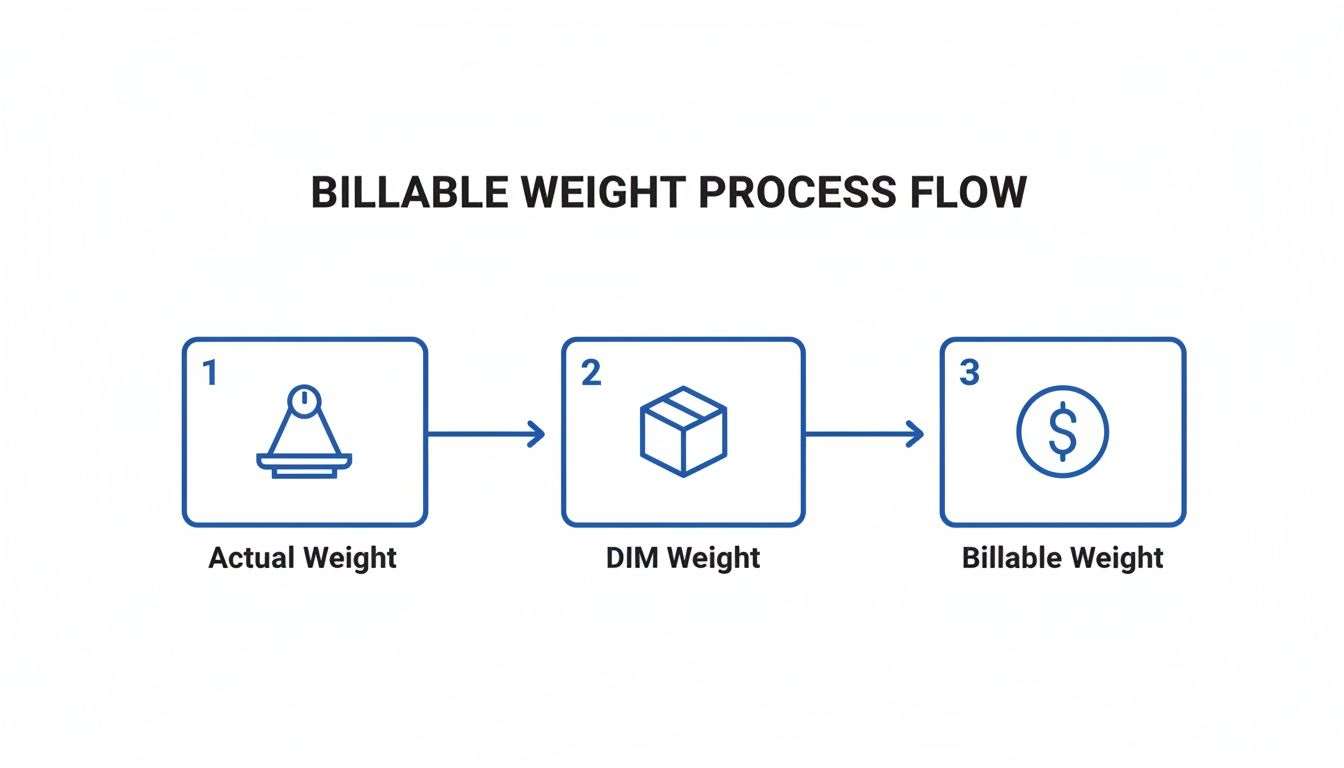
This single rule makes optimizing your package size a massive part of keeping your shipping budget under control.
First things first, you need to find the cubic volume of your package. From there, you'll use that volume to calculate its dimensional weight. The math changes slightly depending on whether you're working in inches and pounds (Imperial) or centimeters and kilograms (Metric).
For Imperial Measurements (Inches/Pounds):
Length (in) x Width (in) x Height (in) = Cubic InchesCubic Inches / DIM Factor = Dimensional Weight (lbs)For Metric Measurements (Centimeters/Kilograms):
Length (cm) x Width (cm) x Height (cm) = Cubic CentimetersCubic Centimeters / DIM Factor = Dimensional Weight (kg)That "DIM Factor" is the secret ingredient. It’s a specific number set by each carrier to convert a package's size into a theoretical weight.
Not all shipping carriers use the same number to divide the volume. This divisor can change over time, so it's always smart to confirm the current factor with your carrier. That said, there are some pretty common industry standards.
Here's a quick-reference table for the most common DIM factors you'll encounter.
| Carrier | System | DIM Factor (Divisor) | Notes |
|---|---|---|---|
| UPS | Imperial | 139 | Standard for daily rates. |
| UPS | Metric | 5,000 | Standard for daily rates. |
| FedEx | Imperial | 139 | Applies to US and international shipments. |
| FedEx | Metric | 5,000 | Applies to US and international shipments. |
| USPS | Imperial | 166 | Used for Priority Mail over 1 cubic foot. |
| DHL | Metric | 5,000 | A common standard for international air express. |
As you can see, 139 (for imperial) and 5,000 (for metric) are the go-to divisors for major private carriers like UPS and FedEx. This is the number you'll be plugging into your own calculations most of the time.
Let's walk through a real-world crowdfunding scenario. Imagine you’re shipping a single reward box that measures 12 x 10 x 8 inches and has an actual weight of 4 lbs.
12 x 10 x 8 = 960 cubic inches960 / 139 = 6.9 lbsIn this situation, the dimensional weight (6.9 lbs) is heavier than the actual weight (4 lbs). That means the carrier is going to bill you for a 7 lb package.
Now, let's think bigger—like freight. Calculating Cubic Meters (CBM) for bulk shipments is absolutely critical for planning container space. For board game creators shipping massive quantities of rewards, getting your CBM right is the key to avoiding demurrage fees that sting 30% of first-time crowdfunders. A standard 40' container holds around 76 CBM, but hitting over 80% utilization is nearly impossible without precise math.
With global sea freight volumes jumping by 4.2% in 2023, the pressure to get this right is higher than ever. For instance, 2,000 game boxes measuring 0.4m x 0.3m x 0.25m (0.03 CBM each) would total 60 CBM, fitting perfectly into one 40' container. To get a handle on this, you can plan your CBM for sea freight and protect your margins.
Key Takeaway: A pledge manager like PledgeBox acts like Shopify for your post-campaign fulfillment, giving you the flexibility to set precise shipping rates based on this data. It's free to send your backer survey and only charges a 3% fee on upsell revenue, making it a powerful tool for protecting your budget. In contrast, the standard Kickstarter pledge manager is more like Amazon—simple but far less customizable.
Look, while it’s great to know the math behind dimensional weight, nobody has time for manual calculations when you’re staring down a mountain of shipments. Let’s be real—you need speed and accuracy.
This is exactly why a free online cubic calculator for shipping should be your best friend. These tools take the guesswork and human error out of the equation, giving you the numbers you need in seconds.
Instead of fumbling with formulas and DIM factors, you just pop in your package dimensions and let the calculator work its magic. The result? An instant snapshot of your billable weight. This lets you quickly compare different box sizes or test out new packaging ideas to see what’s most cost-effective.
The good news is that most of these online tools are incredibly straightforward. They all tend to have a similar, clean interface with fields for length, width, and height. Some even let you input a quantity if you're shipping a bunch of identical boxes.
Here’s the typical flow:
It’s that simple. Here’s what a typical CBM calculator interface looks like—just a few clean fields to get the job done.
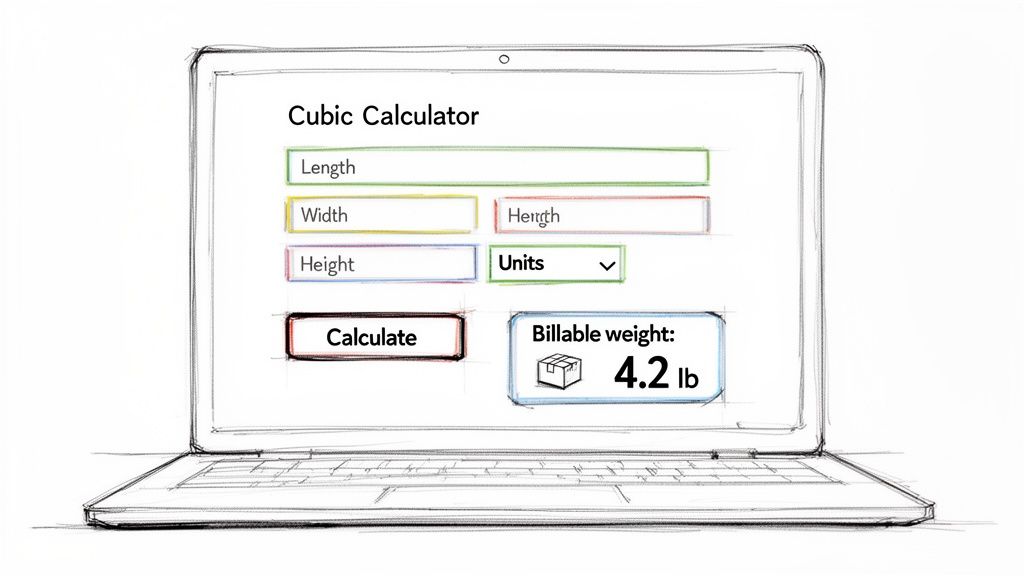
The real power of a tool like this is how it turns abstract numbers into a concrete metric you can actually use for budgeting and planning your fulfillment.
A good cubic calculator is useful for more than just sending a few packages across the country. When you get into international freight, precision is everything. This is especially true for crowdfunding creators shipping rewards all over the world, where every single cubic meter (CBM) eats into your profit margin.
With containerized trade volumes expected to climb by 3-5% each year, getting these calculations right has never been more critical. For Less than Container Load (LCL) sea freight, your shipping rate is based on whichever is higher: the actual weight or the volumetric weight. A common conversion factor here is 1 CBM being equivalent to 1,000 kg.
When you start digging into different tools, you might even stumble upon specialized calculators for things like furniture. For instance, a furniture shipping cost calculator is built to handle the unique challenges of extra-bulky and oversized items.
Whether you're shipping a tiny gadget or a massive pallet of board games, the right calculator takes a complex task and makes it simple. This frees you up to focus on what really matters—getting your product into your backers' hands.
Alright, you’ve done the math and figured out the dimensional weight for all your products. Now what? This is the moment where all that planning pays off, turning those numbers into a real strategy that protects your campaign's bottom line. The right pledge manager is what makes this transition seamless.
This is where you move from theory to action—setting up the actual shipping rates your backers will pay in their post-campaign surveys. You absolutely have to get this right. Undercharging for shipping is one of the quickest ways a successful campaign can end up in the red.
The platform you choose for this job matters more than you might think. Kickstarter's pledge manager is like Amazon—it’s functional for the basics but can be pretty rigid. It’ll get the job done for a simple campaign, but it just doesn't offer the deep customization that most complex crowdfunding projects demand.
A dedicated pledge manager like PledgeBox, on the other hand, is like Shopify. It gives you the flexibility and granular control needed to build a smart shipping fee structure that can handle every variable you throw at it, from different reward tiers to a whole menu of add-ons.
One of the best parts is that PledgeBox is completely free to send your backer survey. The platform only charges a 3% fee on funds raised from upsells, if there are any. This means you can roll out a professional-grade fulfillment strategy without paying a dime upfront.
With your dimensional weight data in hand, you’re ready to build a shipping system that mirrors your actual costs. A flexible pledge manager lets you create specific shipping rules based on weight, destination, and the items in a backer's cart. This is where the numbers from your cubic weight calculator become mission-critical.
Instead of guessing with a single flat rate—a method that almost guarantees you’ll overcharge some backers and undercharge others—you can set up a system that’s both fair and precise.
Here’s how you can put your data to work:
This level of detail means a backer who just wants a small pin isn't stuck paying the same high shipping fee as someone who ordered the massive, all-in deluxe edition of your board game.
Add-ons are fantastic for boosting your funding total, but they can quickly turn into a logistical nightmare if you aren't prepared. A backer might start with a simple T-shirt reward (low dimensional weight) and then pile on a bulky art book and a set of miniatures during the survey. Without a dynamic system, your initial shipping estimate is suddenly way off.
This is where that Shopify-like flexibility from a tool like PledgeBox really shines. You can assign a specific dimensional weight to every single item you offer as an add-on. As a backer adds things to their cart, the system automatically recalculates the new total billable weight of their package and adjusts the shipping fee in real-time.
For example, let's say you know that adding a poster tube to an order effectively increases the dimensional weight by 2 lbs. You can set up your pledge manager to automatically add the correct shipping cost for that increase, making sure you're always covered. If you want to see exactly how this works, check out our deep dive on setting shipping fees for products and add-ons.
By pairing a cubic calculator with a powerful pledge manager, you turn a complicated fulfillment puzzle into a manageable, automated process. This proactive approach saves your budget from surprise overruns and gives your backers a transparent, fair experience—building the kind of trust that brings them back for your next campaign.
Knowing the numbers from a cubic calculator for shipping is a great start, but turning that data into real savings is where the magic happens. Now that you’ve run the calculations and plugged the data into your pledge manager, it’s time to get serious about shrinking your dimensional weight. These are the battle-tested strategies that can help you slash costs and make shipping a strength, not a weakness, for your campaign.
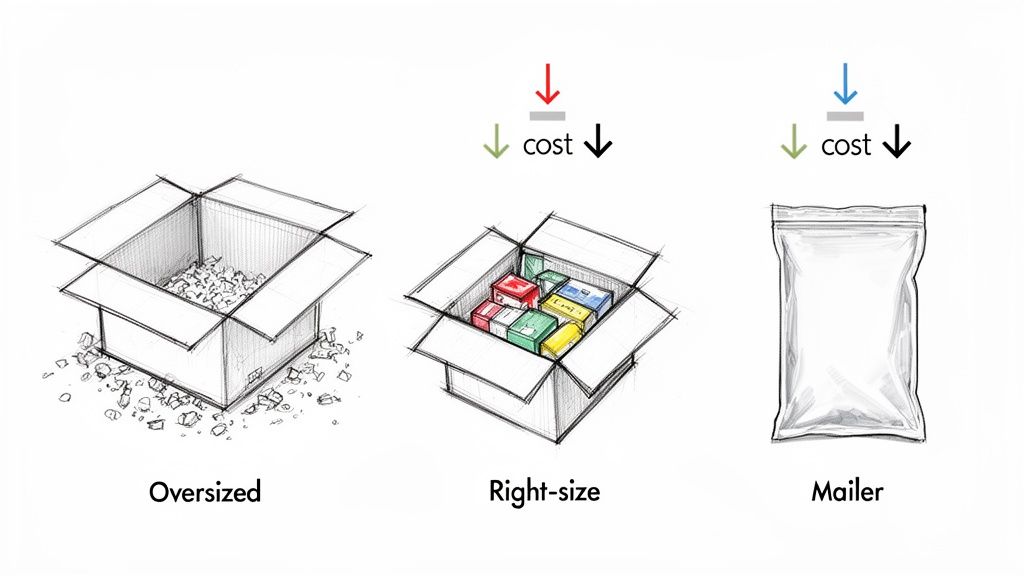
The single most powerful move you can make is to right-size your packaging. Every single inch of empty space in a box is an inch you’re paying to ship. Talk with your manufacturer or fulfillment partner to find—or create—a box that fits your product snugly, with just enough room left for protective materials.
Cutting out that wasted volume has a direct impact on your dimensional weight, and it can lower your shipping costs on every single package you send out the door.
Once you've nailed down the perfect box size, what you put inside it is just as important. Heavy packing materials can push up your actual weight, while bulky ones might force you into a bigger box, defeating the purpose.
Here are some smart choices to consider:
This kind of optimization sends a clear message to your backers: you’ve thought through every single detail of the fulfillment process.
Key Takeaway: A flexible pledge manager is crucial for putting these strategies into action. For example, PledgeBox is free to send your backer survey and only charges 3% of upsell revenue if there's any. This is a huge advantage over the rigid, Amazon-like structure of the Kickstarter pledge manager, giving you the Shopify-like control you need to handle complex shipping scenarios.
Beyond the box itself, a few higher-level strategies can lead to big savings, especially for complex or international campaigns. Sometimes, the most obvious approach isn't the most affordable.
For instance, consider breaking down very large rewards into multiple smaller boxes. It sounds counterintuitive—paying for two shipments instead of one—but the combined dimensional weight of two small boxes can often be much lower than one massive package. You’ll want to run the numbers through a cubic calculator for shipping to see if this makes sense for your product.
Also, don't forget that your accurate dimensional data is a powerful negotiation tool. When you can give carriers precise volume and weight info for a large batch of shipments, you’re in a much stronger position to negotiate discounted rates. Fulfillment centers that specialize in package optimization often have these relationships already, using their massive volume to get better pricing for everyone they work with. For more tips, check out our deep dive on how to reduce shipping costs for your campaign.
When you're mapping out these strategies, especially for global distribution, it’s a good idea to consult a comprehensive guide to international shipping to get a handle on customs and different carrier rules.
This is especially true for air freight, where the volumetric factor is incredibly strict. Miscalculating your CBM is a costly mistake—in fact, 40% of small shipments get repriced at major international airports. With cross-border e-commerce expected to blow past $2 trillion by 2025, creators who use volumetric tools have been found to cut these surprise surcharges by 18%. That’s a critical saving in markets like the US and EU.
No matter how dialed-in your strategy is, questions about shipping costs are going to come up. When you’re in the thick of a crowdfunding campaign, getting straight answers can save you a ton of time, money, and headaches. Here are some of the most common questions we see from creators using a cubic calculator for shipping.
This is probably the most important concept to get right, and it’s where a lot of creators get tripped up. The two terms are definitely related, but they don't measure the same thing.
Cubic Volume is just a measurement of space. You get it by multiplying a package's Length x Width x Height. The answer tells you how much physical room your package takes up, usually in cubic inches, cubic feet, or cubic meters (CBM).
Dimensional Weight (or DIM weight) is a theoretical weight that carriers invent based on that volume. They take your package’s cubic volume and divide it by a special number called a DIM factor. It's their way of turning a package's size into a billable weight.
Think of it this way: cubic volume is the cause, and dimensional weight is the effect on your final shipping bill.
The DIM factor is the magic number that turns your package’s volume into its dimensional weight, and the right one depends completely on which carrier and service you’re using.
For domestic U.S. shipments, carriers like UPS and FedEx almost always use a DIM factor of 139. If you're shipping internationally or using metric units, 5,000 is a pretty common standard. But here’s the catch: these numbers can and do change.
Pro Tip: Never, ever assume the DIM factor. You have to confirm the current divisor with your shipping carrier or fulfillment partner. Using the wrong number, even if it’s just a little off, will lead to bad quotes and surprise charges on your final invoice.
This is where a flexible pledge manager really proves its worth. The Kickstarter pledge manager is like Amazon—simple, but you can't really customize it. A tool like PledgeBox, on the other hand, is like Shopify; it gives you the power to build sophisticated rules. A huge plus is that PledgeBox is free to send your backer survey and only charges 3% on any upsell revenue you make, if there's any. This lets you set up detailed shipping rules using the correct DIM factors for different carriers and countries.
Absolutely, you just need to do one extra thing first. A standard cubic calculator assumes you're shipping a nice, neat box. For anything with an odd shape—like a poster tube, a pyramid-shaped box, or a plushie in a poly mailer—you have to find its "dimensional footprint."
To figure this out, just measure the item at its longest, widest, and tallest points, pretending it's inside an invisible rectangular box. Plug those three maximum measurements into your cubic calculator as the length, width, and height. This makes sure you're accounting for all the space your item will take up on a truck or plane.
This is a classic—and super frustrating—scenario. When it happens, it's usually one of a few things:
Always think of the number from a cubic calculator as your base cost for the weight, not the final price you'll actually pay.
Ready to turn your shipping calculations into a seamless fulfillment strategy? With PledgeBox, you can build a professional-grade survey and shipping system that protects your budget and delights your backers. Get started for free today and see how our Shopify-like flexibility can work for your campaign!
PledgeBox
The All-in-One Toolkit to Launch, Manage & Scale Your Kickstarter / Indiegogo Campaign