 PledgeBox
Ship Management for Crowdfunding: A Fulfillment Guide
Learn how ship management works for crowdfunding: backer surveys, shipping timelines, tracking fixes, and pledge manager fees compared.
Learn how ship management works for crowdfunding: backer surveys, shipping timelines, tracking fixes, and pledge manager fees compared.
Your campaign has closed, the celebration is over, and backers are asking when their rewards will ship. Meanwhile, your order information is scattered across pledge records, survey drafts, production spreadsheets, and emails about address changes. This guide covers ship management for crowdfunding fulfillment, not vessel or fleet management at sea. The job is to turn those scattered records into confirmed orders that your packing team can deliver.
Say your campaign closes with 4,000 backers. That's a hypothetical planning example, not yet a packing list. Some backers haven't chosen a variant, some want extra items, and others will move before dispatch.
Ship management is the back-office work that carries closed-campaign pledges through to delivered rewards. It includes backer records, survey answers, address checks, production quantities, packing instructions, carrier handoff, tracking, and delivery support.
Think of the campaign page as your storefront, the pledge manager as your order system, and ship management as the logistics team moving each order. A successful storefront doesn't automatically produce a usable warehouse instruction.

Orders get lost operationally before anyone loses a physical box. Pay particular attention to these transitions:
For a useful distinction between accepting an order and completing the work behind it, YipSMS Inc. explains what fulfilling an order means. Apply that distinction to crowdfunding: a pledge represents a commitment, while fulfillment requires a complete, actionable order.
A board-game backer cares whether the right edition arrives intact, not whether your campaign dashboard looked organized. A late or missing parcel can become their lasting impression of the project.
Kickstarter and Indiegogo campaigns end with the same operational responsibilities, even when their tools differ. Give every order a clear path through survey completion, order lock, production, packing, dispatch, and support, with someone accountable at each handoff.
Post-campaign fulfillment timeline
| Phase | Main task | Typical timing after campaign end | Usual owner |
|---|---|---|---|
| Survey launch | Send backer survey and collect addresses, add-ons and tax details | Day 1 to Day 21 in this example | Creator |
| Address and reward lock | Close edits, check addresses and export the final order list | Day 21 in this example | Creator |
| Production and packing | Produce rewards, sort by tier and destination country | Weeks 3-8 in this example | Creator or fulfillment partner |
| Dispatch | Print labels, hand parcels to the carrier and upload tracking numbers | Weeks 8-10 in this example | Fulfillment partner |
| Delivery support | Track parcels and handle lost, damaged or wrong orders | Weeks 10-16 in this example | Creator with carrier |
These are illustrative planning ranges, not industry delivery promises. Longer manufacturing lead times move the production row first, then dispatch and delivery. Don't squeeze manufacturing into an unsuitable calendar just to preserve an announcement date.
Use the milestones below to see the main handoffs.
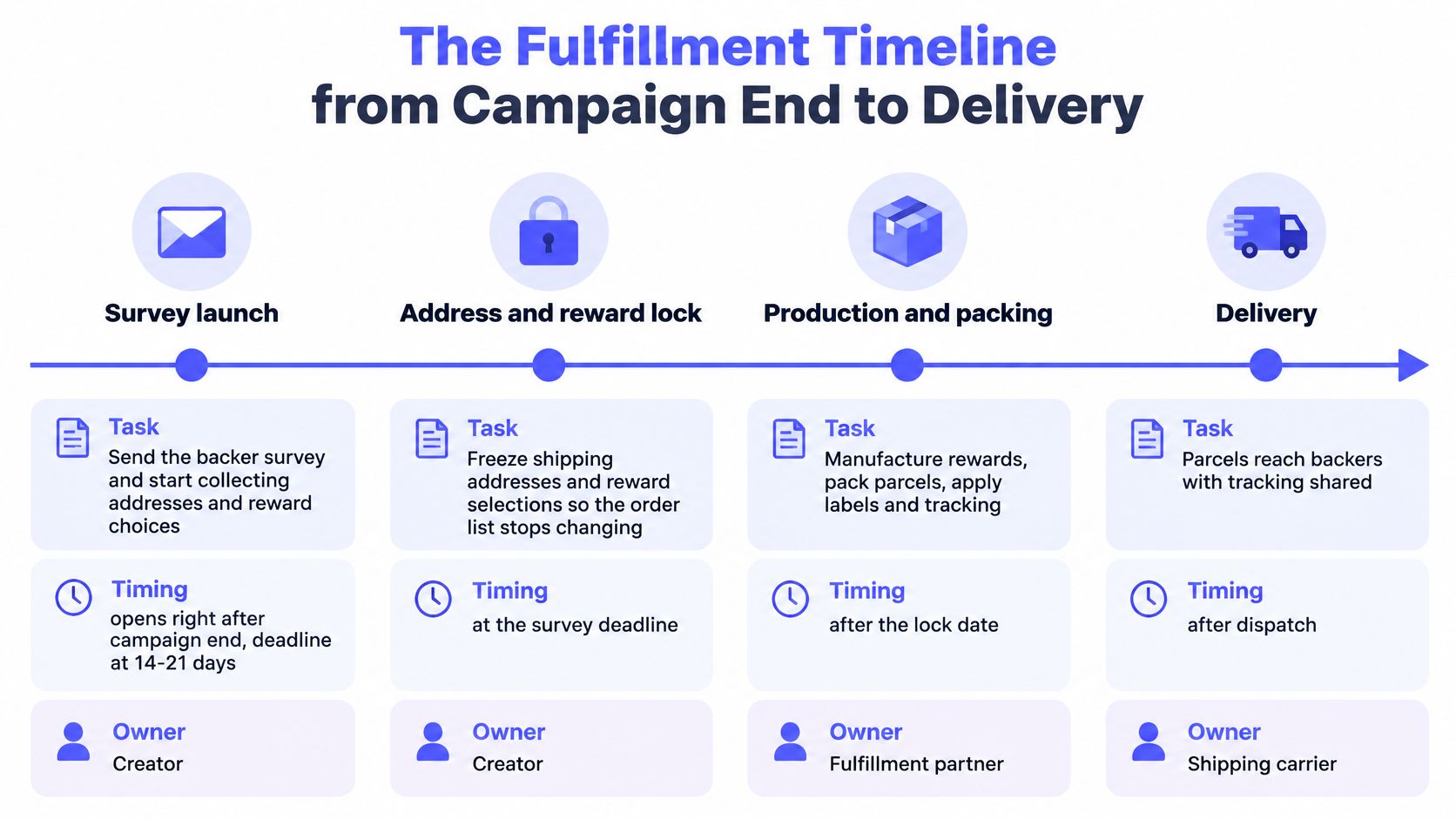
Decide early whether you'll pack in-house or use a fulfillment partner. In-house packing suits straightforward tiers shipping to a limited set of countries. A partner becomes more useful when destination coverage, order volume, or customs preparation exceeds your team's capacity.
Confirm the partner's receiving deadline, inventory-check process, and dispatch booking before setting your lock date. Their ability to receive and process stock can determine the shipping schedule, even when manufacturing finishes on time.
Use the campaign timeline template to assign named owners and dependencies. FLYP LTD.’s contest prize fulfillment guide also provides a relevant reference for coordinating recipient details and reward delivery.
The video offers another way to review the workflow before assigning responsibilities.
A partner may take over receiving, packing, and carrier handoff, but you retain the backer relationship. Put that division of responsibility in writing.
Planning rule: If the lock date passes with unresolved addresses, hold those orders as exceptions and release confirmed orders on schedule.
The lock date is the point of no return for the released order list. Changes after that need controlled handling, not another spreadsheet replacing the warehouse file.
Pledge manager fees for post-campaign surveys
| Item | Kickstarter Pledge Manager | PledgeBox Pledge Manager |
|---|---|---|
| Upfront cost | None | None |
| Survey with no extra payment | No payment-based platform fee when nothing is collected | Free to send |
| Fee on add-on and upgrade payments | 5% on funds other than taxes | 3% on additional payments only |
| Card processing | Stripe at roughly 3-5% on the full payment, including taxes | Payment-provider charges apply on top of the platform fee |
Kickstarter's official Pledge Manager guidance specifies no upfront cost, a 5% platform fee on funds other than taxes, and separate Stripe processing of approximately 3-5% on the full payment, including taxes. The Kickstarter figures in the table describe those separate charges, not a single all-inclusive rate.
The simplest analogy is that Kickstarter Pledge Manager is like Amazon, and PledgeBox Pledge Manager is like Shopify. Kickstarter keeps the experience within the marketplace backers already use. PledgeBox provides a separate creator-run order workflow. This is an analogy about the operating model, not a claim that either service has Amazon's or Shopify's exact features.
PledgeBox is free to send the backer survey and only charges 3% of upsell if there's any. More precisely, that platform fee applies to additional payments collected through the survey, including add-ons, upgrades, shipping, or tax, rather than the original campaign funds.
For a hypothetical $1,000 in add-on payments, applying the platform rates shown above produces $50 at 5% versus $30 at 3%, before payment-provider charges. That arithmetic compares platform fees only. It doesn't establish your total cost of collecting the payments.
Compare the same payment basket. An add-on-only calculation isn't a complete budget when you're also collecting shipping and tax.
Expected upsell volume should influence your choice. The platform-fee difference matters more when you expect substantial additional payments, and less when your survey collects nothing extra.
Also consider the work your team must do after collection: checking payment status, separating tax records, reconciling orders, and preparing fulfillment files. A cheaper headline rate won't repair a poorly configured order process. Choose the workflow before invitations go out, so backers don't receive competing forms or conflicting payment requests.
Before sending invitations, configure products, variants, reward mapping, shipping, tax, and payment settings. Preview the backer experience and resolve blocking checklist messages. Our guide to sending backer surveys gives creators a practical setup reference.
Use the visual checklist to review the main preparation tasks.
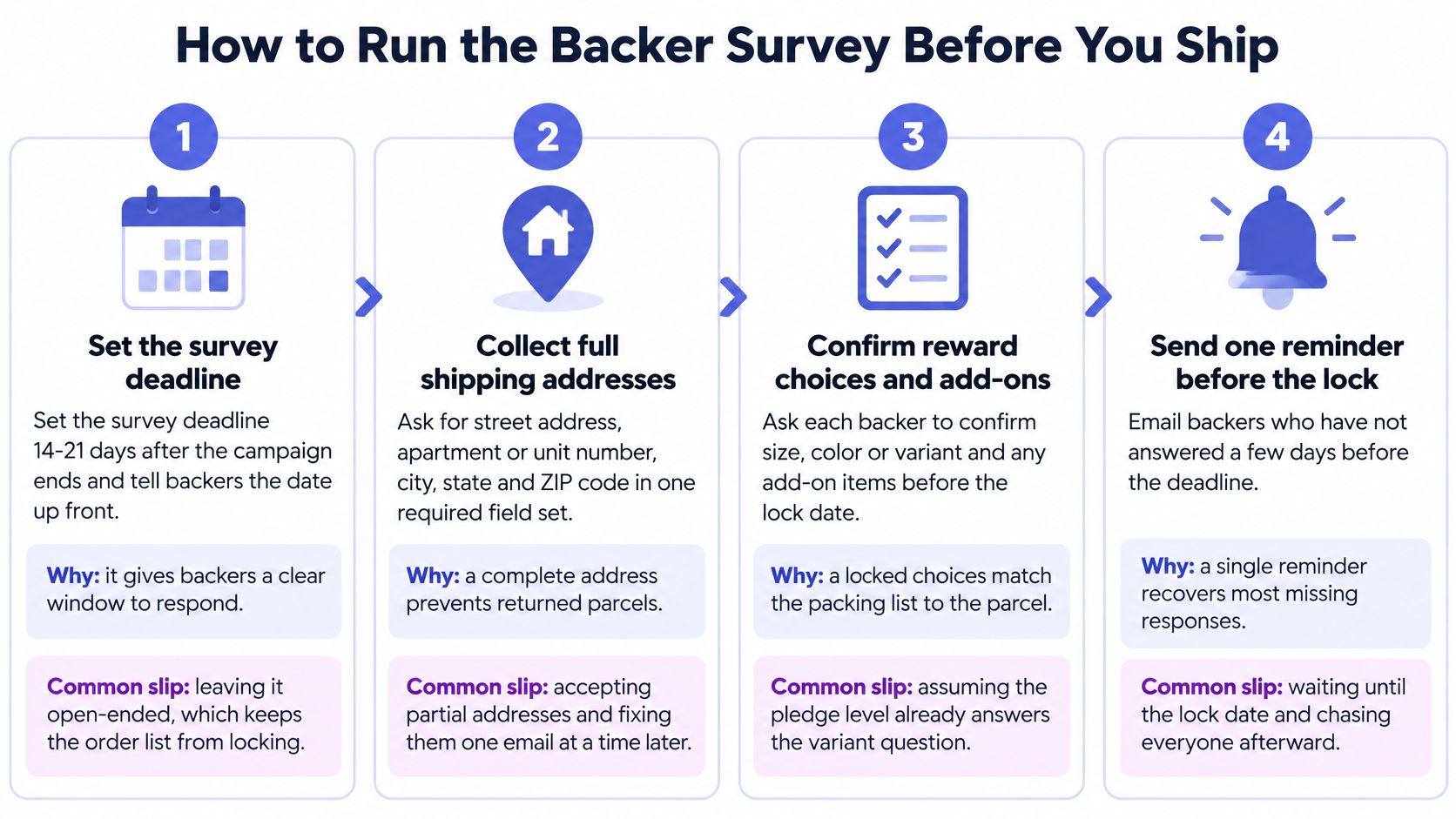
Set a firm deadline. For a hypothetical campaign, choose a survey deadline 14-21 days after campaign end, with the illustrated schedule closing on Day 21. Tell backers the date in the invitation; leaving the window open-ended means your team can't confidently finalize the order list.
Collect a complete shipping address. Require the recipient's name, street, apartment or unit where applicable, city, region, postal code, and country, with validation appropriate to the destination. The common slip is accepting a street address alone and assuming someone can reconstruct the missing details later.
Confirm choices and offer add-ons together. Ask backers to confirm size, color, language, or other variants while choosing upgrades and additional items. A separate follow-up form creates another record to reconcile and another opportunity for the backer to miss a required answer.
Collect shipping and applicable tax. Configure charges before sending invitations, and make clear what the payment covers. Don't promise that survey tax collection alone prevents border charges: your customs declarations and shipping service must support the intended duties-and-taxes arrangement.
Send a targeted reminder. In this example workflow, send one reminder before the deadline to backers who haven't completed the survey. The common slip is emailing everyone, including people who have already answered, or waiting until packing starts to chase missing information.
Lock edits and export intended orders. Creators export the intended orders from Download Center, or use an available shipping integration, to prepare orders for fulfillment. Export only the orders you intend to release, rather than treating every imported pledge as ready to pack.
A backer can change their shipping address while the order allows edits. If the order is locked or shipped, they contact the creator, who must check whether the warehouse or carrier can still act on the change.
Don't update only the support ticket. Update the operational record and confirm whether an existing label needs cancellation.
A clean list gives every released backer one confirmed address, one reward mapping, and one shipping method. It also identifies unresolved payments and exceptions clearly enough that a packing team won't mistake them for approved orders.
Delivery problems, causes and fixes
| Symptom | Likely cause | Fix |
|---|---|---|
| Parcel returned or not delivered | Incomplete or wrong address entered in the survey | Validate addresses in the survey and confirm the change with the backer before reshipping |
| Tracking shows no movement | Carrier scan or tracking number not uploaded | Upload tracking numbers at label print and check the carrier record |
| Duty or tax charged at delivery | Tax and customs not collected in the survey, or delivery terms don't match the collection arrangement | Collect applicable tax and shipping charges before dispatch, and align customs documents and delivery terms |
| Backer says item never arrived | Lost parcel or wrong destination country | Check the carrier scan, then reship or refund according to your policy |
| Reward missing from the box | Reward-to-variant mapping error | Check mapping and variant inventory before exporting the order list |
A tracking number proves that someone created a shipment record. It doesn't prove that a carrier accepted the parcel. Keep label creation, carrier acceptance, and delivery separate in your support language.
Our shipment-tracking guide is a useful operational reference. For shipments handled through the relevant broker, J.W. Smith Customs Brokers Ltd. provides a way to find customs tracking updates; use the service responsible for the shipment rather than assuming the parcel carrier has every clearance detail.
Say an international backer's parcel returns because the postal code was missing. Ask the backer to confirm the complete corrected address, check it against the destination format, and update the order record before generating another label.
Record the return reason, replacement shipment, and extra cost against the original order. Otherwise, your team may ship again to the same incomplete address or lose track of whether the original parcel has returned to stock.
For a delivered-but-not-received complaint, inspect the carrier's delivery evidence and confirm the destination before authorizing a replacement. Check for a household recipient, reception desk, or delivery-location note without dismissing the backer's report.
Support discipline: Don't reship just to close a ticket. Establish what happened, document the decision, and prevent a duplicate replacement.
A missing tracking upload can be an administrative fix you complete within a working day in a planned workflow. An international replacement can take weeks because it requires inventory, another dispatch, border processing, and final delivery. These are planning examples, not service guarantees.
Backers contact the project creator about rewards, delivery, shipping charges, or refunds. Set a support inbox and a reply template before dispatch that requests the order reference and states the next action.
Treat the survey and lock records as the first diagnostic stop. An address omission or mapping error won't be solved by changing carriers.
The most useful shipping decision happens before a label prints: deciding which orders are ready. A warehouse can pack accurately only when the creator supplies stable quantities, clear variant mappings, and approved destinations.
Don't use dispatch as the deadline for resolving basic order questions. By then, stock may already be allocated and parcels sealed. Keep unresolved orders in an exception queue with a named owner rather than letting them enter the packing batch.
Our Pledge Manager supports targeted bundles, detailed shipping rules, specific-order previews, and saved Test Mode orders. Use those controls to inspect representative orders, including a mixed-item basket, an upgraded reward, and an international destination, before approving the export.
The platform workspace supports the preparation behind that release.
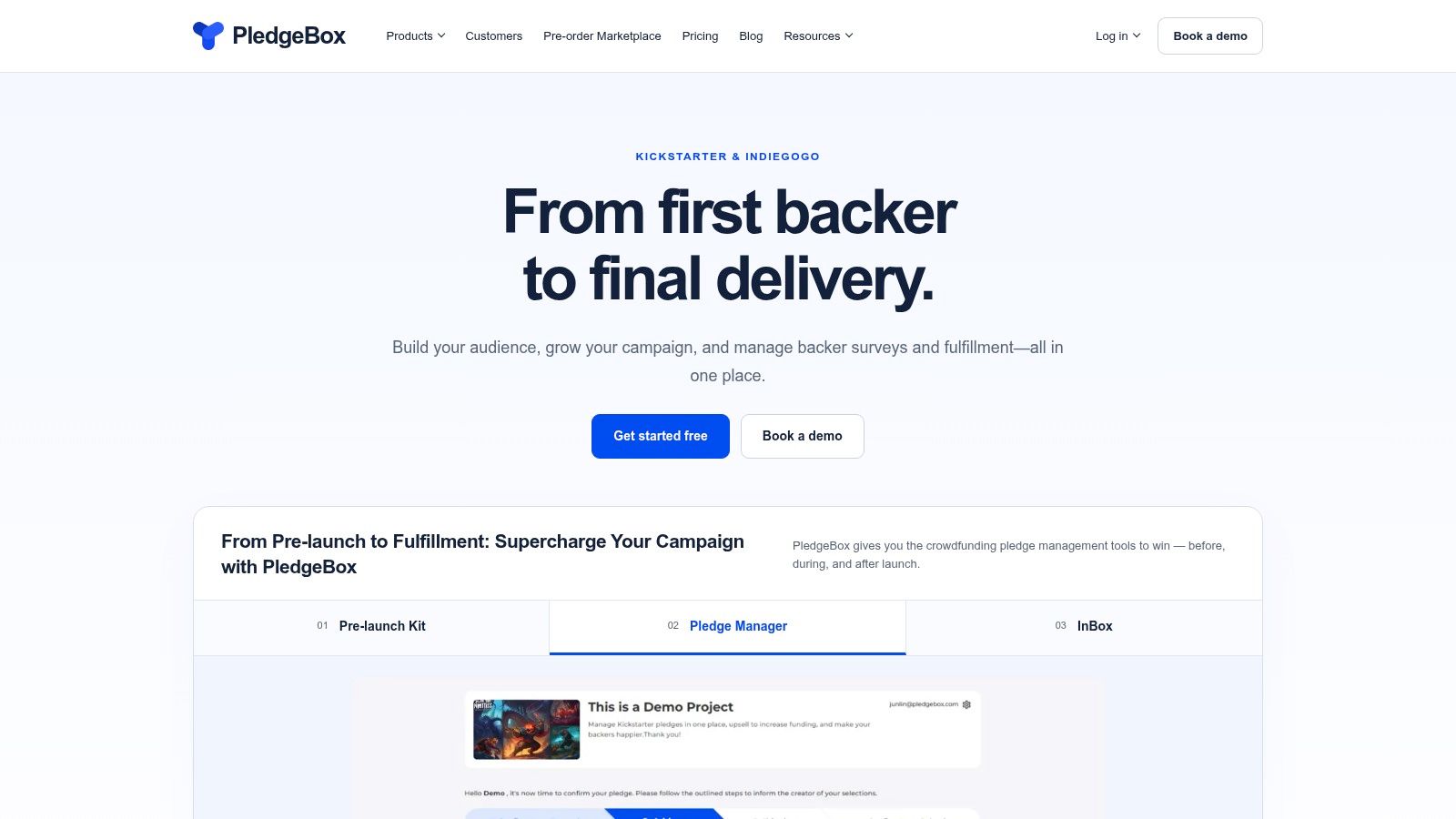
PledgeBox also supports shipping notifications and integration with shipping vendors. Those tools help carry order information into dispatch, but your team still needs to reconcile the released order list with what the warehouse ships.
According to PledgeBox's pricing, surveys are free when no additional payment is collected, with a 3% platform fee only on additional add-on, upgrade, shipping, or tax payments and no setup fee or campaign fee on original Kickstarter or Indiegogo funds. Keep payment-provider charges separate when budgeting.
Lock the order list first, start production only after addresses are confirmed, and dispatch against the agreed schedule. That's a shipping plan your creator team, fulfillment partner, and backers can all work from.
PledgeBox brings backer surveys, reward choices, shipping-fee collection, and fulfillment preparation into one workflow. Visit PledgeBox to configure your survey, preview representative orders, and prepare a confirmed order list before your first dispatch.
PledgeBox
The All-in-One Toolkit to Launch, Manage & Scale Your Kickstarter / Indiegogo Campaign